
Filtering part is not working
The support doesn work on Saturdays and Sundays, so some Friday requests can be answered on Monday. If you have problems with registration ask help on contact us page pleaseIf you not got email within 24~36 business hours, firstly check your spam box, and if no any email from the support there - back to the forum and read answer here. DO NOT ANSWER ON EMAILS [noreply@pluginus.net] FROM THE FORUM!! Emails are just for your info, all answers should be published only here.
The support doesn work on Saturdays and Sundays, so some Friday requests can be answered on Monday.

Quote from katie on September 28, 2020, 14:31i have this plugin installed on a test site: https://tagtrade.webdesignpeopleltd.co.uk/guide-bar
i only want this to work on 1 page - guide bars page, when i make a search it does not filter the products on the right ? it shows the loading part but just shows all products instead.
How do i fix this
thanks
Katie
i have this plugin installed on a test site: https://tagtrade.webdesignpeopleltd.co.uk/guide-bar
i only want this to work on 1 page - guide bars page, when i make a search it does not filter the products on the right ? it shows the loading part but just shows all products instead.
How do i fix this
thanks
Katie

Quote from Pablo Borysenco on September 29, 2020, 11:14Hello Katie
Paste your license key here - https://c2n.me/43SC6rb.png -> https://c2n.me/42HBIt7.png
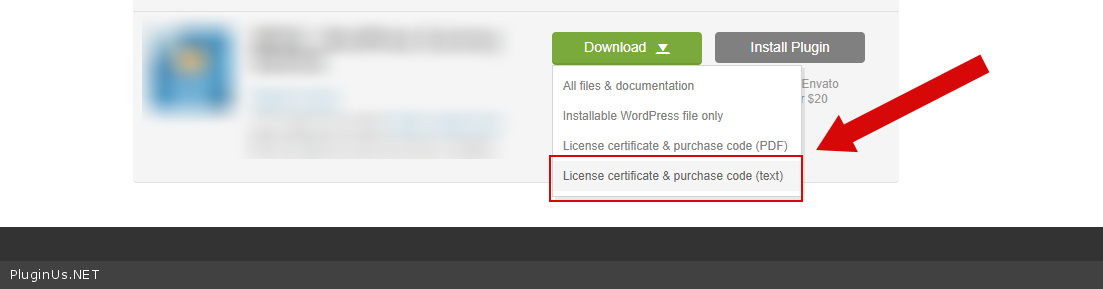
To get license key - https://codecanyon.net/downloads - https://c2n.me/46i7Aam.png
To show products use woocommerce functions OR shortcode [woof_products]
Hello Katie
Paste your license key here - https://c2n.me/43SC6rb.png -> https://c2n.me/42HBIt7.png


To get license key - https://codecanyon.net/downloads - https://c2n.me/46i7Aam.png
To show products use woocommerce functions OR shortcode [woof_products]
Quote from katie on September 29, 2020, 11:29I have done the short code and this does not work either.
Please see license key in the private data area.
thanks
Katie
I have done the short code and this does not work either.
Please see license key in the private data area.
thanks
Katie
Quote from Pablo Borysenco on September 29, 2020, 11:55I created test page - https://tagtrade.webdesignpeopleltd.co.uk/test-woof/ - with native shortcode[products] - as you can see the products are not displayed at all.
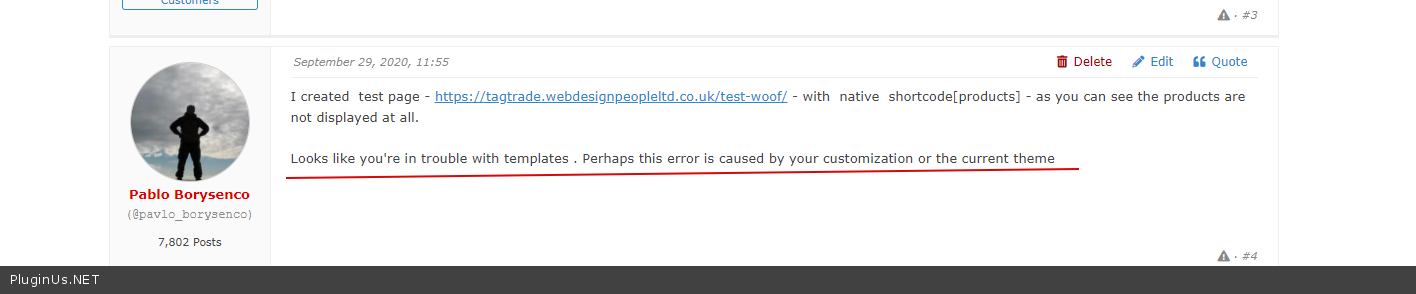
Looks like you're in trouble with templates . Perhaps this error is caused by your customization or the current theme
I created test page - https://tagtrade.webdesignpeopleltd.co.uk/test-woof/ - with native shortcode[products] - as you can see the products are not displayed at all.
Looks like you're in trouble with templates . Perhaps this error is caused by your customization or the current theme
Quote from katie on September 30, 2020, 10:01Can i apply for a refund then please?
thanks
Katie
Can i apply for a refund then please?
thanks
Katie
Quote from katie on September 30, 2020, 10:29Sorry have you added a code in the shop, as this code is working as a filter.
Can you let me know once you have finished with this please,
thanks
Katie
Sorry have you added a code in the shop, as this code is working as a filter.
Can you let me know once you have finished with this please,
thanks
Katie
Quote from Pablo Borysenco on September 30, 2020, 11:48Hello Katie
I didn't add anything on the shop page. I only created a test page - https://tagtrade.webdesignpeopleltd.co.uk/test-woof/
Can you let me know once you have finished with this please, - What should I finish?
Can i apply for a refund then please? - Unfortunately, if you have an incorrect woocommerce setup or have problems on the site, this is not a reason for the refund. I'm 100% sure if I disable the current theme and your customization the filter will work well
Also I checked your site - https://c2n.me/49gqVjq - the filter seems to work correctly
Hello Katie
I didn't add anything on the shop page. I only created a test page - https://tagtrade.webdesignpeopleltd.co.uk/test-woof/
Can you let me know once you have finished with this please, - What should I finish?
Can i apply for a refund then please? - Unfortunately, if you have an incorrect woocommerce setup or have problems on the site, this is not a reason for the refund. I'm 100% sure if I disable the current theme and your customization the filter will work well
Also I checked your site - https://c2n.me/49gqVjq - the filter seems to work correctly
Quote from katie on September 30, 2020, 13:53I still dont understand how it has even got on this page to be honest with you, how do i get this on the followig page: https://tagtrade.webdesignpeopleltd.co.uk/guide-bar/
either up the top or on the side, as the widget that i have on there does not filter the products on the right, but i dont mind this either being on the top or on the side.
thanks
Katie
I still dont understand how it has even got on this page to be honest with you, how do i get this on the followig page: https://tagtrade.webdesignpeopleltd.co.uk/guide-bar/
either up the top or on the side, as the widget that i have on there does not filter the products on the right, but i dont mind this either being on the top or on the side.
thanks
Katie
Quote from katie on September 30, 2020, 19:57I have managed to get this working now but im stuck with how to keep the filter open after i have selected a product, also when i click on any categories on the left hand side it means the filter then does not work, do you have a email i can contact you on regarding this and maybe doing some paid customization on it ?
thanks
Katie
I have managed to get this working now but im stuck with how to keep the filter open after i have selected a product, also when i click on any categories on the left hand side it means the filter then does not work, do you have a email i can contact you on regarding this and maybe doing some paid customization on it ?
thanks
Katie
Quote from Pablo Borysenco on October 1, 2020, 11:26Hello Katie
Please try to watch a video - https://products-filter.com/video-tutorials#video_beGT6p_look
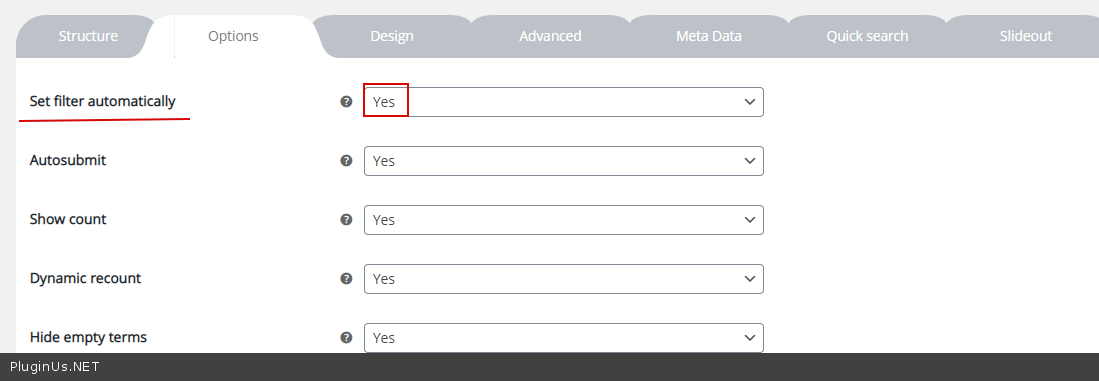
I still dont understand how it has even got on this page to be honest with you, - https://c2n.me/49hhU9W.png - this setting adds a filter above products for all standard woocommerce pages
how do i get this on the followig page: - to add a filter on top of the products in the custom page - please use shortcode[woof] - https://products-filter.com/shortcode/woof/
now but im stuck with how to keep the filter open after i have selected a product - I'm not sure if I understood you correctly. Try to use ajax mode
when i click on any categories on the left hand side it means the filter then does not work - i described the problem here - https://c2n.me/49hizhL.png
Support only on the forum.
Unfortunately we don't have time for custom tasks.
Hello Katie
Please try to watch a video - https://products-filter.com/video-tutorials#video_beGT6p_look
I still dont understand how it has even got on this page to be honest with you, - https://c2n.me/49hhU9W.png - this setting adds a filter above products for all standard woocommerce pages
how do i get this on the followig page: - to add a filter on top of the products in the custom page - please use shortcode[woof] - https://products-filter.com/shortcode/woof/
now but im stuck with how to keep the filter open after i have selected a product - I'm not sure if I understood you correctly. Try to use ajax mode
when i click on any categories on the left hand side it means the filter then does not work - i described the problem here - https://c2n.me/49hizhL.png
Support only on the forum.
Unfortunately we don't have time for custom tasks.