

Filter so slow
The support doesn work on Saturdays and Sundays, so some Friday requests can be answered on Monday. If you have problems with registration ask help on contact us page pleaseIf you not got email within 24~36 business hours, firstly check your spam box, and if no any email from the support there - back to the forum and read answer here. DO NOT ANSWER ON EMAILS [noreply@pluginus.net] FROM THE FORUM!! Emails are just for your info, all answers should be published only here.
The support doesn work on Saturdays and Sundays, so some Friday requests can be answered on Monday.

Quote from Kenneth on October 28, 2021, 10:17We have almost 80,000 products with attributes and enabling the dynamic recount and hide empty terms makes the page go error or whitescreen.
We are planning to hide some filter on main categories that we seen in here https://pluginus.net/support/forum/woof-woocommerce-products-filter/
Is this removed from the actual filters and it doesn't do query if we set dynamic?Also can we make certain filters dynamic recount and some are not?
Maybe you have better ideas or suggestion.
Thanks.
We have almost 80,000 products with attributes and enabling the dynamic recount and hide empty terms makes the page go error or whitescreen.
We are planning to hide some filter on main categories that we seen in here https://pluginus.net/support/forum/woof-woocommerce-products-filter/
Is this removed from the actual filters and it doesn't do query if we set dynamic?
Also can we make certain filters dynamic recount and some are not?
Maybe you have better ideas or suggestion.
Thanks.

Quote from Pablo Borysenco on October 28, 2021, 12:14Hello
Please read this - https://products-filter.com/searching-is-slow
try to use the cache - https://c2n.me/4dNYTza.png
removing unnecessary taxonomies is also a good additional way and dynamic recalculation will work more efficiently
Hello
Please read this - https://products-filter.com/searching-is-slow
try to use the cache - https://c2n.me/4dNYTza.png
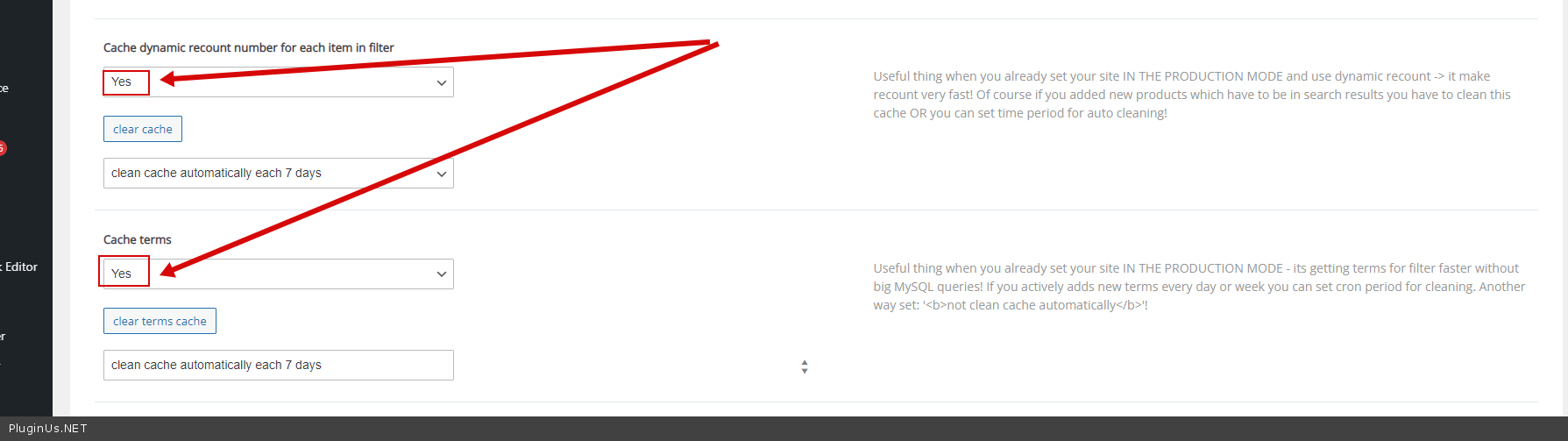
removing unnecessary taxonomies is also a good additional way and dynamic recalculation will work more efficiently
Quote from Kenneth on October 29, 2021, 11:34Hi Pablo,
If we use this https://products-filter.com/extencion/conditionals/
Will it still use same query? Or it will just query when it is shown?
Hi Pablo,
If we use this https://products-filter.com/extencion/conditionals/
Will it still use same query? Or it will just query when it is shown?
Quote from Pablo Borysenco on October 29, 2021, 12:23Hello
Will it still use same query? - No! Dynamic recount does not work for hidden filters (in this case)
Hello
Will it still use same query? - No! Dynamic recount does not work for hidden filters (in this case)
Quote from Kenneth on October 29, 2021, 13:10Will it work for specific value of a filter? Like Filter/Category value then show this filters?
Will it work for specific value of a filter? Like Filter/Category value then show this filters?
Quote from Pablo Borysenco on November 1, 2021, 11:58Hello
Unfortunately no.
Hello
Unfortunately no.
Quote from Kenneth on November 4, 2021, 14:37Hi Pablo,
Seems there is chance that we can fix the whitescreen or error 503 if we do ajax.
But it doesn't give correct layout
Expected layout
https://prnt.sc/1ybjgx4Broken layout + AJAXfied enabled.
https://prnt.sc/1ybjls1I also notice the ratings is showing even it is disabled in our customizer settings.
Is there an easy fix for this?
Hi Pablo,
Seems there is chance that we can fix the whitescreen or error 503 if we do ajax.
But it doesn't give correct layout
Expected layout
https://prnt.sc/1ybjgx4
Broken layout + AJAXfied enabled.
https://prnt.sc/1ybjls1
I also notice the ratings is showing even it is disabled in our customizer settings.
Is there an easy fix for this?
Quote from Pablo Borysenco on November 5, 2021, 12:39Hello
unfortunately some themes are incompatible with ajax mode
I will try to explain what is the reason:
It looks like the theme uses JS script to generate the template (this can be useful for adapting the template)
When the plugin does filtering, it redraws products in Ajax mode (without page reloading).
in this case, the theme does not know that the products have changed and the JS script for the template is not applied
How to fix it:
You should find this script and paste it here - https://share.pluginus.net/image/i20211105133946.png
Hello
unfortunately some themes are incompatible with ajax mode
I will try to explain what is the reason:
It looks like the theme uses JS script to generate the template (this can be useful for adapting the template)
When the plugin does filtering, it redraws products in Ajax mode (without page reloading).
in this case, the theme does not know that the products have changed and the JS script for the template is not applied
How to fix it:
You should find this script and paste it here - https://share.pluginus.net/image/i20211105133946.png

Quote from Kenneth on November 5, 2021, 18:06Hi Pablo,
Can you rephrase what script I'm looking for?
I also tried other filter plugin from YITH and the layout is not broken
https://prnt.sc/1yfsn24Same look even like refreshing the page. Does it mean it is the WOOF filter problem?
Hi Pablo,
Can you rephrase what script I'm looking for?
I also tried other filter plugin from YITH and the layout is not broken
https://prnt.sc/1yfsn24
Same look even like refreshing the page. Does it mean it is the WOOF filter problem?
Quote from Pablo Borysenco on November 8, 2021, 15:29Hello
Can you rephrase what script I'm looking for? - JS script that affects the template.
Same look even like refreshing the page. - But I cannot repeat it. I am doing a test on your site and the template is correct. In this case, the reason may be that the store template is not made according to standards - developers are not using one of the hooks: 'woocommerce_before_shop_loop', 'woocommerce_after_shop_loop'
Hello
Can you rephrase what script I'm looking for? - JS script that affects the template.
Same look even like refreshing the page. - But I cannot repeat it. I am doing a test on your site and the template is correct. In this case, the reason may be that the store template is not made according to standards - developers are not using one of the hooks: 'woocommerce_before_shop_loop', 'woocommerce_after_shop_loop'