
filter sets
The support doesn work on Saturdays and Sundays, so some Friday requests can be answered on Monday. If you have problems with registration ask help on contact us page pleaseIf you not got email within 24~36 business hours, firstly check your spam box, and if no any email from the support there - back to the forum and read answer here. DO NOT ANSWER ON EMAILS [noreply@pluginus.net] FROM THE FORUM!! Emails are just for your info, all answers should be published only here.
The support doesn work on Saturdays and Sundays, so some Friday requests can be answered on Monday.

Quote from gabriel.pribeagu on January 20, 2021, 10:07Hello,
Can we have different filter sets for different categories? If yes, where are the settings?
Thank you
Hello,
Can we have different filter sets for different categories? If yes, where are the settings?
Thank you

Quote from Pablo Borysenco on January 20, 2021, 13:02Hello
1) In category pages use shortcode - [woof_products] with attribute : taxonomies=product_cat:X Where X id your product category. ( if you use custom page )
2) In widgets use shortcode [woof] with attribute : * taxonomies=product_cat:X
+
tax_only - write taxonomies or products slug using comma
+
by_only - write any by-filter-elements there using comma: by_text,by_price,by_sku,by_author,by_insales,by_instock. Of course firstly user should enable extensions for that by-filter-elements
*- Do not forget set the same condition in [woof_products]3) For show or hide widgets on different pages - http://www.woocommerce-filter.com/how-to-show-or-hide-widget-only-on-selected-site-pages/
You can read more about shortcodes - http://www.woocommerce-filter.com/documentation/#!/section_3_1
Hello
1) In category pages use shortcode - [woof_products] with attribute : taxonomies=product_cat:X Where X id your product category. ( if you use custom page )
2) In widgets use shortcode [woof] with attribute : * taxonomies=product_cat:X
+
tax_only - write taxonomies or products slug using comma
+
by_only - write any by-filter-elements there using comma: by_text,by_price,by_sku,by_author,by_insales,by_instock. Of course firstly user should enable extensions for that by-filter-elements
*- Do not forget set the same condition in [woof_products]
3) For show or hide widgets on different pages - http://www.woocommerce-filter.com/how-to-show-or-hide-widget-only-on-selected-site-pages/
You can read more about shortcodes - http://www.woocommerce-filter.com/documentation/#!/section_3_1
Quote from gabriel.pribeagu on January 23, 2021, 18:57Hello,
So I assigned to the shop page to main menu and than under shop page I have 2 submenus aka 2 product categories pages (not using custom pages for categories).
First category is Category number 18 that has the name and slug "mese" (tables in english)
Second category is Category number 19 that has the name and slug "scaune" (chairs in english)
I have made 2 woof widgets and place them in the shop sidebar.
The first widget has in the "Additional text before:" field this shortcode:
[woof taxonomies=product_cat:18 by_only="by_instock" tax_only="brands"]
and in the "Widget logic:" field this logic:
is_product_category(array("mese"))
The second widget has in the "Additional text before:" field this shortcode:
[woof taxonomies=product_cat:19 by_only="by_price" tax_only="color"]
and in the "Widget logic:" field this logic:
is_product_category(array("scaune"))
In the plugin settings I have activated the price, stock, color, and brand atributes.
The problem is that when I visit the 2 categories I see some of the elements doubled (the non atributes ones).
More exactly in category 18 ("mese") I see:
-Widget title for category 18
-instock checkbox
-instock checkbox (why second time?)
-color buttons
-price slider
-brands checkboxes
In category 19 ("scaune") I see:
-Widget title for category 19
-price slider
-instock checkbox
-color buttons
-price slider (why second time?)
-brands checkboxes
Also, I dont`t know where and in what field exactly to insert the shortcodes for [woof_products]:
[woof_products taxonomies=product_cat:18 by_only="by_instock" tax_only="brands"]
[woof_products taxonomies=product_cat:19 by_only="by_price" tax_only="color"]
Hello,
So I assigned to the shop page to main menu and than under shop page I have 2 submenus aka 2 product categories pages (not using custom pages for categories).
First category is Category number 18 that has the name and slug"mese" (tables in english)
Second category is Category number 19 that has the name and slug"scaune" (chairs in english)
I have made 2 woof widgets and place them in the shop sidebar.
The first widget has in the"Additional text before:" field this shortcode:
[woof taxonomies=product_cat:18 by_only="by_instock" tax_only="brands"]
and in the"Widget logic:" field this logic:
is_product_category(array("mese"))
The second widget has in the"Additional text before:" field this shortcode:
[woof taxonomies=product_cat:19 by_only="by_price" tax_only="color"]
and in the"Widget logic:" field this logic:
is_product_category(array("scaune"))
In the plugin settings I have activated the price, stock, color, and brand atributes.
The problem is that when I visit the 2 categories I see some of the elements doubled (the non atributes ones).
More exactly in category 18 ("mese") I see:
-Widget title for category 18
-instock checkbox
-instock checkbox (why second time?)
-color buttons
-price slider
-brands checkboxes
In category 19 ("scaune") I see:
-Widget title for category 19
-price slider
-instock checkbox
-color buttons
-price slider (why second time?)
-brands checkboxes
Also, I dont`t know where and in what field exactly to insert the shortcodes for [woof_products]:
[woof_products taxonomies=product_cat:18 by_only="by_instock" tax_only="brands"]
[woof_products taxonomies=product_cat:19 by_only="by_price" tax_only="color"]
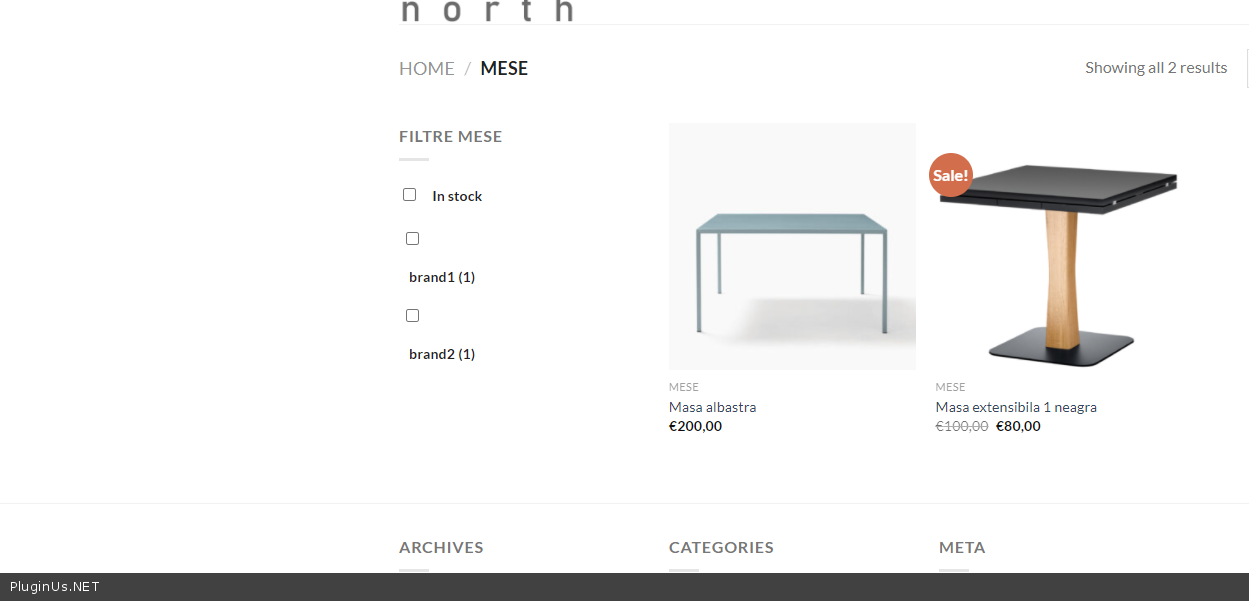
Quote from gabriel.pribeagu on January 23, 2021, 22:41According with the shortcode used For Category 18 the correct filter should only show:
-Widget title for category 18
-instock checkbox
-brands checkboxes
According with the shortcode used For Category 19 the correct filter should only show:
-Widget title for category 19
-price slider
-color buttons
According with the shortcode used For Category 18 the correct filter should only show:
-Widget title for category 18
-instock checkbox
-brands checkboxes
According with the shortcode used For Category 19 the correct filter should only show:
-Widget title for category 19
-price slider
-color buttons
Quote from Pablo Borysenco on January 25, 2021, 16:00Hello
please drop me exact link to the issue and wp-admin access - https://c2n.me/43SC6rb.png ->https://c2n.me/42BAoj4.png
Also, I dont`t know where and in what field exactly to insert the shortcodes for [woof_products]: - this is only for custom pages
Hello
please drop me exact link to the issue and wp-admin access - https://c2n.me/43SC6rb.png ->https://c2n.me/42BAoj4.png


Also, I dont`t know where and in what field exactly to insert the shortcodes for [woof_products]: - this is only for custom pages
Quote from gabriel.pribeagu on January 25, 2021, 17:58Ok, I`ve sent the acces info
Ok, I`ve sent the acces info
Quote from Pablo Borysenco on January 26, 2021, 13:37Hello
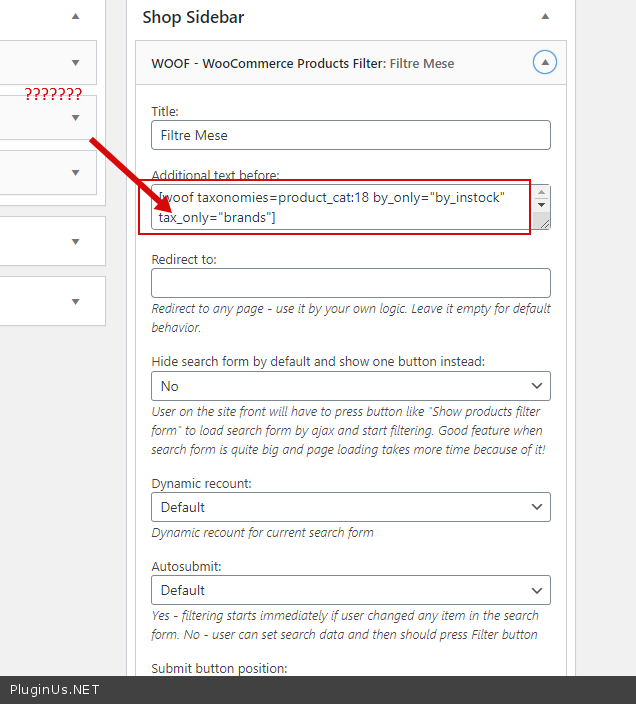
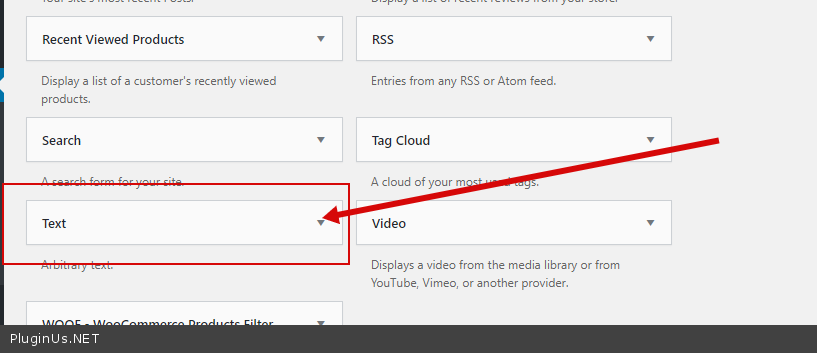
https://c2n.me/4aHogkG.png - it is not right! Paste shortcodes in text widget - https://c2n.me/4aHom6s.png and delete woof widget
Hello
https://c2n.me/4aHogkG.png - it is not right! Paste shortcodes in text widget - https://c2n.me/4aHom6s.png and delete woof widget
Quote from gabriel.pribeagu on January 26, 2021, 15:36Hello,
Still have a problem.
The "colors" and "brands" attributes criteria not showing with this text widgets.
Pls check at the same links from the private data.
Thx
Hello,
Still have a problem.
The"colors" and"brands" attributes criteria not showing with this text widgets.
Pls check at the same links from the private data.
Thx
Quote from Pablo Borysenco on January 27, 2021, 12:34Hello
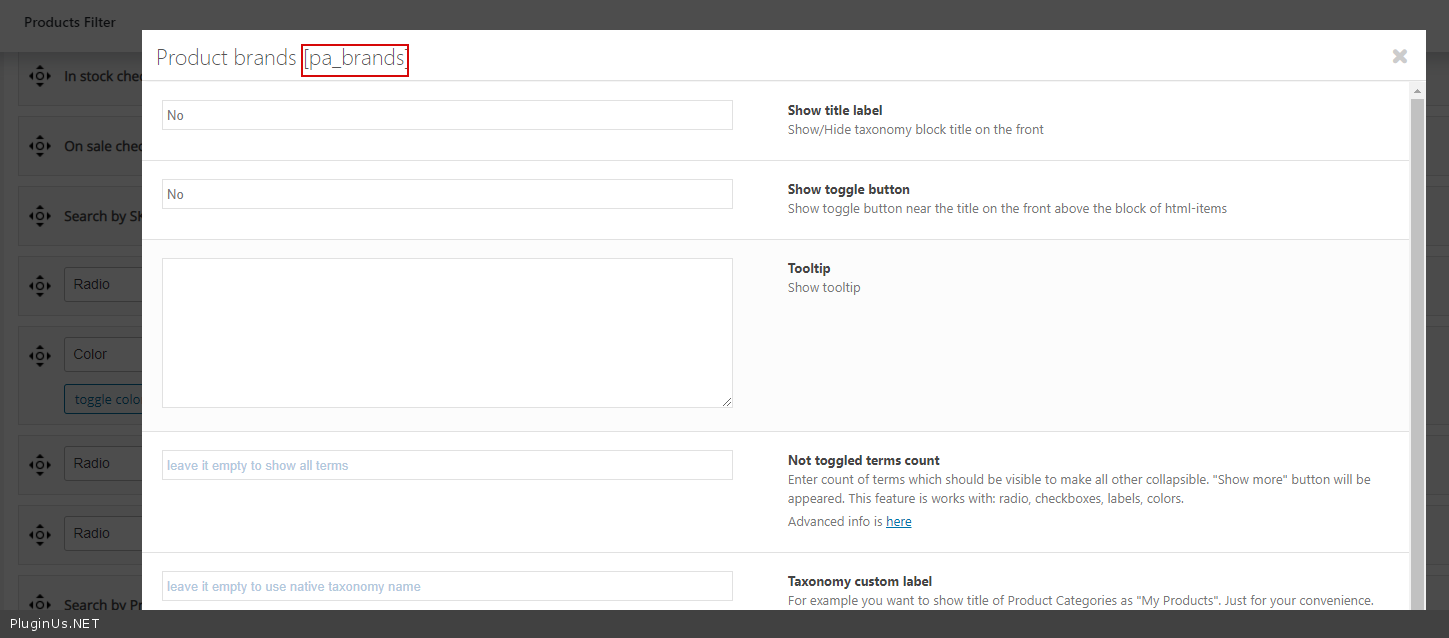
To get correct taxonomy keys - https://c2n.me/4aIgPYX.png
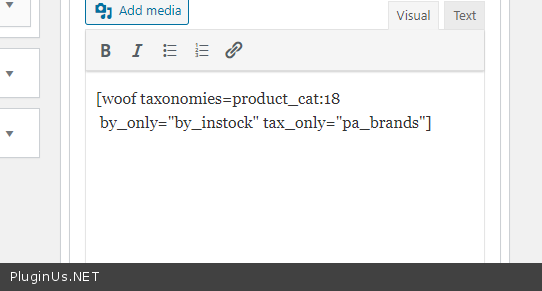
My test - https://c2n.me/4aIgT2V.png result - https://c2n.me/4aIgUqr.png
Hello
To get correct taxonomy keys - https://c2n.me/4aIgPYX.png
My test - https://c2n.me/4aIgT2V.png result - https://c2n.me/4aIgUqr.png
Quote from gabriel.pribeagu on January 27, 2021, 12:51Thank you!
Thank you!
Quote from Pablo Borysenco on January 27, 2021, 13:40Welcome;)
http://codecanyon.net/downloads - rate please the plugin if you liked it ...
Welcome;)
http://codecanyon.net/downloads - rate please the plugin if you liked it ...
Quote from gabriel.pribeagu on January 27, 2021, 15:12already did it!
5 stars :)
already did it!
5 stars :)
Quote from Pablo Borysenco on January 28, 2021, 11:28Hello
Thank you!
Hello
Thank you!