

Filter Search Engine Faster?
The support doesn work on Saturdays and Sundays, so some Friday requests can be answered on Monday. If you have problems with registration ask help on contact us page pleaseIf you not got email within 24~36 business hours, firstly check your spam box, and if no any email from the support there - back to the forum and read answer here. DO NOT ANSWER ON EMAILS [noreply@pluginus.net] FROM THE FORUM!! Emails are just for your info, all answers should be published only here.
The support doesn work on Saturdays and Sundays, so some Friday requests can be answered on Monday.

Quote from Lokendra on September 6, 2021, 09:00Any possibility to make the search engine faster? It's especially slow when you click on a school (which is probably what most people do). So if you go to the shop and just click on "Eton" for example it takes about 10 seconds to load up just an Eton page
https://metalrockseducation.co.uk/elevenplus-thirteenplus-past-exam-specimen-paper
and I have already applied these things https://products-filter.com/searching-is-slow/
Please let me know how we can make it fast? Need your suggestions
Thanks
Any possibility to make the search engine faster? It's especially slow when you click on a school (which is probably what most people do). So if you go to the shop and just click on"Eton" for example it takes about 10 seconds to load up just an Eton page
https://metalrockseducation.co.uk/elevenplus-thirteenplus-past-exam-specimen-paper
and I have already applied these things https://products-filter.com/searching-is-slow/
Please let me know how we can make it fast? Need your suggestions
Thanks

Quote from Pablo Borysenco on September 6, 2021, 16:53Hello
To make page with filter load faster: you can disable dynamic recount, but also you can enable 'Hide search form by default and show one button instead' in the widget or [woof start_filtering_btn=1] shortcode
To make filtering work faster try to use 'Turbo Mode' described on https://products-filter.com/turbo-mode , here is the demo site https://turbo.products-filter.com/
Hello
To make page with filter load faster: you can disable dynamic recount, but also you can enable 'Hide search form by default and show one button instead' in the widget or [woof start_filtering_btn=1] shortcode 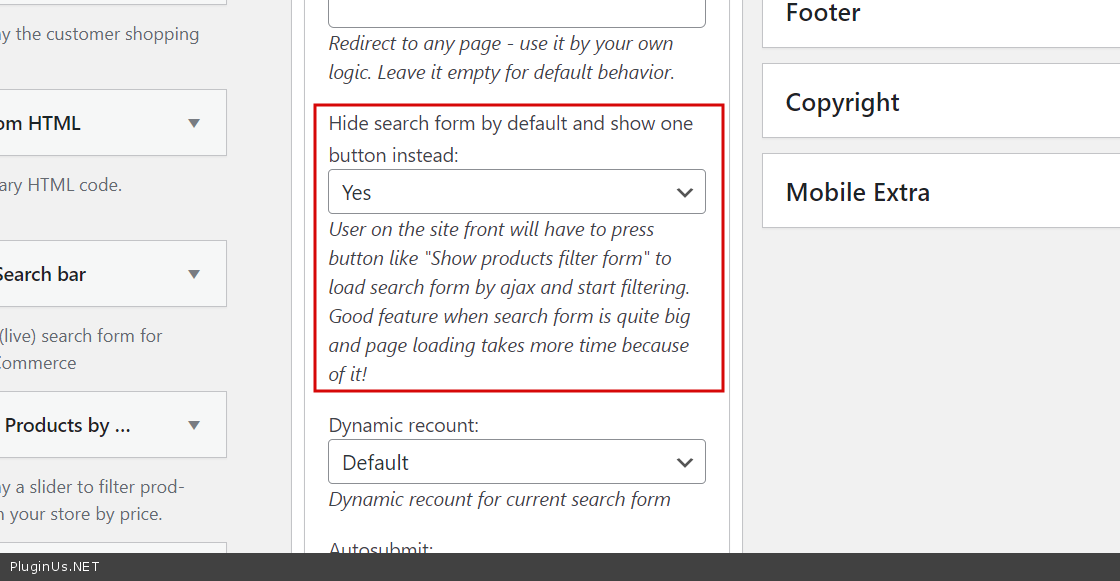
To make filtering work faster try to use 'Turbo Mode' described on https://products-filter.com/turbo-mode , here is the demo site https://turbo.products-filter.com/
Quote from Lokendra on September 7, 2021, 06:47Ok thanks, can you explain if we enable turbo mode so our filter design would be the same as we have now?
and Is this paid or free?
Thanks
Ok thanks, can you explain if we enable turbo mode so our filter design would be the same as we have now?
and Is this paid or free?
Thanks
Quote from Pablo Borysenco on September 7, 2021, 12:00Hello
Turbo mode also included into free version, activate it please in tab Extension https://clip2net.com/s/4dfDfOJ
Read please: https://products-filter.com/extencion/turbo-mode/ - principle of this -> scanning all the products and assembling data into json file, then on the front WOOF uses javascript and simple MySQL queries with products IDs on the server
Example is here: https://turbo.products-filter.com/ - 23K products (Shared hosting, PHP 8.0.10, MySQL 5.7.33, RAM 1024MB)
Hello
Turbo mode also included into free version, activate it please in tab Extension https://clip2net.com/s/4dfDfOJ
Read please: https://products-filter.com/extencion/turbo-mode/ - principle of this -> scanning all the products and assembling data into json file, then on the front WOOF uses javascript and simple MySQL queries with products IDs on the server
Example is here: https://turbo.products-filter.com/ - 23K products (Shared hosting, PHP 8.0.10, MySQL 5.7.33, RAM 1024MB)
Quote from Lokendra on November 15, 2021, 13:14Ok after doing this, I think it is creating a cache issue when we are going to add a new product so It doesn't show that product category in the filter list
Ok after doing this, I think it is creating a cache issue when we are going to add a new product so It doesn't show that product category in the filter list
Quote from Pablo Borysenco on November 16, 2021, 12:31Hello
Yes. After changing the filter data, you should recreate the search file and clear all cache
Hello
Yes. After changing the filter data, you should recreate the search file and clear all cache
Quote from Lokendra on November 17, 2021, 09:56Thanks for your reply. After enabling the turbo mode, it is not showing the right count, please check here https://ibb.co/wYwvZHS
and without turbo mode, it shows the right count https://ibb.co/cXTnN0B
and how to recreate the search file
Thanks for your reply. After enabling the turbo mode, it is not showing the right count, please check here https://ibb.co/wYwvZHS
and without turbo mode, it shows the right count https://ibb.co/cXTnN0B
and how to recreate the search file
Quote from Pablo Borysenco on November 17, 2021, 13:32Hello
Turbo mode ignores children. products must be tagged across the entire category hierarchy
Hello
Turbo mode ignores children. products must be tagged across the entire category hierarchy
Quote from Lokendra on November 17, 2021, 14:01Ok thanks, can we hide these children, please look at this screenshot https://ibb.co/SJZsSxc
Ok thanks, can we hide these children, please look at this screenshot https://ibb.co/SJZsSxc
Quote from Pablo Borysenco on November 18, 2021, 11:57Hello
.woof_childs_list_li>.woof_checkbox_label .woof_checkbox_count{
display: none !important;
}
Hello
.woof_childs_list_li>.woof_checkbox_label .woof_checkbox_count{
display: none !important;
}
Quote from Lokendra on November 24, 2021, 07:47Thanks for your reply. I have added the above CSS but still, it is appearing after enabling the turbo mode.
please check the screenshot here https://ibb.co/DYSrpZk
Ok please ignore, I have done that by using this
.woof_childs_list_li>.woof_checkbox_label .woof_turbo_count{
display: none !important;
}
Thanks for your reply. I have added the above CSS but still, it is appearing after enabling the turbo mode.
please check the screenshot here https://ibb.co/DYSrpZk
Ok please ignore, I have done that by using this
.woof_childs_list_li>.woof_checkbox_label .woof_turbo_count{
display: none !important;
}
Quote from Pablo Borysenco on November 24, 2021, 12:51Hello
Great! Welcome;)
Hello
Great! Welcome;)