PluginUs.Net - Business Tools for WooCommerce and WordPress

[realize your idea - make your dreams come true]

Support Forum

You need to log-in to create request (topic) to the support

Filter on variation stock level doesn't show

The support doesn work on Saturdays and Sundays, so some Friday requests can be answered on Monday. If you have problems with registration ask help on contact us page please
If you not got email within 24~36 business hours, firstly check your spam box, and if no any email from the support there - back to the forum and read answer here. DO NOT ANSWER ON EMAILS [noreply@pluginus.net] FROM THE FORUM!! Emails are just for your info, all answers should be published only here.
The support doesn work on Saturdays and Sundays, so some Friday requests can be answered on Monday.

We have the premium version:-)

Here is the problem: we have main articles, shoes, and variations which are the shoes sizes set. We have stock level activated WooCommerce.

So for example article A is there in size 7 with stock level zero, size 8 stock level 10 pair etc etc for every size. To get the stock level working we also set the stock level for the main article A on 50 pairs total. When using WOOF and looking for all sizes 7 on the shopping page it still shows all sizes 7, even when the stock of te variation is zero. My idea is that it looks only at the stock level of the main article A which is set on 50 pairs and not at the stock level of the individual variations.

How can I get it to look at the stock levels of the variations which are actually in stock so that sold out variations are not shown?

Hello

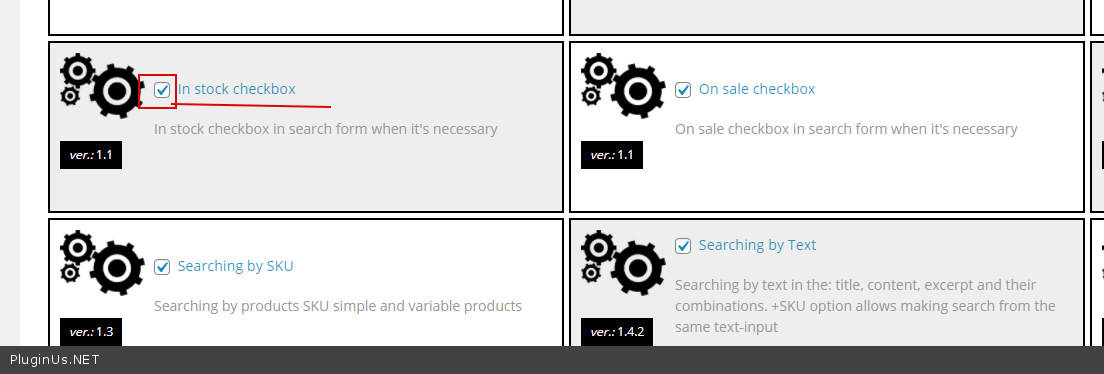
Please  activate  this  extension - https://c2n.me/4aATxIH.png -  And check this  option - https://c2n.me/4aATCH2.png

Thank you, that works! Sadly it's now very slow, is there a way to speed it up?

Hello

Please  raed  this - https://products-filter.com/searching-is-slow/

This is very helpful, thank you! Last question if I may: we use WP-Rocket and I'm guessing it is interfering with WOOF (activating the options slows WOOF down), do I need to switch of specific options or use exclude rules in Wp-Rocket?

Hello

activating the options slows WOOF down - I'm not sure if this is possible

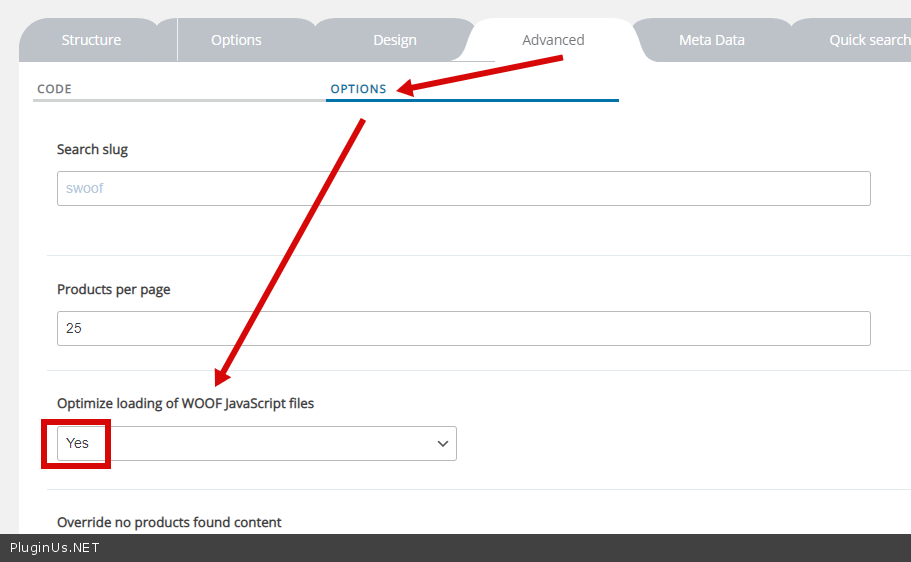
Some settings of  Wp-Rocket can cause JS errors in the filter. In this case it is necessary to investigate this( disable optimization of some Js files or use the option - https://c2n.me/4aCHj7C.png )