PluginUs.Net - Business Tools for WooCommerce and WordPress

[realize your idea - make your dreams come true]

Support Forum

You need to log-in to create request (topic) to the support

Filter not show in product page (if possible to show?)

The support doesn work on Saturdays and Sundays, so some Friday requests can be answered on Monday. If you have problems with registration ask help on contact us page please
If you not got email within 24~36 business hours, firstly check your spam box, and if no any email from the support there - back to the forum and read answer here. DO NOT ANSWER ON EMAILS [noreply@pluginus.net] FROM THE FORUM!! Emails are just for your info, all answers should be published only here.
The support doesn work on Saturdays and Sundays, so some Friday requests can be answered on Monday.

Hi, I want to show the image but wasn't able (maybe need to upload it somewhere) - so I just make it simple here.

I found out that there is no filter show here: https://khind.ae/product-category/appliances/kitchen-appliances/ (below the"product categories").  I read that you said that this is a filter, not a menu. Okay, I get it. Also, something that I need to show child categories. I tried playing around and wasn't like I want. I mean, I don't want to show the child categories as it was too long on the sidebar. So I decided to hide the child categories.

So the question, is possible to show the filter in here https://khind.ae/product-category/appliances/kitchen-appliances/ (product category page)? Or possible just show the menu just the same as here: https://khind.ae/shop/ (that shows the selected menu always on top)? I tried putting 2 filters but nothing changes.

Is there any CSS or any code snippet just to show this?

You can also reply to me via email nani@pttoutdoor.com


Thanks!


Regards,
Nani

Hello Nani

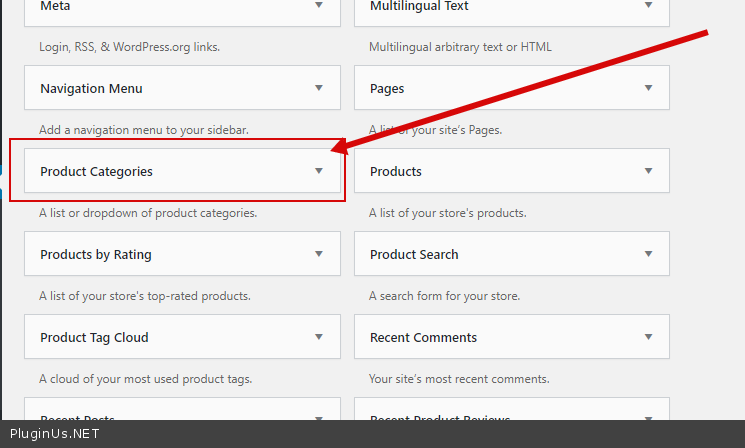
Please  use this  widget  to  show  menu - https://c2n.me/49RZdwJ.png

Hi,

but it duplicates for the title - http://c2n.me/49S2E3o

http://c2n.me/49S2UvW

So it means that I cannot make the filter menu for the category invisible on the category page?
But only the title? Then, can I remove the title or the filter in the product category page? :)

Thanks!

Hello Nani

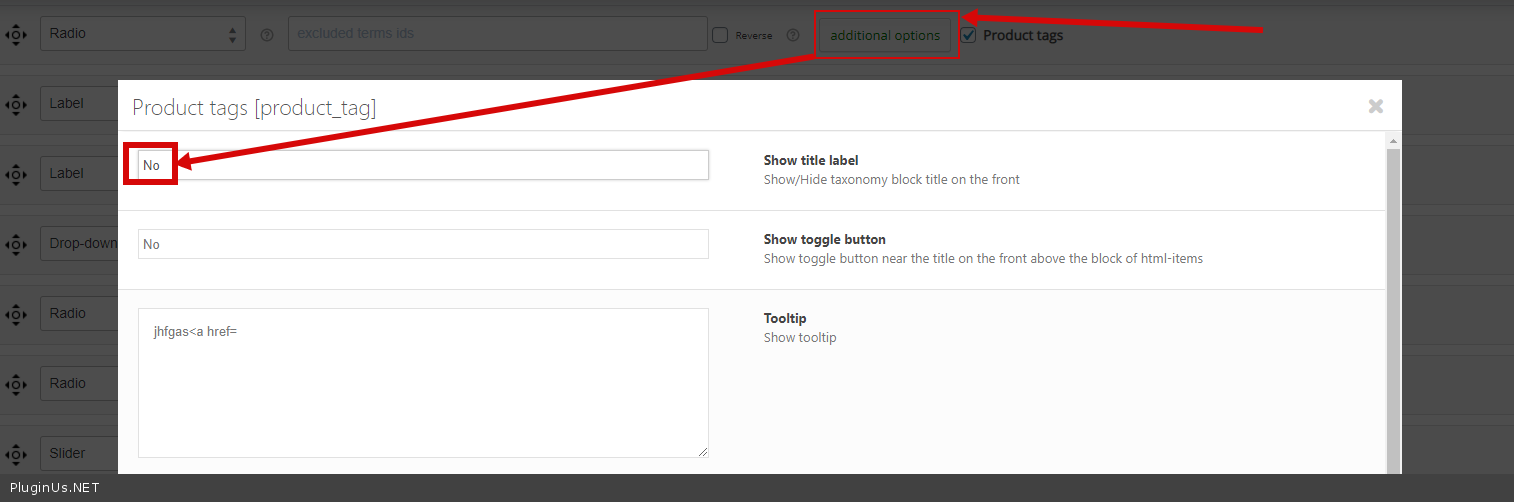
Check  an option please - https://c2n.me/49SQKHl.png

Hi Pablo,

I ticked that option, but still, it showed the title in here : http://c2n.me/49UA4wr

I'm sure I do it the correct way as I actually focus on the"Product categories [product_cat", and not the product tags, right?

I tried ticked for both tags also, but it's even worst. So yes, I'm just want to hide the title on that product category page. Is there anything I can do with CSS instead? Cause I'm afraid, it will hide to 'all pages'.

Hello

Try  to  add CSS

.tax-product_cat  .widget-woof .widget-title{

display: none;

}