

Filter names by attributes
The support doesn work on Saturdays and Sundays, so some Friday requests can be answered on Monday. If you have problems with registration ask help on contact us page pleaseIf you not got email within 24~36 business hours, firstly check your spam box, and if no any email from the support there - back to the forum and read answer here. DO NOT ANSWER ON EMAILS [noreply@pluginus.net] FROM THE FORUM!! Emails are just for your info, all answers should be published only here.
The support doesn work on Saturdays and Sundays, so some Friday requests can be answered on Monday.

Quote from samo on March 6, 2021, 13:46Hi,
I'm not using English language on the site I'm working on. I've set several filters by attribute (dropdowns). However on the front-end as a specific filter name a word "Product" appears in front of every attribute name. The site is about wines and I have many attributes regarding it.
For example..
Filter by:
Product Country origin:
Product quantity:
Product year:
How can I get rid of this word?
Thanks for the answer!
Samo
Hi,
I'm not using English language on the site I'm working on. I've set several filters by attribute (dropdowns). However on the front-end as a specific filter name a word"Product" appears in front of every attribute name. The site is about wines and I have many attributes regarding it.
For example..
Filter by:
Product Country origin:
Product quantity:
Product year:
How can I get rid of this word?
Thanks for the answer!
Samo

Quote from Pablo Borysenco on March 8, 2021, 12:28Hello Samo
Read this please – https://wordpress.org/support/topic/woocommerce-3-0-prepending-product-to-filters/
Hello Samo
Read this please – https://wordpress.org/support/topic/woocommerce-3-0-prepending-product-to-filters/
Quote from samo on March 9, 2021, 15:20Thank you for your answer. However - there is no:
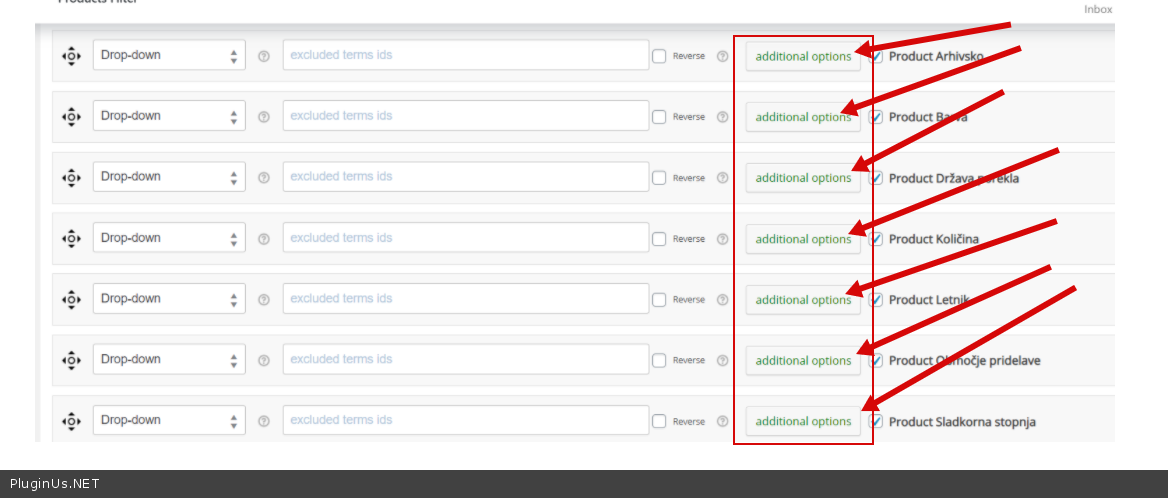
* button ‘additional options’
* Taxonomy custom label: http://clip2net.com/s/3JiSVmUin the design tab! I'm using:
WOOF - WooCommerce Products Filter v.1.2.4.2
What am I missing?
Thank you for your answer. However - there is no:
* button ‘additional options’
* Taxonomy custom label: http://clip2net.com/s/3JiSVmU
in the design tab! I'm using:
WOOF - WooCommerce Products Filter v.1.2.4.2
What am I missing?
Quote from Pablo Borysenco on March 10, 2021, 13:12Hello
OK! Please drop me a screenshot of the structure tab
Hello
OK! Please drop me a screenshot of the structure tab
Quote from samo on March 11, 2021, 10:33I've send you a link and access (private data). I await your response. Thank you in advance!! :)
I've send you a link and access (private data). I await your response. Thank you in advance!! :)
Quote from Pablo Borysenco on March 11, 2021, 13:00Hello
Please drop me a screenshot of the structure tab of the WOOF
Hello
Please drop me a screenshot of the structure tab of the WOOF
Quote from samo on March 11, 2021, 13:19I wanted to do that first, but can't paste the pic to the post. Please tell me how to do it. :(
I wanted to do that first, but can't paste the pic to the post. Please tell me how to do it. :(
Quote from Pablo Borysenco on March 12, 2021, 13:29Hello
Please use services to transfer images by link OR paste the images to the page of your site and drop me a link
Hello
Please use services to transfer images by link OR paste the images to the page of your site and drop me a link
Quote from samo on March 12, 2021, 13:48Hi,
I've pasted a link to private data.
Kind regards, Samo
Hi,
I've pasted a link to private data.
Kind regards, Samo
Quote from samo on March 15, 2021, 10:14Dear Pablo. Can you please check my pics? I hope there is a solution to this.
Below the pics I posted another one - how can I change the color of the prechosen option in the dropdown?
Dear Pablo. Can you please check my pics? I hope there is a solution to this.
Below the pics I posted another one - how can I change the color of the prechosen option in the dropdown?
Quote from Pablo Borysenco on March 15, 2021, 14:25Hello
Ok!
However - there is no: - please click here - https://c2n.me/4bj6jPE.png and find "Taxonomy custom label"
Hello
Ok!
However - there is no: - please click here - https://c2n.me/4bj6jPE.png and find "Taxonomy custom label"
Quote from samo on March 15, 2021, 14:40I posted another pic - from your tutorial.
It's strange that your attribute names are written without "Product" tag in front and mine are not, eventhough I checked my attribute names and I never have written "product in front.
I don't understand your comment regarding additional options. I tried that, but it creates only another label, the dropdown is the same.
I posted another pic - from your tutorial.
It's strange that your attribute names are written without"Product" tag in front and mine are not, eventhough I checked my attribute names and I never have written"product in front.
I don't understand your comment regarding additional options. I tried that, but it creates only another label, the dropdown is the same.
Quote from Pablo Borysenco on March 16, 2021, 13:28Hello
Ok! Please try to read this - https://wordpress.org/support/topic/woocommerce-3-0-prepending-product-to-filters/
If you read this topic you will find out that woocommerce adds this prefix "Product" and two ways to remove it. The easiest way - https://c2n.me/4bjZhrO.png
Hello
Ok! Please try to read this - https://wordpress.org/support/topic/woocommerce-3-0-prepending-product-to-filters/
If you read this topic you will find out that woocommerce adds this prefix"Product" and two ways to remove it. The easiest way - https://c2n.me/4bjZhrO.png
Quote from samo on March 16, 2021, 15:06Thank you Pablo. I must say I overlooked the "Taxonomy custom label" - I just didn't scroll down. I can't believe I didn't see it and made such a childish mistake!! :)
It works perfectly!
However there's another issue I really struggled with. Dropdown items have a preselected first field which has a blue background. OK, on hover every dropdown field is actually blue. I tried with CSS, but can't find the right setting. Do you know how can I change this to a custom colour?
I updated my private data.
Thank you Pablo. I must say I overlooked the"Taxonomy custom label" - I just didn't scroll down. I can't believe I didn't see it and made such a childish mistake!! :)
It works perfectly!
However there's another issue I really struggled with. Dropdown items have a preselected first field which has a blue background. OK, on hover every dropdown field is actually blue. I tried with CSS, but can't find the right setting. Do you know how can I change this to a custom colour?
I updated my private data.
Quote from Pablo Borysenco on March 17, 2021, 13:41Hello
Drop me exact link to the issue
If you use standard select - the styles are independent of my plugin.- https://www.w3schools.com/howto/howto_custom_select.asp
Hello
Drop me exact link to the issue
If you use standard select - the styles are independent of my plugin.- https://www.w3schools.com/howto/howto_custom_select.asp
Quote from samo on March 17, 2021, 13:49The link is in the private data.
The link is in the private data.
Quote from Pablo Borysenco on March 18, 2021, 11:41Hello
I only see the link to the screenshot
Hello
I only see the link to the screenshot
Quote from samo on March 18, 2021, 12:33I guess I didn't save it. Now it's there.
I guess I didn't save it. Now it's there.
Quote from Pablo Borysenco on March 18, 2021, 13:13Yes. You are using standard drop dawn/ So read this - https://www.w3schools.com/howto/howto_custom_select.asp
Yes. You are using standard drop dawn/ So read this - https://www.w3schools.com/howto/howto_custom_select.asp
Quote from samo on March 18, 2021, 14:25Dear Pablo. Thanks for the pointers,..we're getting close. I'm familiar with html ind CSS, but have no idea how to implement it in woocommerce/your filter. In the advance tab there is a place for CSS, but I also need to change html. Can you please give me a hint for this too?
Dear Pablo. Thanks for the pointers,..we're getting close. I'm familiar with html ind CSS, but have no idea how to implement it in woocommerce/your filter. In the advance tab there is a place for CSS, but I also need to change html. Can you please give me a hint for this too?