

Filter jumping and other issues
The support doesn work on Saturdays and Sundays, so some Friday requests can be answered on Monday. If you have problems with registration ask help on contact us page pleaseIf you not got email within 24~36 business hours, firstly check your spam box, and if no any email from the support there - back to the forum and read answer here. DO NOT ANSWER ON EMAILS [noreply@pluginus.net] FROM THE FORUM!! Emails are just for your info, all answers should be published only here.
The support doesn work on Saturdays and Sundays, so some Friday requests can be answered on Monday.

Quote from Adrienne on May 21, 2020, 04:19Hi, we have a number of issues with the Pro filter I'm hoping you can help.
When one makes a selection but then unchecks that selection, the drop-down window closes and jumps to the top of the page. So I have to scroll down again to the filter choice, open it, and then choose again. This also happens when you choose multiple items, like style, color. This is also just a general issue, jumping to the top of the page. There are 4 filter options. When I choose one, jump to the top of the page. Choose the next, jump, etc. etc. Is there a way to stop that jumping to the top of the page whenever you make a choice? And the drop-down not closing?
The filter is slow. This is a rug site. So people have 4 filters, size, style, color, and price. The issue is, if I choose the size I have to wait until all that size shows up before I can choose a style. Then I have to wait for style before I can move on. When one tries to just check a size, check a style, check a color basically a message says there are no rugs. When I know there are. This is kind of an issue with the filter in general. It's slow and therefore seems as if it's not working. Is this just a setting that we aren't using properly maybe?
Can I reverse the +/-?
So it's a + when it's closed and a - when it's open?
Can the entire row be a link and not just the +/-? So the words Shape/Size be clickable to open the drop-down with the choices?
Thanks.
Hi, we have a number of issues with the Pro filter I'm hoping you can help.
When one makes a selection but then unchecks that selection, the drop-down window closes and jumps to the top of the page. So I have to scroll down again to the filter choice, open it, and then choose again. This also happens when you choose multiple items, like style, color. This is also just a general issue, jumping to the top of the page. There are 4 filter options. When I choose one, jump to the top of the page. Choose the next, jump, etc. etc. Is there a way to stop that jumping to the top of the page whenever you make a choice? And the drop-down not closing?
The filter is slow. This is a rug site. So people have 4 filters, size, style, color, and price. The issue is, if I choose the size I have to wait until all that size shows up before I can choose a style. Then I have to wait for style before I can move on. When one tries to just check a size, check a style, check a color basically a message says there are no rugs. When I know there are. This is kind of an issue with the filter in general. It's slow and therefore seems as if it's not working. Is this just a setting that we aren't using properly maybe?
Can I reverse the +/-? So it's a + when it's closed and a - when it's open?
Can the entire row be a link and not just the +/-? So the words Shape/Size be clickable to open the drop-down with the choices?
Thanks.

Quote from Pablo Borysenco on May 21, 2020, 13:11Hello
Paste your license key here - https://c2n.me/43SC6rb.png -> https://c2n.me/42HBIt7.png
Add exact link to the issue
Hello
Paste your license key here - https://c2n.me/43SC6rb.png -> https://c2n.me/42HBIt7.png


Add exact link to the issue
Quote from Adrienne on May 21, 2020, 16:27Added license and exact link in the privacy area. Thanks.
Added license and exact link in the privacy area. Thanks.
Quote from Pablo Borysenco on May 22, 2020, 12:45Hello
Jumping Up - This is a Page Reload. Activate ajax mode please OR read this - https://products-filter.com/auto-scroll-to-products-after-their-filtering-in-redirect-mode/
Read this - https://products-filter.com/searching-is-slow/
settings ->Design - https://c2n.me/47E3pxF.png
So the words Shape/Size be clickable to open the drop-down with the choices? - You need customization of a code:
Try this solution: https://c2n.me/423Ze1k.png
You need to make changes to the js file.
file: path/to/domain/wp-content/plugins/woocommerce-products-filter/js/front.js
1. Finde function woof_init_toggles() and comment it.
2. Then add this function after the previous comment function:function woof_init_toggles() {
jQuery('.woof_container_inner h4').life('click', function () {
if (jQuery(this).children().data('condition') == 'opened') {
jQuery(this).children().removeClass('woof_front_toggle_opened');
jQuery(this).children().addClass('woof_front_toggle_closed');
jQuery(this).children().data('condition', 'closed');
if (woof_toggle_type == 'text') {
jQuery(this).children().text(woof_toggle_closed_text);
} else {
jQuery(this).children().find('img').prop('src', woof_toggle_closed_image);
}
} else {
jQuery(this).children().addClass('woof_front_toggle_opened');
jQuery(this).children().removeClass('woof_front_toggle_closed');
jQuery(this).children().data('condition', 'opened');
if (woof_toggle_type == 'text') {
jQuery(this).children().text(woof_toggle_opened_text);
} else {
jQuery(this).children().find('img').prop('src', woof_toggle_opened_image);
}
}
jQuery(this).parent().find('.woof_block_html_items').toggle(500);
return false;
});
}If you use something to optimize the js, rebuild the js file.
Hello
Jumping Up - This is a Page Reload. Activate ajax mode please OR read this - https://products-filter.com/auto-scroll-to-products-after-their-filtering-in-redirect-mode/
Read this - https://products-filter.com/searching-is-slow/
settings ->Design - https://c2n.me/47E3pxF.png
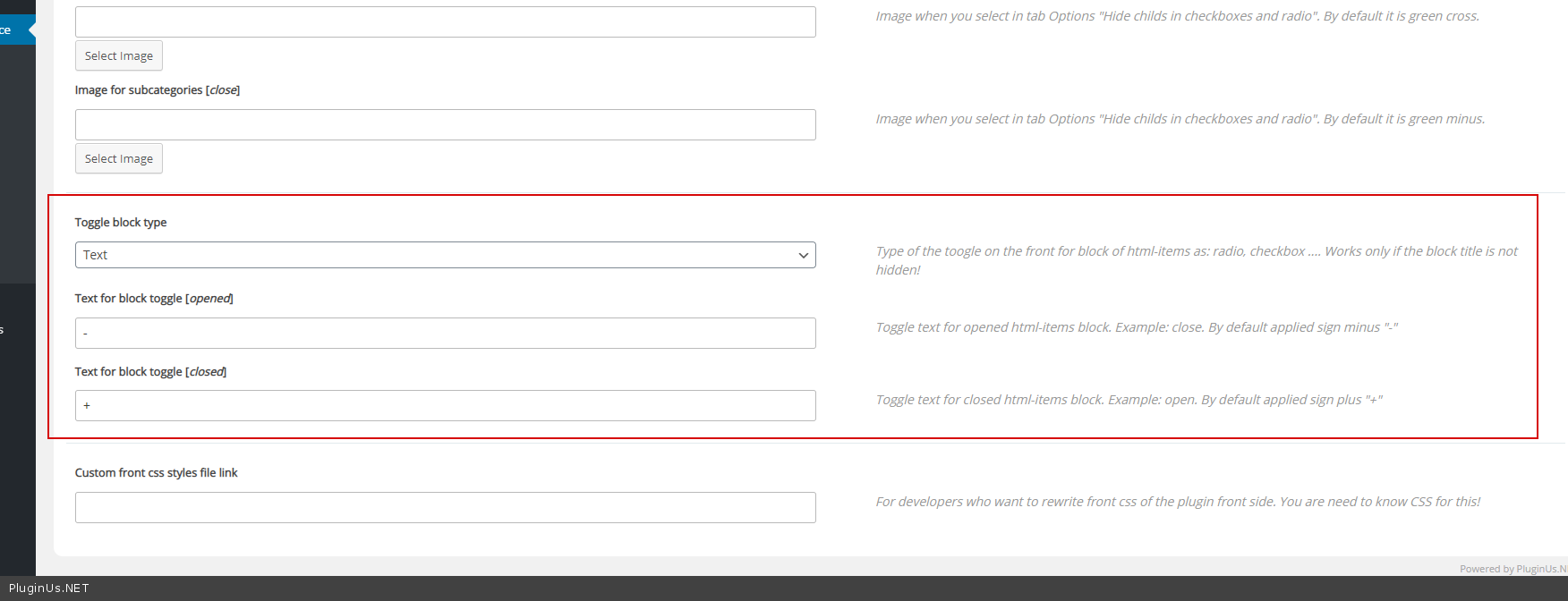
So the words Shape/Size be clickable to open the drop-down with the choices? - You need customization of a code:
Try this solution: https://c2n.me/423Ze1k.png
You need to make changes to the js file.
file: path/to/domain/wp-content/plugins/woocommerce-products-filter/js/front.js
1. Finde function woof_init_toggles() and comment it.
2. Then add this function after the previous comment function:
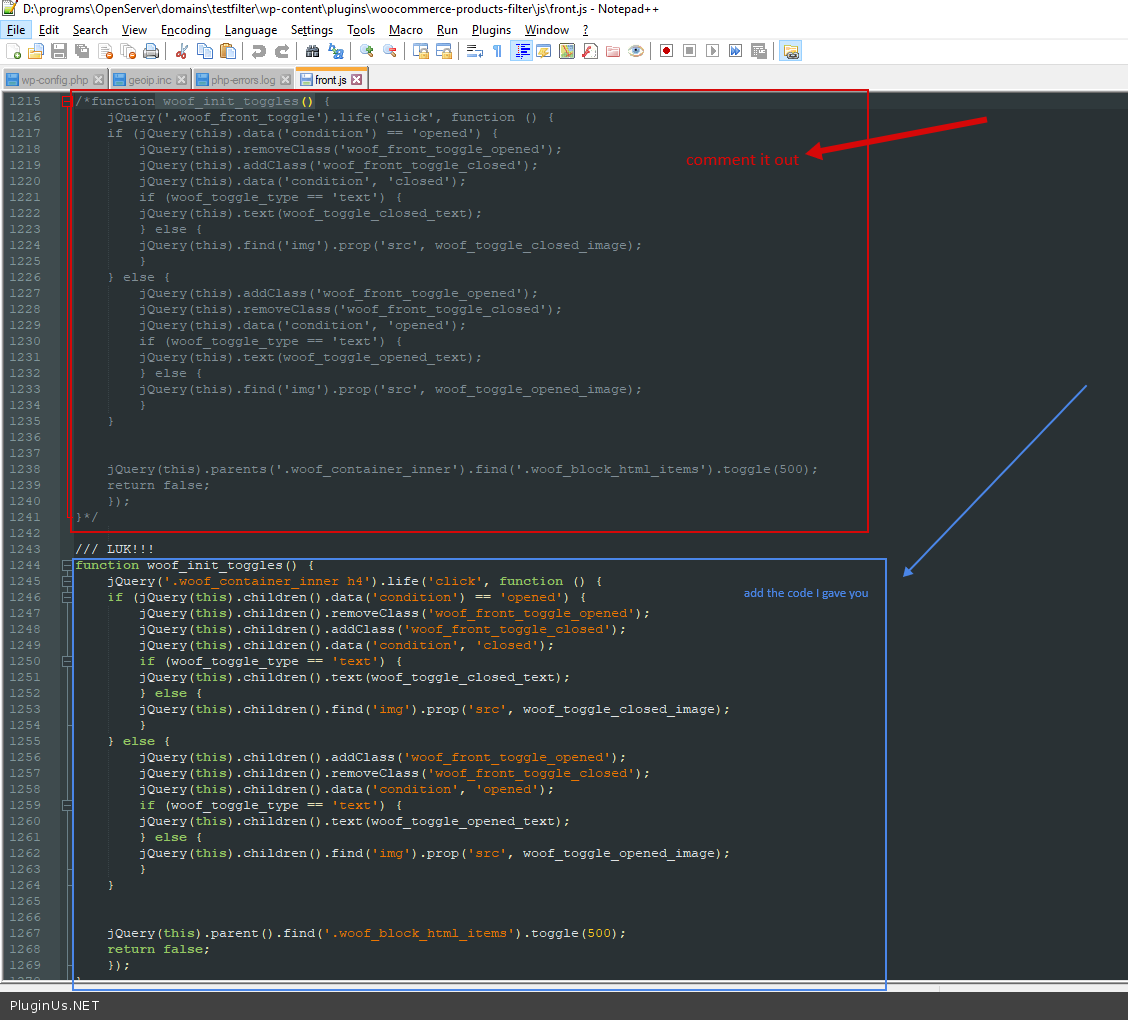
function woof_init_toggles() {
jQuery('.woof_container_inner h4').life('click', function () {
if (jQuery(this).children().data('condition') == 'opened') {
jQuery(this).children().removeClass('woof_front_toggle_opened');
jQuery(this).children().addClass('woof_front_toggle_closed');
jQuery(this).children().data('condition', 'closed');
if (woof_toggle_type == 'text') {
jQuery(this).children().text(woof_toggle_closed_text);
} else {
jQuery(this).children().find('img').prop('src', woof_toggle_closed_image);
}
} else {
jQuery(this).children().addClass('woof_front_toggle_opened');
jQuery(this).children().removeClass('woof_front_toggle_closed');
jQuery(this).children().data('condition', 'opened');
if (woof_toggle_type == 'text') {
jQuery(this).children().text(woof_toggle_opened_text);
} else {
jQuery(this).children().find('img').prop('src', woof_toggle_opened_image);
}
}
jQuery(this).parent().find('.woof_block_html_items').toggle(500);
return false;
});
}
If you use something to optimize the js, rebuild the js file.
Quote from Adrienne on May 26, 2020, 17:53Hi,
I was able to fix the -/+ toggle. Thank you!
For the jumping to top of page, auto scroll. I actually don't want it to do that. When they select the filter options I don't want it to jump back to the top of the page. They need to be able to pick the 4 filter options first with no auto scroll after each option is picked. Also, on my function.php theme file there is no <?php wp_footer(); ?> in the file. So I'm not sure if I need to put that in there as well? When I just added your code, it created an error on the site.
I commented out and added the code for woof_init_toggles() and it did not seem to do anything.
One more item, the client is very particular. When I check a size, say 8x11 and then a style, kids/fun, if I want to uncheck size it collapses and if I want to choose another size I have to open, using the +, again. Is that something that can be changed? So it stays open?
Hi,
I was able to fix the -/+ toggle. Thank you!
For the jumping to top of page, auto scroll. I actually don't want it to do that. When they select the filter options I don't want it to jump back to the top of the page. They need to be able to pick the 4 filter options first with no auto scroll after each option is picked. Also, on my function.php theme file there is no <?php wp_footer(); ?> in the file. So I'm not sure if I need to put that in there as well? When I just added your code, it created an error on the site.
I commented out and added the code for woof_init_toggles() and it did not seem to do anything.
One more item, the client is very particular. When I check a size, say 8x11 and then a style, kids/fun, if I want to uncheck size it collapses and if I want to choose another size I have to open, using the +, again. Is that something that can be changed? So it stays open?
Quote from Adrienne on May 27, 2020, 02:11We are trying to get it to mimic this site as much as possible: https://www.arizonarug.com/advance-search
We are trying to get it to mimic this site as much as possible: https://www.arizonarug.com/advance-search
Quote from Pablo Borysenco on May 27, 2020, 11:52Hello
activate ajax mode
I commented out and added the code for woof_init_toggles() and it did not seem to do anything - https://c2n.me/47IAT1a
Is that something that can be changed? - unfortunately the plugin does not have such a feature
Hello
activate ajax mode
I commented out and added the code for woof_init_toggles() and it did not seem to do anything - https://c2n.me/47IAT1a
Is that something that can be changed? - unfortunately the plugin does not have such a feature