

filter doesn't work with taxonomies
The support doesn work on Saturdays and Sundays, so some Friday requests can be answered on Monday. If you have problems with registration ask help on contact us page pleaseIf you not got email within 24~36 business hours, firstly check your spam box, and if no any email from the support there - back to the forum and read answer here. DO NOT ANSWER ON EMAILS [noreply@pluginus.net] FROM THE FORUM!! Emails are just for your info, all answers should be published only here.
The support doesn work on Saturdays and Sundays, so some Friday requests can be answered on Monday.

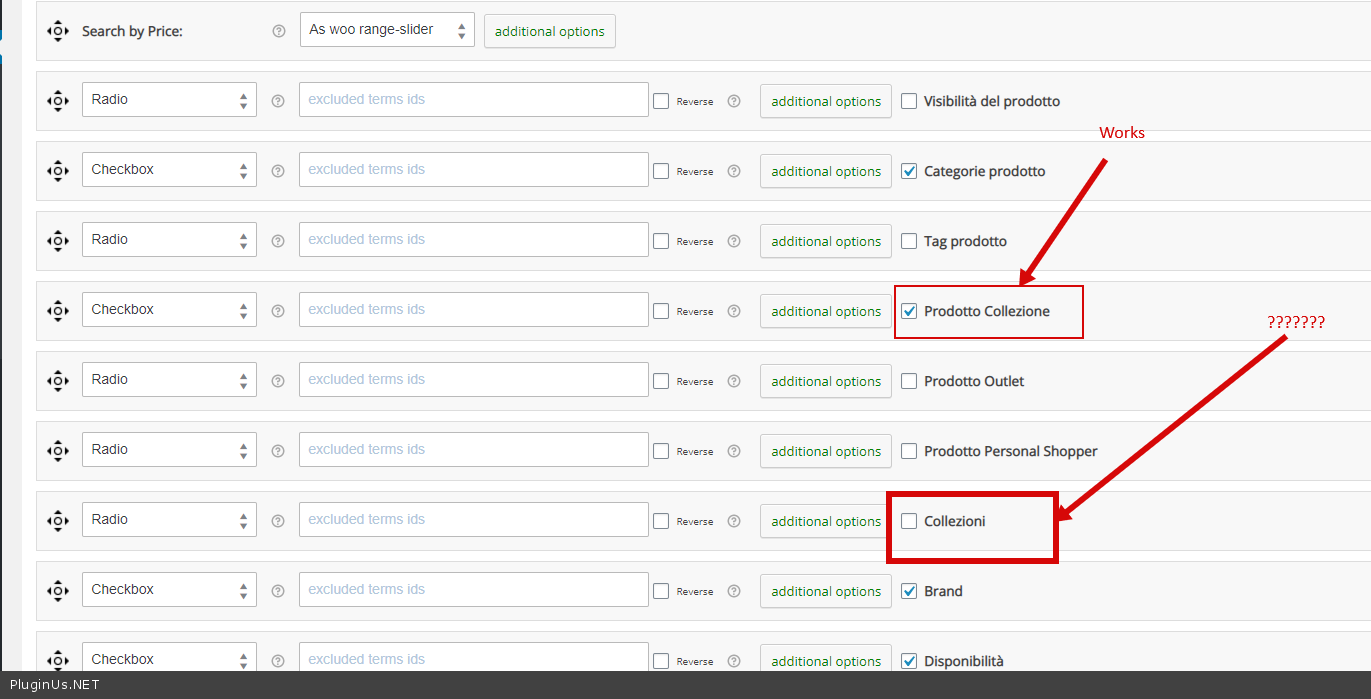
Quote from mdmd on April 13, 2021, 22:49Hi, only the filter for categories and subcategories works, while the filter does not work for any other product taxonomies.
I have already tried the "Disable swoof influence" option but the problem remains.
How can I fix it?
Thank you
Hi, only the filter for categories and subcategories works, while the filter does not work for any other product taxonomies.
I have already tried the"Disable swoof influence" option but the problem remains.
How can I fix it?
Thank you

Quote from Pablo Borysenco on April 14, 2021, 16:01Hello
Plugin works fine with all taxonomies if added correctly
In your case, the filter does not work with taxanomies created by this third-party plugin - https://c2n.me/4bH08gz.png
My test - https://c2n.me/4bH0f78
Better use this plugin - https://wordpress.org/plugins/custom-post-type-ui/ - to create custom taxonomies
Hello
Plugin works fine with all taxonomies if added correctly
In your case, the filter does not work with taxanomies created by this third-party plugin - https://c2n.me/4bH08gz.png

My test - https://c2n.me/4bH0f78
Better use this plugin - https://wordpress.org/plugins/custom-post-type-ui/ - to create custom taxonomies
Quote from mdmd on April 14, 2021, 18:53Thanks for your reply. Please note that all the custom taxonomies were created using the same plugin. In your test, you show that one taxonomy filter works (the "collezione" taxonomy) but other taxonomies ("brand" and "disponibilità") don't work even if they were created in the same way of "collezione".
So, why one custom taxonomy works and 2 other custom taxonomies don't work?
I can't switch to a different plugin for custom taxonomies, cause it would require creating again all the dynamic templates. I need to make work the filters with the existent taxonomies.
Thank you
Thanks for your reply. Please note that all the custom taxonomies were created using the same plugin. In your test, you show that one taxonomy filter works (the"collezione" taxonomy) but other taxonomies ("brand" and"disponibilità") don't work even if they were created in the same way of"collezione".
So, why one custom taxonomy works and 2 other custom taxonomies don't work?
I can't switch to a different plugin for custom taxonomies, cause it would require creating again all the dynamic templates. I need to make work the filters with the existent taxonomies.
Thank you
Quote from Pablo Borysenco on April 15, 2021, 11:32Hello
don't work even if they were created in the same way of "collezione". - I doubt it( https://c2n.me/4bHCgP1.png ) . My test - https://c2n.me/4bHBHm8
Unfortunately, we cannot be responsible for third-party plugins.
To test you can disable my plugin and check links:
Correct taxonomy - https://moobilia.metadigitale.com/categoria-prodotto/arredamento/?pa_collezione=promozioni - You will see the result
Taxonomies that were created incorrectly - https://moobilia.metadigitale.com/categoria-prodotto/arredamento/?brand=artek - there is no difference
Hello
don't work even if they were created in the same way of"collezione". - I doubt it( https://c2n.me/4bHCgP1.png ) . My test - https://c2n.me/4bHBHm8
Unfortunately, we cannot be responsible for third-party plugins.
To test you can disable my plugin and check links:
Correct taxonomy - https://moobilia.metadigitale.com/categoria-prodotto/arredamento/?pa_collezione=promozioni - You will see the result
Taxonomies that were created incorrectly - https://moobilia.metadigitale.com/categoria-prodotto/arredamento/?brand=artek - there is no difference
Quote from mdmd on April 15, 2021, 12:02I got your point. Anyway, your link is wrong, the correct taxonomy link is this: https://moobilia.metadigitale.com/brand/artek/ and if you click on it, you can see that it is working.
This isn't a taxonomy but an attribute: https://moobilia.metadigitale.com/categoria-prodotto/arredamento/?pa_collezione=promozioni%C2%A0
So, your plugin works only with categories and attributes but not with taxonomies, is it correct?
I got your point. Anyway, your link is wrong, the correct taxonomy link is this: https://moobilia.metadigitale.com/brand/artek/ and if you click on it, you can see that it is working.
This isn't a taxonomy but an attribute: https://moobilia.metadigitale.com/categoria-prodotto/arredamento/?pa_collezione=promozioni
So, your plugin works only with categories and attributes but not with taxonomies, is it correct?
Quote from mdmd on April 15, 2021, 17:14I'm testing a different filter plugin and it's working well with my custom taxonomies. You can check if you want.
So, I have to assume that your plugin doesn't work with taxonomies. If this is correct, I'm sorry but I'd have to ask for a refund cause the plugin is different from the description on the sales page. But if you can help me to make your plugin works with custom taxonomies, I will be happy to use your plugin on this site.
Thank you
I'm testing a different filter plugin and it's working well with my custom taxonomies. You can check if you want.
So, I have to assume that your plugin doesn't work with taxonomies. If this is correct, I'm sorry but I'd have to ask for a refund cause the plugin is different from the description on the sales page. But if you can help me to make your plugin works with custom taxonomies, I will be happy to use your plugin on this site.
Thank you
Quote from Pablo Borysenco on April 16, 2021, 12:38Hello
Anyway, your link is wrong, - Whay?? Your link has nothing to do with the problem! You gave a link to the archive page
your plugin works only with categories and attributes but not with taxonomies, is it correct? - No! My plugin works well with all correct taxonomies.
I'm sorry but I'd have to ask for a refund cause the plugin is different from the description on the sales page. - Ok! My test - https://c2n.me/4bIAgav.mp4 - as you can see my plugin works great with custom taxonomies.
Hello
Anyway, your link is wrong, - Whay?? Your link has nothing to do with the problem! You gave a link to the archive page
your plugin works only with categories and attributes but not with taxonomies, is it correct? - No! My plugin works well with all correct taxonomies.
I'm sorry but I'd have to ask for a refund cause the plugin is different from the description on the sales page. - Ok! My test - https://c2n.me/4bIAgav.mp4 - as you can see my plugin works great with custom taxonomies.
Quote from mdmd on April 16, 2021, 14:48First of all, I would like to tell you that yours is not a support. You make no attempt to help use your plugin on my site. The only thing you are desperately trying to do is find ways to avoid issuing a refund. Bad way to invest your time.
However, it seems to me that you are a bit confused, in your previous post you used the attribute link structure to prove that my custom taxonomies didn't work, and you were wrong. This link will never works: https://moobilia.metadigitale.com/categoria-prodotto/arredamento/?brand=artek%C2%A0 (so no reason to test without your plugin, wake up!)
Now, I don't know how you created the custom taxonomy "test" that works with your plugin. The problem though is that your plugin only works with YOUR CUSTOM TAXONOMY.
I do not want to waste any more time, if you intend to provide help to make your plugin work with the custom taxonomies that are present on the site, I am available to work with you, otherwise, I formally ask for a refund.
If you do not want to refund me (judging from your answers I bet on it), although it is clear that I cannot use your plugin (I will use another one already installed, the one that WORKS perfectly with custom taxonomies, you can try it), I will leave you a negative review (on Envato and any other portals where someone talks about your plugin) and I'll forget about you.
First of all, I would like to tell you that yours is not a support. You make no attempt to help use your plugin on my site. The only thing you are desperately trying to do is find ways to avoid issuing a refund. Bad way to invest your time.
However, it seems to me that you are a bit confused, in your previous post you used the attribute link structure to prove that my custom taxonomies didn't work, and you were wrong. This link will never works: https://moobilia.metadigitale.com/categoria-prodotto/arredamento/?brand=artek (so no reason to test without your plugin, wake up!)
Now, I don't know how you created the custom taxonomy"test" that works with your plugin. The problem though is that your plugin only works with YOUR CUSTOM TAXONOMY.
I do not want to waste any more time, if you intend to provide help to make your plugin work with the custom taxonomies that are present on the site, I am available to work with you, otherwise, I formally ask for a refund.
If you do not want to refund me (judging from your answers I bet on it), although it is clear that I cannot use your plugin (I will use another one already installed, the one that WORKS perfectly with custom taxonomies, you can try it), I will leave you a negative review (on Envato and any other portals where someone talks about your plugin) and I'll forget about you.
Quote from Pablo Borysenco on April 19, 2021, 11:39Hello
so no reason to test without your plugin, wake up! - You are absolutely wrong. Please try to test it with any correct custom taxonomy
As described above, we cannot be responsible for third party plugins. And if a third-party plugin creates incorrect taxonomies, it's not our fault. I proved to you that the plugin works with a custom taxonomy, you can check it too if you create a custom taxonomy using good plugins
If you do not agree with me, please open a dispute on envato. This will be fair
https://c2n.me/4bK7XI2.png - Threats, cool! I will only give you the refund if it is according to the envato rule.
Hello
so no reason to test without your plugin, wake up! - You are absolutely wrong. Please try to test it with any correct custom taxonomy
As described above, we cannot be responsible for third party plugins. And if a third-party plugin creates incorrect taxonomies, it's not our fault. I proved to you that the plugin works with a custom taxonomy, you can check it too if you create a custom taxonomy using good plugins
If you do not agree with me, please open a dispute on envato. This will be fair
https://c2n.me/4bK7XI2.png - Threats, cool! I will only give you the refund if it is according to the envato rule.
