
Filter by stock doesn't work for non logged in visitors
The support doesn work on Saturdays and Sundays, so some Friday requests can be answered on Monday. If you have problems with registration ask help on contact us page pleaseIf you not got email within 24~36 business hours, firstly check your spam box, and if no any email from the support there - back to the forum and read answer here. DO NOT ANSWER ON EMAILS [noreply@pluginus.net] FROM THE FORUM!! Emails are just for your info, all answers should be published only here.
The support doesn work on Saturdays and Sundays, so some Friday requests can be answered on Monday.

Quote from rene on January 25, 2022, 03:01There's a strange problem. Everything works fine if I'm logged in https://myrth.nl/product-category/schoenen/?swoof=1&onsales=salesonly&really_curr_tax=173-product_cat
I can select MAAT (size) 36 and it shows the products with 36 in stock only https://prnt.sc/26aj7yu
Only the attribute MAAT (size) is used for variations.
However, when I'm checking as visitor the product count is wrong and it doesn't filter products in stock. Here's a comparison https://prnt.sc/26aja7a
Using the direct link the same problem happens https://myrth.nl/product-category/schoenen/?swoof=1&onsales=salesonly&stock=instock&pa_maat=36&really_curr_tax=173-product_cat
Dynamic Recount is enabled https://prnt.sc/26ar6pl
Cache is disabled https://prnt.sc/26area9
No cache plugin is installed on the site. mod_pagespeed is active but it can't be disabled. It's required by the server provider.
It looks like a problem with sessions. Do you have any advise?
There's a strange problem. Everything works fine if I'm logged in https://myrth.nl/product-category/schoenen/?swoof=1&onsales=salesonly&really_curr_tax=173-product_cat
I can select MAAT (size) 36 and it shows the products with 36 in stock only https://prnt.sc/26aj7yu
Only the attribute MAAT (size) is used for variations.
However, when I'm checking as visitor the product count is wrong and it doesn't filter products in stock. Here's a comparison https://prnt.sc/26aja7a
Using the direct link the same problem happens https://myrth.nl/product-category/schoenen/?swoof=1&onsales=salesonly&stock=instock&pa_maat=36&really_curr_tax=173-product_cat
Dynamic Recount is enabled https://prnt.sc/26ar6pl
Cache is disabled https://prnt.sc/26area9
No cache plugin is installed on the site. mod_pagespeed is active but it can't be disabled. It's required by the server provider.
It looks like a problem with sessions. Do you have any advise?

Quote from Pablo Borysenco on January 25, 2022, 13:57Hello
It looks like a problem with sessions. - my plugin does not use sessions
if the result is different for the registered user and the guest - very similar to a cache problem. you should disable this third-party cache and do tests
Please paste your license key here - https://share.pluginus.net/image/i20210618130558.png -> https://share.pluginus.net/image/i20210618130614.png
Hello
It looks like a problem with sessions. - my plugin does not use sessions
if the result is different for the registered user and the guest - very similar to a cache problem. you should disable this third-party cache and do tests
Please paste your license key here - https://share.pluginus.net/image/i20210618130558.png -> https://share.pluginus.net/image/i20210618130614.png


Quote from rene on February 7, 2022, 04:57Hi again,
mod_pagespeed was finally disabled and no other cache plugin is used.
All installed plugins have been deactivated to test without success.
When logged-in the filter is correctly displaying in stock variants only. But it doesn't work for guest visitors.
As previously mentioned login and check this URL https://myrth.nl/product-category/schoenen/?swoof=1&onsales=salesonly&really_curr_tax=173-product_cat
I can select MAAT (size) 36 and it shows the products with 36 in stock only https://prnt.sc/26aj7yu
Only the attribute MAAT (size) is used for variations.
However, if you check as guest it does not filter the size 36 in stock.
That's the problem, the filter count and the results are not the same logged-in vs guest.
Hope you can help us.
Hi again,
mod_pagespeed was finally disabled and no other cache plugin is used.
All installed plugins have been deactivated to test without success.
When logged-in the filter is correctly displaying in stock variants only. But it doesn't work for guest visitors.
As previously mentioned login and check this URL https://myrth.nl/product-category/schoenen/?swoof=1&onsales=salesonly&really_curr_tax=173-product_cat
I can select MAAT (size) 36 and it shows the products with 36 in stock only https://prnt.sc/26aj7yu
Only the attribute MAAT (size) is used for variations.
However, if you check as guest it does not filter the size 36 in stock.
That's the problem, the filter count and the results are not the same logged-in vs guest.
Hope you can help us.
Quote from Pablo Borysenco on February 7, 2022, 13:51hello
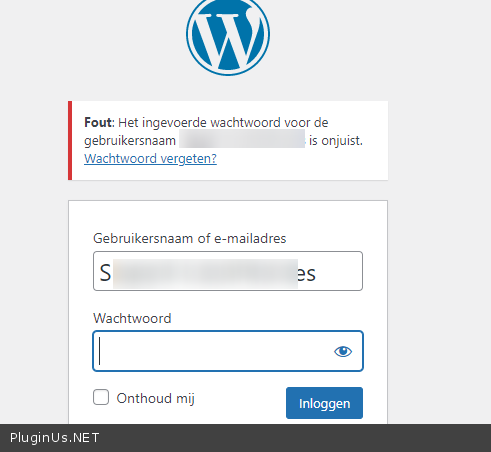
Please check your wp-admin access - https://c2n.me/4eR7VIN.png and add FTP access - https://share.pluginus.net/image/i20210618130558.png -> https://share.pluginus.net/image/i20210618130637.png
hello
Please check your wp-admin access - https://c2n.me/4eR7VIN.png and add FTP access - https://share.pluginus.net/image/i20210618130558.png -> https://share.pluginus.net/image/i20210618130637.png

Quote from rene on February 11, 2022, 18:27Hi again,
I updated the login details. The WP admin account is correct now.
The FTP access was also added to the private data.
Thanks
Hi again,
I updated the login details. The WP admin account is correct now.
The FTP access was also added to the private data.
Thanks
Quote from Pablo Borysenco on February 14, 2022, 17:53Hello
Please do a test
Hello
Please do a test
Quote from rene on February 14, 2022, 19:05Hi Pablo,
It's working fine now. Many thanks!
Can you tell me what did you change? Is it in the plugin settings or files?
If any file was changed will it be included on the next plugin releases?
Hi Pablo,
It's working fine now. Many thanks!
Can you tell me what did you change? Is it in the plugin settings or files?
If any file was changed will it be included on the next plugin releases?
Quote from Pablo Borysenco on February 15, 2022, 13:11hello
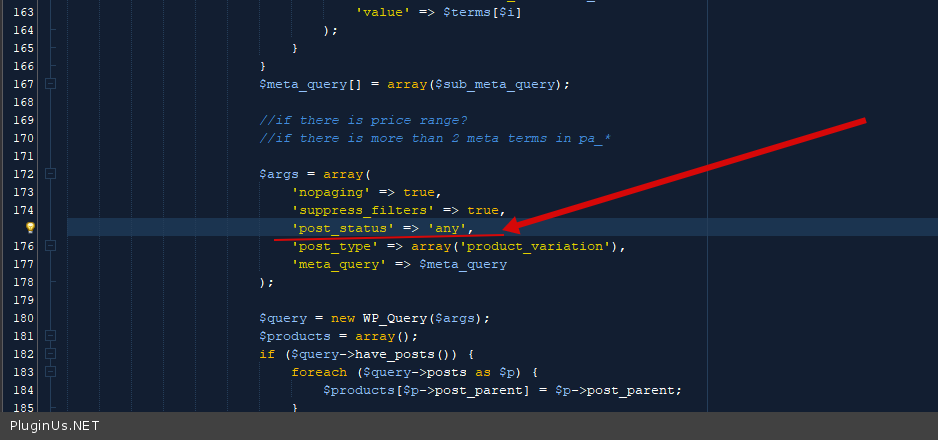
in file - wp-content\plugins\woocommerce-products-filter\ext\by_instock\index.php - I changed code - https://c2n.me/4eWznGo.png
This will be included in the next version.
hello
in file - wp-content\plugins\woocommerce-products-filter\ext\by_instock\index.php - I changed code - https://c2n.me/4eWznGo.png
This will be included in the next version.
Quote from rene on February 15, 2022, 22:26Hi Pablo,
I just checked and it's working fine.
Many thanks for your help.
Hi Pablo,
I just checked and it's working fine.
Many thanks for your help.