

Filter button not showing
The support doesn work on Saturdays and Sundays, so some Friday requests can be answered on Monday. If you have problems with registration ask help on contact us page pleaseIf you not got email within 24~36 business hours, firstly check your spam box, and if no any email from the support there - back to the forum and read answer here. DO NOT ANSWER ON EMAILS [noreply@pluginus.net] FROM THE FORUM!! Emails are just for your info, all answers should be published only here.
The support doesn work on Saturdays and Sundays, so some Friday requests can be answered on Monday.

Quote from tonny@pingwin.nl on March 18, 2026, 10:59I have two different kind of pages where there filter shows and work. The webshop archive and several landingpages.
However, usability on phone is not very good using the price slider. So there I am looking for a button to tell the filter to run.I think I have that set in settings, but nothing is showing. And again, I would only want that "go" button on mobile breakpoint.
Can you pls help?
https://development.bogard.eu/betonlook-eettafels/ (landingpage)
https://development.bogard.eu/alle-producten/ (archive)
I have two different kind of pages where there filter shows and work. The webshop archive and several landingpages.
However, usability on phone is not very good using the price slider. So there I am looking for a button to tell the filter to run.
I think I have that set in settings, but nothing is showing. And again, I would only want that"go" button on mobile breakpoint.
Can you pls help?
https://development.bogard.eu/betonlook-eettafels/ (landingpage)
https://development.bogard.eu/alle-producten/ (archive)



Quote from Alex Dovlatov on March 18, 2026, 13:16Hello
Here is how to achieve this properly in a cache-friendly way (so it works even if you have full-page caching enabled).
Step 1 — Plugin settings:
- Products Filter → Settings → General → Autosubmit → set to No
- Products Filter → Settings → Price → Show button → set to Yes
This ensures the button HTML is always rendered in the page source.
Step 2 — Add this snippet (via FluentSnippets or your child theme's functions.php):
add_action('wp_footer', function() {
    ?>
    <script>
    jQuery(function($) {
        if (window.innerWidth >= 768) {
            // Desktop: enable autosubmit, hide the price button
            woof_autosubmit = 1;
            woof_show_price_search_button = 0;
            $('.woof_submit_search_form').hide();
        }
        // Mobile: autosubmit stays 0, button stays visible — nothing to do
    });
    </script>
    <?php
}, 99);
This approach works because:
- The server always delivers the same cached HTML to everyone ✅
- The JavaScript runs client-side and checks the actual screen width ✅
- On desktop: autosubmit is re-enabled and the button is hidden ✅
- On mobile: autosubmit stays off and the button remains visible ✅
Let me know if you need any help applying this.
Place please actual purchase code of the plugin into the private area of this ticket:
https://share.pluginus.net/image/i20230222134241.png
https://share.pluginus.net/image/i20230222134615.png
https://share.pluginus.net/image/i20230222134511.pngAlso you can shreate wp-admin acess to the site in the private area of this ticket to make tests if nessesary
Hello
Here is how to achieve this properly in a cache-friendly way (so it works even if you have full-page caching enabled).
Step 1 — Plugin settings:
- Products Filter → Settings → General → Autosubmit → set to No
- Products Filter → Settings → Price → Show button → set to Yes
This ensures the button HTML is always rendered in the page source.
Step 2 — Add this snippet (via FluentSnippets or your child theme's functions.php):
add_action('wp_footer', function() {
    ?>
    <script>
    jQuery(function($) {
        if (window.innerWidth >= 768) {
            // Desktop: enable autosubmit, hide the price button
            woof_autosubmit = 1;
            woof_show_price_search_button = 0;
            $('.woof_submit_search_form').hide();
        }
        // Mobile: autosubmit stays 0, button stays visible — nothing to do
    });
    </script>
    <?php
}, 99);
This approach works because:
- The server always delivers the same cached HTML to everyone ✅
- The JavaScript runs client-side and checks the actual screen width ✅
- On desktop: autosubmit is re-enabled and the button is hidden ✅
- On mobile: autosubmit stays off and the button remains visible ✅
Let me know if you need any help applying this.
Place please actual purchase code of the plugin into the private area of this ticket:
https://share.pluginus.net/image/i20230222134241.png
https://share.pluginus.net/image/i20230222134615.png
https://share.pluginus.net/image/i20230222134511.png


Also you can shreate wp-admin acess to the site in the private area of this ticket to make tests if nessesary
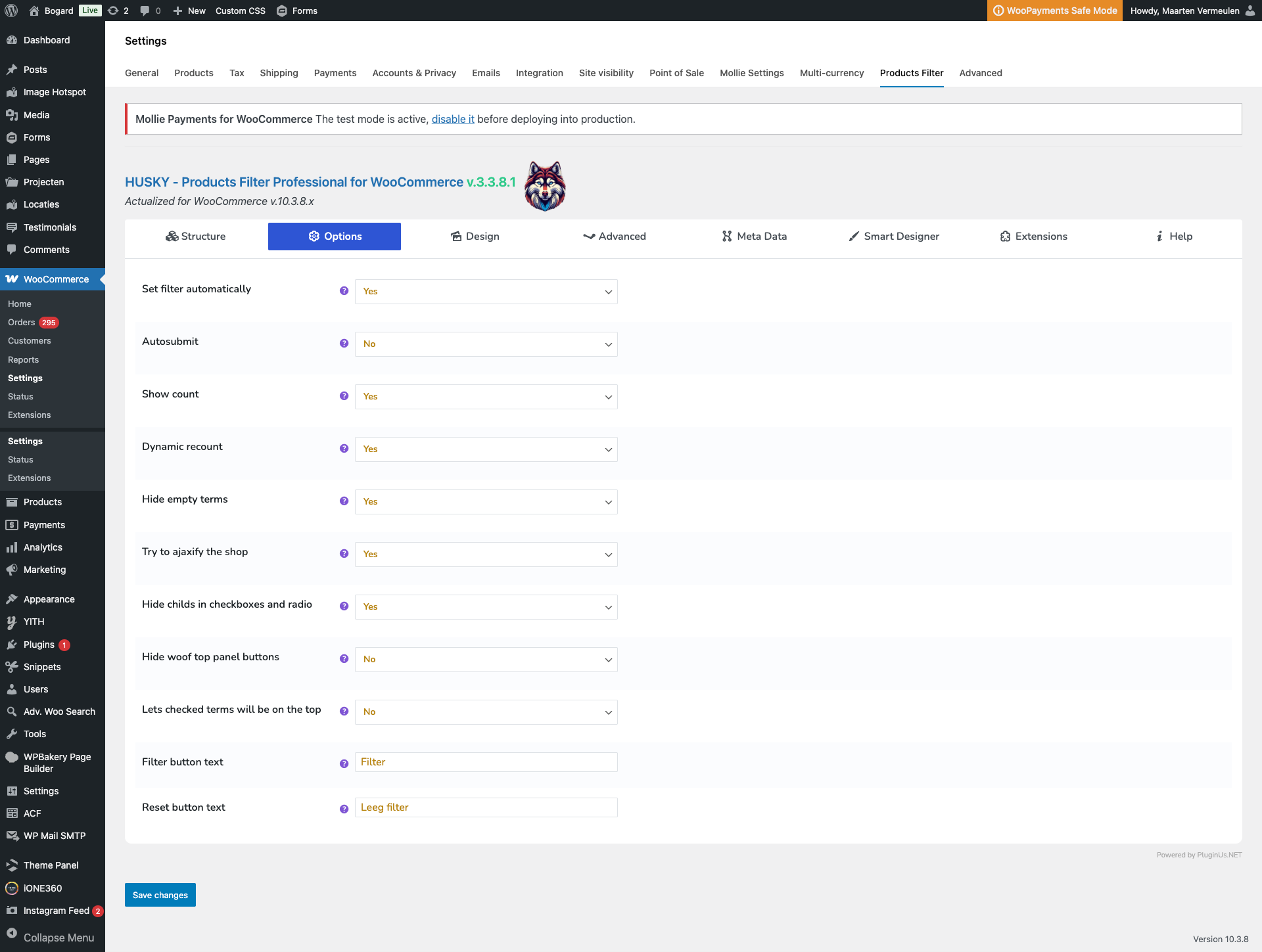
Quote from tonny@pingwin.nl on March 19, 2026, 11:17That is allready set:
- Products Filter → Settings → General → Autosubmit → set to No
BUT I don't see that option?
- Products Filter → Settings → Price → Show button → set to Yes
That is allready set:
- Products Filter → Settings → General → Autosubmit → set to No
BUT I don't see that option?
- Products Filter → Settings → Price → Show button → set to Yes
Quote from Alex Dovlatov on March 19, 2026, 21:53Hello
I looked your filters, you created them by woof front builder, such trick which you want will not work there, so I replaced it to shortcode [woof], and in setting set Autosubmit -> Yes, + remade snippet code to:
add_action('wp_footer', function() {
    ?>
    <script>
		jQuery(function($) {
		setTimeout(function() {
			if (window.innerWidth <= 968) {
				// Mobile: disable autosubmit, show the submit button
				woof_autosubmit = 0;
				woof_show_price_search_button = 0;
				$('.woof_submit_search_form_container').show();
				$('.woof_submit_search_form_container').html('<button class="button woof_submit_search_form woof_submit_search_form2">Filter</button>');

				jQuery('.woof_submit_search_form2').on('click', function () {
					woof_submit_link(woof_get_submit_link());
					return false;
				});
			}
			// Desktop: autosubmit stays default — nothing to do
		}, 999);
	});
    </script>
    <?php
}, 99);
Now it works as you want: in desctop mode works autosubmit, in mobile mode autosubmit is off and user should click on button, try ot please ...
Hello
I looked your filters, you created them by woof front builder, such trick which you want will not work there, so I replaced it to shortcode [woof], and in setting set Autosubmit -> Yes, + remade snippet code to:
add_action('wp_footer', function() {
    ?>
    <script>
		jQuery(function($) {
		setTimeout(function() {
			if (window.innerWidth <= 968) {
				// Mobile: disable autosubmit, show the submit button
				woof_autosubmit = 0;
				woof_show_price_search_button = 0;
				$('.woof_submit_search_form_container').show();
				$('.woof_submit_search_form_container').html('<button class="button woof_submit_search_form woof_submit_search_form2">Filter</button>');

				jQuery('.woof_submit_search_form2').on('click', function () {
					woof_submit_link(woof_get_submit_link());
					return false;
				});
			}
			// Desktop: autosubmit stays default — nothing to do
		}, 999);
	});
    </script>
    <?php
}, 99);
Now it works as you want: in desctop mode works autosubmit, in mobile mode autosubmit is off and user should click on button, try ot please ...