
Filter button does not update.
The support doesn work on Saturdays and Sundays, so some Friday requests can be answered on Monday. If you have problems with registration ask help on contact us page pleaseIf you not got email within 24~36 business hours, firstly check your spam box, and if no any email from the support there - back to the forum and read answer here. DO NOT ANSWER ON EMAILS [noreply@pluginus.net] FROM THE FORUM!! Emails are just for your info, all answers should be published only here.
The support doesn work on Saturdays and Sundays, so some Friday requests can be answered on Monday.

Quote from Alpha on March 10, 2026, 07:03Due to compatibility issues between Husky and Astra, I use the ‘Filter’ button to activate the dynamic capabilities of the filters on the following page. I can live with that, however, the ‘Price’ range Button retains prior values, which are reflected in the Slider, and does not update to reflect the dollar values on the page when products are changed. How do I fix the button not updating? Is there a place I can manually enter the values for the ‘Filter’ Button? https://www.alphaantenna.com/official-home/alpha-antenna-shop/modular-antenna-radio-array/
Due to compatibility issues between Husky and Astra, I use the ‘Filter’ button to activate the dynamic capabilities of the filters on the following page. I can live with that, however, the ‘Price’ range Button retains prior values, which are reflected in the Slider, and does not update to reflect the dollar values on the page when products are changed. How do I fix the button not updating? Is there a place I can manually enter the values for the ‘Filter’ Button? https://www.alphaantenna.com/official-home/alpha-antenna-shop/modular-antenna-radio-array/
Quote from Alpha on March 10, 2026, 07:21I have the pro version and the entry 0-1000 is in the field “Drop-down OR radio price filter ranges”, after which the Cache is cleared everywhere.
I have the pro version and the entry 0-1000 is in the field “Drop-down OR radio price filter ranges”, after which the Cache is cleared everywhere.

Quote from Alex Dev on March 10, 2026, 12:59Place please actual purchase code of the plugin into the private area of this ticket:
https://share.pluginus.net/image/i20230222134241.png
https://share.pluginus.net/image/i20230222134615.png
https://share.pluginus.net/image/i20230222134511.png
Place please actual purchase code of the plugin into the private area of this ticket:
https://share.pluginus.net/image/i20230222134241.png
https://share.pluginus.net/image/i20230222134615.png
https://share.pluginus.net/image/i20230222134511.png
Quote from Alpha on March 10, 2026, 15:14I have given you Admin access. Here are some other things that don't work with the Husky Plugin and Astra, which I would also request that you fix. 1) The [woof_front_builder], which I have placed at the bottom of that same page, does not work. 2) The 'ion range-slider' does not work on the option 'Search by Price'.
I have given you Admin access. Here are some other things that don't work with the Husky Plugin and Astra, which I would also request that you fix. 1) The [woof_front_builder], which I have placed at the bottom of that same page, does not work. 2) The 'ion range-slider' does not work on the option 'Search by Price'.
Quote from Alpha on March 10, 2026, 18:19View Page Source on the reference page shows those values for the button that are not being updated:
<form method="get" action="https://www.alphaantenna.com/official-home/alpha-antenna-shop/modular-antenna-radio-array/"> <div class="price_slider_wrapper"> <div class="price_slider" style="display:none;"></div> <div class="price_slider_amount"> <input type="text" id="min_price" name="min_price" value="0" data-min="0" placeholder="Min price" /><input type="text" id="max_price" name="max_price" value="2300" data-max="2300" placeholder="Max price" /><button type="submit" class="button">Filter</button> <div class="price_label" style="display:none;"> Price: <span class="from"></span> — <span class="to"></span> </div>
View Page Source on the reference page shows those values for the button that are not being updated:
| <form method="get" action="https://www.alphaantenna.com/official-home/alpha-antenna-shop/modular-antenna-radio-array/"> |
| <div class="price_slider_wrapper"> |
| <div class="price_slider" style="display:none;"></div> |
| <div class="price_slider_amount"> |
| <input type="text" id="min_price" name="min_price" value="0" data-min="0" placeholder="Min price" /><input type="text" id="max_price" name="max_price" value="2300" data-max="2300" placeholder="Max price" /><button type="submit" class="button">Filter</button> |
| <div class="price_label" style="display:none;"> |
| Price: <span class="from"></span> — <span class="to"></span> |
| </div> |
Quote from Alpha on March 10, 2026, 20:59I found another work-around to enabling the filters to work. Rather than having to select the 'Filter' button on Husky the Filter every time I visit the page. The alternate method is to use a page URL like this, which by 'de facto standards' activates the Husky Filter. I look forward to you fixing the three issues I have provided. https://www.alphaantenna.com/official-home/alpha-antenna-shop/modular-antenna-radio-array/?min_price=0&max_price=1000
I found another work-around to enabling the filters to work. Rather than having to select the 'Filter' button on Husky the Filter every time I visit the page. The alternate method is to use a page URL like this, which by 'de facto standards' activates the Husky Filter. I look forward to you fixing the three issues I have provided. https://www.alphaantenna.com/official-home/alpha-antenna-shop/modular-antenna-radio-array/?min_price=0&max_price=1000
Quote from Alex Dev on March 11, 2026, 13:36Hello
Purchse code you can get here:
- https://codecanyon.net/downloads
I checked wp-admin access to the site: works
https://www.alphaantenna.com/official-home/alpha-antenna-shop/modular-antenna-radio-array - I changed in WOOF settings price slider to ion range (skin square) and it works fine
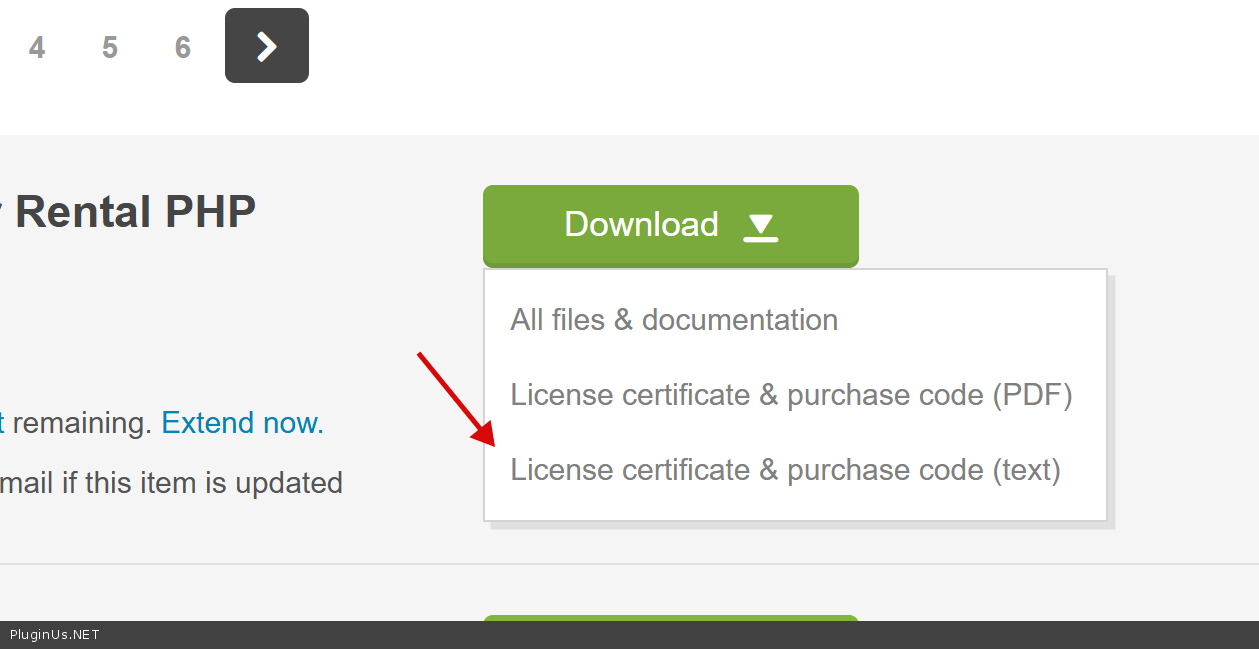


Hello
Purchse code you can get here:
I checked wp-admin access to the site: works
https://www.alphaantenna.com/official-home/alpha-antenna-shop/modular-antenna-radio-array - I changed in WOOF settings price slider to ion range (skin square) and it works fine
Quote from Alpha on March 11, 2026, 14:14The license has been uploaded and you still have Admin access. Please complete the fix for:
1) The [woof_front_builder], which I have placed at the bottom of that same page here, and
2) The code not updating to reflect the price range from 0-1000 on the Price slider, which is stuck at 0-2300.
The license has been uploaded and you still have Admin access. Please complete the fix for:
1) The [woof_front_builder], which I have placed at the bottom of that same page here, and
2) The code not updating to reflect the price range from 0-1000 on the Price slider, which is stuck at 0-2300.
Quote from Alex Dev on March 12, 2026, 12:34Hello
Sure!
Just checked the code: it is not there https://clip2net.com/s/4nM9ADX
Hello
Sure!
Just checked the code: it is not there https://clip2net.com/s/4nM9ADX
Quote from Alpha on March 12, 2026, 13:24Oops. The license is now there.
Oops. The license is now there.
Quote from Alex Dev on March 12, 2026, 13:30
- price range -
works only for radion and drop-down view, in your case you need to apply hooks:
add_filter('woof_get_min_price', function($min) { return 0; });
add_filter('woof_get_max_price', function($max) { return 1000; });I placed them into file functions.php of the current wp theme - but questions to you, how you placed products filter, where I can see that shortocode, give me please bacjkend link or/and screen, because I see here https://www.alphaantenna.com/tester/?currency=usd - 1000 as should be, but here https://www.alphaantenna.com/official-home/alpha-antenna-shop/modular-antenna-radio-array/ still 2300
Second questions: what is wrong with [woof_front_builder] - I see filter and its works. For me configuration button is hidden
- price range -
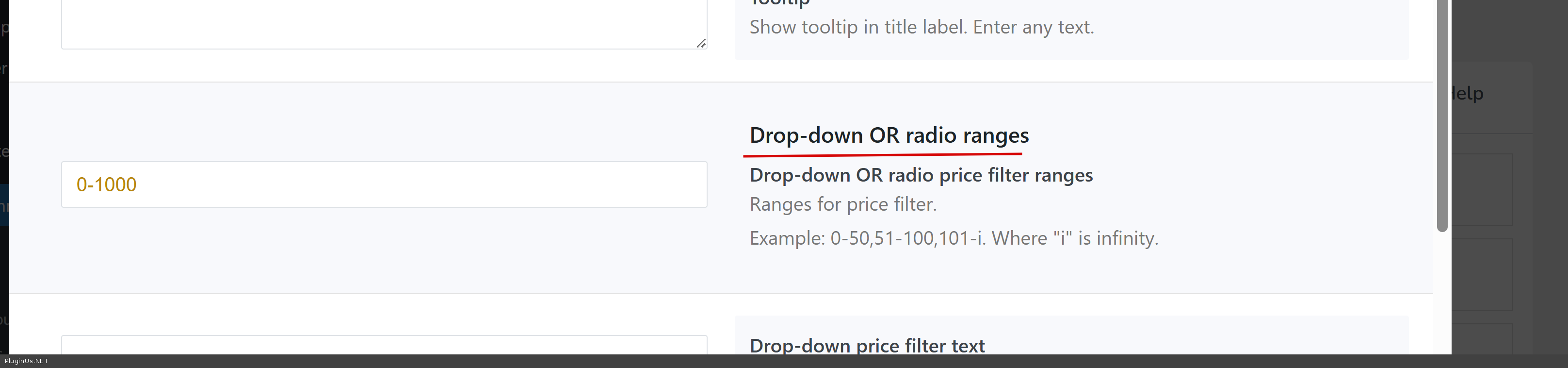
works only for radion and drop-down view, in your case you need to apply hooks:
add_filter('woof_get_min_price', function($min) { return 0; });
add_filter('woof_get_max_price', function($max) { return 1000; });
I placed them into file functions.php of the current wp theme - but questions to you, how you placed products filter, where I can see that shortocode, give me please bacjkend link or/and screen, because I see here https://www.alphaantenna.com/tester/?currency=usd - 1000 as should be, but here https://www.alphaantenna.com/official-home/alpha-antenna-shop/modular-antenna-radio-array/ still 2300
Second questions: what is wrong with [woof_front_builder] - I see filter and its works. For me configuration button is hidden
Quote from Alpha on March 12, 2026, 16:41When logged in as the Admin I hover over the [woof_front_builder] at the bottom of This Page, but the configuration option does not appear. Can you fix this?
I was using the [woof autosubmit=1] shortcode and letting the settings of the Husky plug-in control the results for the Price range. The Husky plugin was not pulling the Price range on This Page. The Husky plug-in seemed to pull the values (0-2300) from The Store page, where there is indeed a $2300 product. The placement of your 0-1000 settings in the functions.php did resolve that issue. Thank you!
I have Copy and Pasted the shortcode [woof autosubmit=1] to The Home Page. When the Slider for the Search by Price is changed/slid one way or the other, then the Shop page is displayed instead of results being displayed on the Home page. Alternatively, when any of the filters are selected other than price, the products do not update on the Home Page. Can you fix this?
Finally, when the Slider for the Search by Price is removed, none of the filters work on any of the pages. Can you fix this?
NOTE - Updates to pages takes time because of the Caching that happens at Cloudflare. So, if you want to see the results to Any changes you make, just make sure you Purge All under Caching to start that clock.
When logged in as the Admin I hover over the [woof_front_builder] at the bottom of This Page, but the configuration option does not appear. Can you fix this?
I was using the [woof autosubmit=1] shortcode and letting the settings of the Husky plug-in control the results for the Price range. The Husky plugin was not pulling the Price range on This Page. The Husky plug-in seemed to pull the values (0-2300) from The Store page, where there is indeed a $2300 product. The placement of your 0-1000 settings in the functions.php did resolve that issue. Thank you!
I have Copy and Pasted the shortcode [woof autosubmit=1] to The Home Page. When the Slider for the Search by Price is changed/slid one way or the other, then the Shop page is displayed instead of results being displayed on the Home page. Alternatively, when any of the filters are selected other than price, the products do not update on the Home Page. Can you fix this?
Finally, when the Slider for the Search by Price is removed, none of the filters work on any of the pages. Can you fix this?
NOTE - Updates to pages takes time because of the Caching that happens at Cloudflare. So, if you want to see the results to Any changes you make, just make sure you Purge All under Caching to start that clock.
Quote from Alex Dev on March 13, 2026, 10:31Hello
Cloudflare - this is problem for dev tasks, its take time for simple tests, do next please - create please clone of the site by https://wordpress.org/plugins/duplicator/ on test subdomain and cloudflare there must be disabled, share in the private area of this ticket wp-admin access + ftp access - I will make hard tests which better not do on production site. Clone site should work normally, if it will be slow by self I will not be able to help you
Also from my experiense part of issues can be if cloudflare make agressive caching, it will be good to test as under cachisng so without
Thank you ...
Hello
Cloudflare - this is problem for dev tasks, its take time for simple tests, do next please - create please clone of the site by https://wordpress.org/plugins/duplicator/ on test subdomain and cloudflare there must be disabled, share in the private area of this ticket wp-admin access + ftp access - I will make hard tests which better not do on production site. Clone site should work normally, if it will be slow by self I will not be able to help you
Also from my experiense part of issues can be if cloudflare make agressive caching, it will be good to test as under cachisng so without
Thank you ...
Quote from Alpha on March 13, 2026, 16:19I disabled Caching on Cloudflare and updates are now happening right away! You were so right that causing problems for dev tasks. Please continue to work on the pages I provided.
Can you fix these three things now?
- When logged in as the Admin, hover over the [woof_front_builder] at the bottom of This Page, but the configuration option does not appear. Can you fix this?
- I have Copy and Pasted the shortcode [woof autosubmit=1] to The Home Page. When the Slider for the Search by Price is changed/slid one way or the other, then the Shop page is displayed instead of results being displayed on the Home page. Alternatively, when any of the filters are selected other than price, the products do not update on the Home Page. Can you fix this?
- Finally, when the Slider for the Search by Price is removed, none of the filters work on any of the pages or the Price slider reappears. Can you fix this?
I disabled Caching on Cloudflare and updates are now happening right away! You were so right that causing problems for dev tasks. Please continue to work on the pages I provided.
Can you fix these three things now?
- When logged in as the Admin, hover over the [woof_front_builder] at the bottom of This Page, but the configuration option does not appear. Can you fix this?
- I have Copy and Pasted the shortcode [woof autosubmit=1] to The Home Page. When the Slider for the Search by Price is changed/slid one way or the other, then the Shop page is displayed instead of results being displayed on the Home page. Alternatively, when any of the filters are selected other than price, the products do not update on the Home Page. Can you fix this?
- Finally, when the Slider for the Search by Price is removed, none of the filters work on any of the pages or the Price slider reappears. Can you fix this?
Quote from Alex Dev on March 16, 2026, 12:41Hello
Thank you!
I set this task into turn, today or tommorow things should be resolved
Hello
Thank you!
I set this task into turn, today or tommorow things should be resolved
Quote from Alex Dev on March 16, 2026, 18:10Hello
Just stearted to work with the ticket, but looks like wp admin access was removed from the private atea of the ticket, I need it for tests, please back it
2) [woof autosubmit=1] - redirect to shop page - right, this is behaviour, if you want to leave it on the main page add 'redirect' attribute with value-link to main page. Be sure that for products are used shortcodes [products] OR [woof_products] . Shortcode doc: https://products-filter.com/shortcode/woof
3) Looks like that was cache, if not, I still need admin access, and information about where you placed (file, page link) that shortcode, as I remember its not in the widget
Hello
Just stearted to work with the ticket, but looks like wp admin access was removed from the private atea of the ticket, I need it for tests, please back it
2) [woof autosubmit=1] - redirect to shop page - right, this is behaviour, if you want to leave it on the main page add 'redirect' attribute with value-link to main page. Be sure that for products are used shortcodes [products] OR [woof_products] . Shortcode doc: https://products-filter.com/shortcode/woof
3) Looks like that was cache, if not, I still need admin access, and information about where you placed (file, page link) that shortcode, as I remember its not in the widget
Quote from Alpha on March 16, 2026, 20:59
- Admin login expired and new URL has been provided in the 'Private data for this topic'.
- What would the short code look like for the following two short code combinations, or are they just two separate Short Code entries in the 'Short Code' field? [woof autosubmit=1] and [woof redirect=’http://www.my_site.com/search_page_results_77′]
- The Price Slider does not appear when you open the page Antenna Selection Tool by Alpha Antenna. However, the Price Slider does appear after any one item on the Filters is selected. What can be done to keep the Price Slider from appearing once any one of the Filter selections is clicked?
- Admin login expired and new URL has been provided in the 'Private data for this topic'.
- What would the short code look like for the following two short code combinations, or are they just two separate Short Code entries in the 'Short Code' field? [woof autosubmit=1] and [woof redirect=’http://www.my_site.com/search_page_results_77′]
- The Price Slider does not appear when you open the page Antenna Selection Tool by Alpha Antenna. However, the Price Slider does appear after any one item on the Filters is selected. What can be done to keep the Price Slider from appearing once any one of the Filter selections is clicked?
Quote from Alex Dev on March 17, 2026, 13:27Hello
A few things to address:
1. Duplicate filter / cache issue Two filters on the same page (
/modular-antenna-radio-array/) will cause conflicts — the price filter was already enabled in the plugin settings, so the shortcode is redundant. I removed it, but the filter form is still appearing on the frontend. I also tried the?epc_purge_all=1cache purge parameter, but it had no effect. I disabled Elementor Element Cache as well (Dashboard → Elementor → Performance), but the old version of the page is still being served.This is a caching problem on your end — the page is not updating after edits. Please do the following:
- Clear your Cloudflare cache completely: Cloudflare Dashboard → Caching → Purge Everything
- Clear any server-side or plugin cache (WP Rocket, LiteSpeed, etc.) if active
For reference, the
[woof]shortcode placed on the test page/tester-2/works correctly, confirming the plugin itself is fine.2. Redirect & autosubmit Using
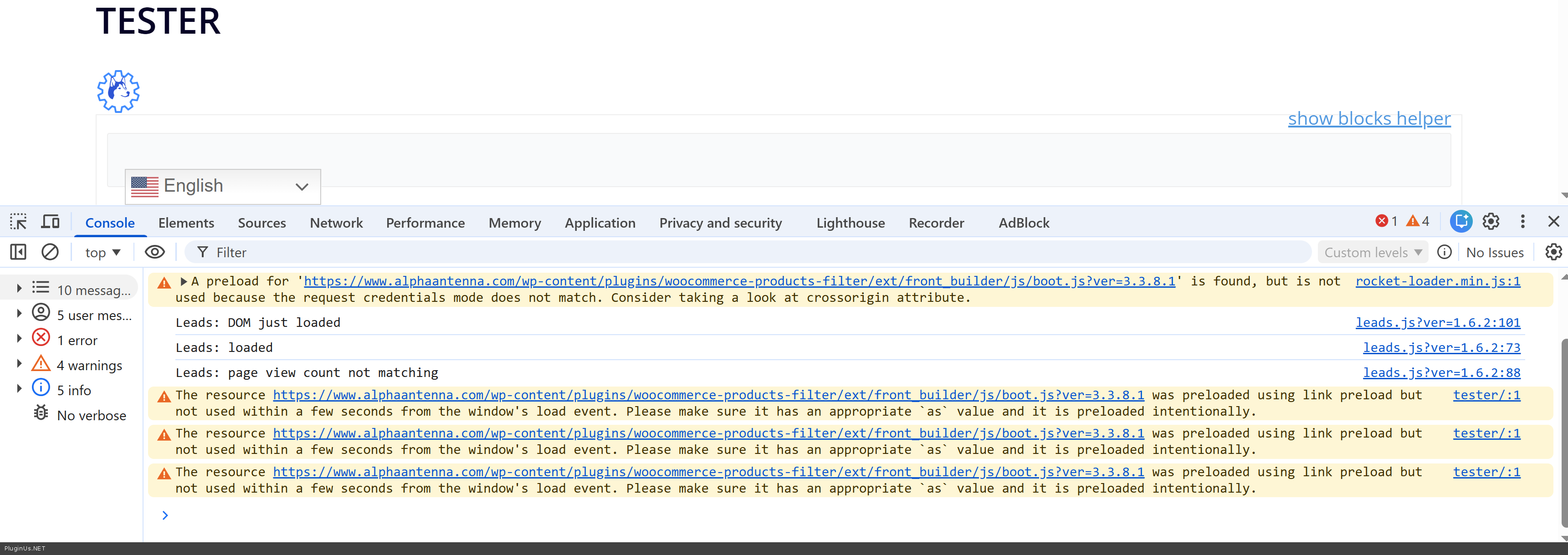
[woof redirect="https://www.alphaantenna.com/tester-2/" autosubmit=1]works as expected — results display on the target page. This approach is confirmed working; it just needs the cache issue resolved first.3. Front builder not working (Rocket Loader) I ran tests on your site and identified the root cause. Your site is running Cloudflare with Rocket Loader enabled. Rocket Loader intercepts and rewrites how JavaScript files are loaded, and it is interfering with the front builder's core script (
front_builder/js/boot.js) — the browser preloads it but then refuses to execute it due to a credentials/crossorigin mismatch introduced by Rocket Loader.This is why existing filters display correctly (they are rendered from saved data) but the "Add new filter" button does nothing — that part of the UI depends entirely on the JavaScript that Rocket Loader is blocking.
The fix: disable Rocket Loader in Cloudflare Dashboard → Speed → Optimization → Rocket Loader → OFF, then purge the cache and reload.
To conclude: all cache layers need to be fully cleared (Cloudflare, Elementor, and any server-side cache), and JavaScript loading optimization — specifically Cloudflare Rocket Loader — must be disabled to ensure the plugin scripts execute correctly.
Hello
A few things to address:
1. Duplicate filter / cache issue Two filters on the same page (/modular-antenna-radio-array/) will cause conflicts — the price filter was already enabled in the plugin settings, so the shortcode is redundant. I removed it, but the filter form is still appearing on the frontend. I also tried the ?epc_purge_all=1 cache purge parameter, but it had no effect. I disabled Elementor Element Cache as well (Dashboard → Elementor → Performance), but the old version of the page is still being served.
This is a caching problem on your end — the page is not updating after edits. Please do the following:
- Clear your Cloudflare cache completely: Cloudflare Dashboard → Caching → Purge Everything
- Clear any server-side or plugin cache (WP Rocket, LiteSpeed, etc.) if active
For reference, the [woof] shortcode placed on the test page /tester-2/ works correctly, confirming the plugin itself is fine.
2. Redirect & autosubmit Using [woof redirect="https://www.alphaantenna.com/tester-2/" autosubmit=1] works as expected — results display on the target page. This approach is confirmed working; it just needs the cache issue resolved first.
3. Front builder not working (Rocket Loader) I ran tests on your site and identified the root cause. Your site is running Cloudflare with Rocket Loader enabled. Rocket Loader intercepts and rewrites how JavaScript files are loaded, and it is interfering with the front builder's core script (front_builder/js/boot.js) — the browser preloads it but then refuses to execute it due to a credentials/crossorigin mismatch introduced by Rocket Loader.
This is why existing filters display correctly (they are rendered from saved data) but the "Add new filter" button does nothing — that part of the UI depends entirely on the JavaScript that Rocket Loader is blocking.
The fix: disable Rocket Loader in Cloudflare Dashboard → Speed → Optimization → Rocket Loader → OFF, then purge the cache and reload.
To conclude: all cache layers need to be fully cleared (Cloudflare, Elementor, and any server-side cache), and JavaScript loading optimization — specifically Cloudflare Rocket Loader — must be disabled to ensure the plugin scripts execute correctly.
Quote from Alex Dev on March 17, 2026, 13:29P.S. I attempted to reproduce the issue on a local clone of your site, but unfortunately Duplicator was unable to complete the zip archive — most likely due to the site size or server execution time limits
P.S. I attempted to reproduce the issue on a local clone of your site, but unfortunately Duplicator was unable to complete the zip archive — most likely due to the site size or server execution time limits
Quote from Alpha on March 17, 2026, 18:26The portion of this plug-in that I needed is now working correctly on This Page.
I only have one more question, which is: How do I remove the word Product that appears before every single filter on This Page?
- Thank you Alex Dovlatov for the work you did over the last week, it really shows your dedication, patience, and professionalism!
- Note for future users: WP Rocket breaks this plug-in, however, W3 Total Cache even with the addition of Cloudflare Cache does not break the plug-in.
- SETUP - Both Cache should still be disabled when while the settings for this plug-in are being tested and implemented.
- Simply because of the delay caused by the Cache for page appearing from the Cache rather than the server where changes are being made to the plug-in.
- Cudos to Rocket for making cancellation of WPRocket and RocketCDN quick and simple.
The portion of this plug-in that I needed is now working correctly on This Page.
I only have one more question, which is: How do I remove the word Product that appears before every single filter on This Page?
- Thank you Alex Dovlatov for the work you did over the last week, it really shows your dedication, patience, and professionalism!
- Note for future users: WP Rocket breaks this plug-in, however, W3 Total Cache even with the addition of Cloudflare Cache does not break the plug-in.
- SETUP - Both Cache should still be disabled when while the settings for this plug-in are being tested and implemented.
- Simply because of the delay caused by the Cache for page appearing from the Cache rather than the server where changes are being made to the plug-in.
- Cudos to Rocket for making cancellation of WPRocket and RocketCDN quick and simple.