

Filter attribute showing when it shouldn't
The support doesn work on Saturdays and Sundays, so some Friday requests can be answered on Monday. If you have problems with registration ask help on contact us page pleaseIf you not got email within 24~36 business hours, firstly check your spam box, and if no any email from the support there - back to the forum and read answer here. DO NOT ANSWER ON EMAILS [noreply@pluginus.net] FROM THE FORUM!! Emails are just for your info, all answers should be published only here.
The support doesn work on Saturdays and Sundays, so some Friday requests can be answered on Monday.

Quote from toto1 on October 29, 2020, 00:36I have created an attribute and have used on products within a category, problem is that the filter is showing for every category even though there is no products in that category using the attribute.. here are the settings for it.
Can you advise how to get it to show in only in categories where products are using the attribute?
Product Width [pa_width]
Show title labelShow/Hide taxonomy block title on the frontNo
YesShow toggle buttonShow toggle button near the title on the front above the block of html-itemsNo
Yes, show as closed
Yes, show as openedTooltipShow tooltipNot toggled terms countEnter count of terms which should be visible to make all other collapsible. "Show more" button will be appeared. This feature is works with: radio, checkboxes, labels, colors.Advanced info is hereTaxonomy custom labelFor example you want to show title of Product Categories as "My Products". Just for your convenience.Sort termsHow to sort terms inside of filter blockDefault
Id
Title
Numeric.Sort termsDirection of terms sorted inside of filter blockASC
DESCLogic of filteringAND or OR: if to select AND and on the site front select 2 terms - will be found products which contains both terms on the same time.If to select NOT IN will be found items which not has selected terms!! Means vice versa to the the concept of including: excludingOR
AND
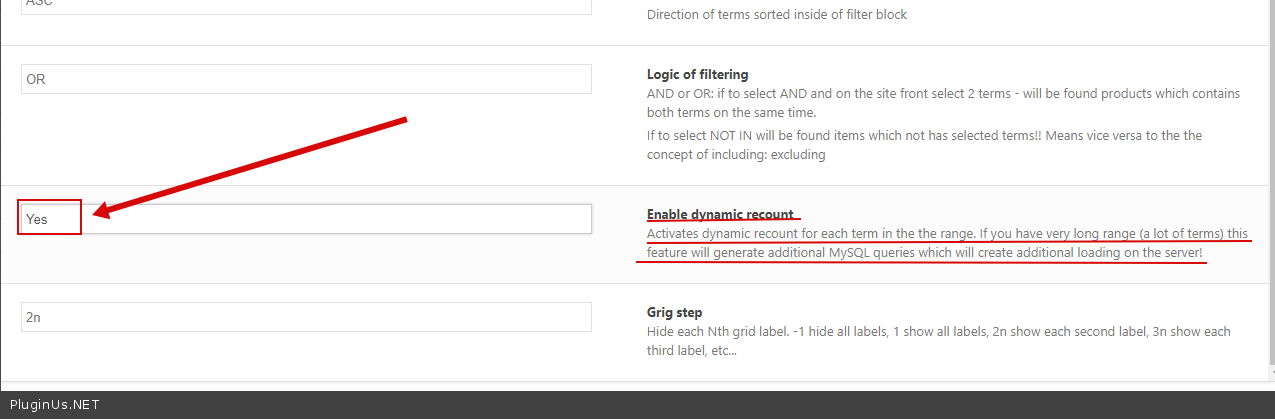
NOT INEnable dynamic recountActivates dynamic recount for each term in the the range. If you have very long range (a lot of terms) this feature will generate additional MySQL queries which will create additional loading on the server!No
YesGrig stepHide each Nth grid label. -1 hide all labels, 1 show all labels, 2n show each second label, 3n show each third label, etc...
I have created an attribute and have used on products within a category, problem is that the filter is showing for every category even though there is no products in that category using the attribute.. here are the settings for it.
Can you advise how to get it to show in only in categories where products are using the attribute?
Product Width [pa_width]
Yes
Yes, show as closed
Yes, show as opened
Id
Title
Numeric.
DESC
AND
NOT IN
Yes

Quote from Pablo Borysenco on October 29, 2020, 13:13Hello
please check options - https://c2n.me/49CBBaX.png
If no luck - drop me exact link to the issue
AND add wp-admin access - https://c2n.me/43SC6rb.png ->https://c2n.me/42BAoj4.png
Hello
please check options - https://c2n.me/49CBBaX.png
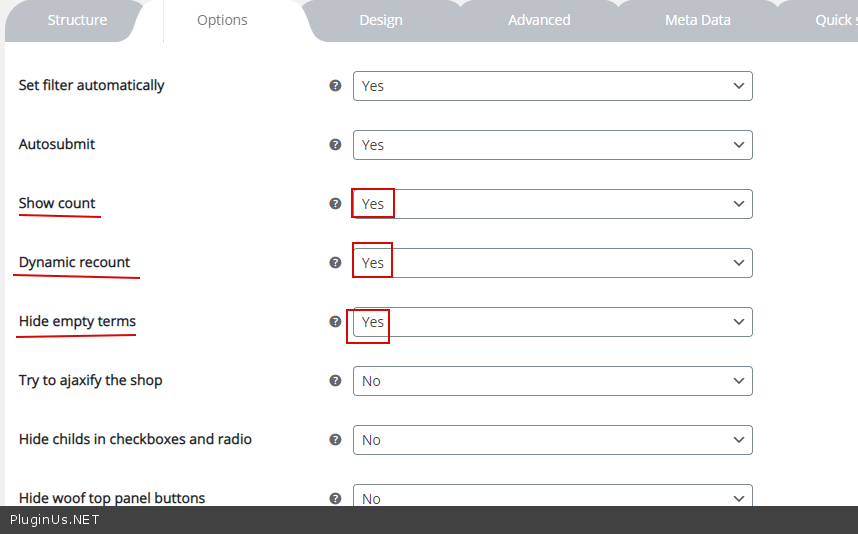
If no luck - drop me exact link to the issue
AND add wp-admin access - https://c2n.me/43SC6rb.png ->https://c2n.me/42BAoj4.png


Quote from toto1 on November 3, 2020, 01:11hi
i checked the option settings and all fine there. still have issue - https://urbaneliving.co.uk/products/wallpapers/boracay-wallpapers/ i sent admin details
thanks
hi
i checked the option settings and all fine there. still have issue - https://urbaneliving.co.uk/products/wallpapers/boracay-wallpapers/ i sent admin details
thanks
Quote from Pablo Borysenco on November 3, 2020, 12:37Hello
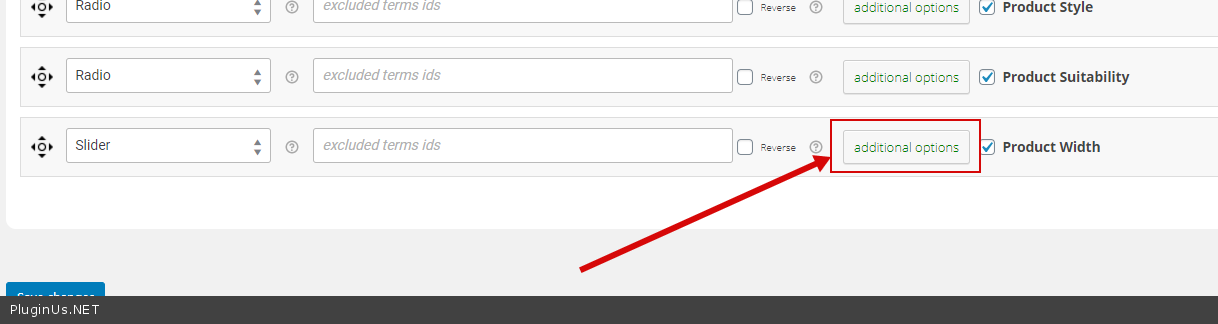
Ok! In additional option( https://c2n.me/49G5Nxo.png )->check option - https://c2n.me/49G5WBr.png and do a test
Hello
Ok! In additional option( https://c2n.me/49G5Nxo.png )->check option - https://c2n.me/49G5WBr.png and do a test
Quote from toto1 on November 4, 2020, 02:05thanks, that did the trick
thanks, that did the trick
Quote from Pablo Borysenco on November 4, 2020, 12:50hello
Welcome;)
hello
Welcome;)