

Filter and Reset button not working
The support doesn work on Saturdays and Sundays, so some Friday requests can be answered on Monday. If you have problems with registration ask help on contact us page pleaseIf you not got email within 24~36 business hours, firstly check your spam box, and if no any email from the support there - back to the forum and read answer here. DO NOT ANSWER ON EMAILS [noreply@pluginus.net] FROM THE FORUM!! Emails are just for your info, all answers should be published only here.
The support doesn work on Saturdays and Sundays, so some Friday requests can be answered on Monday.

Quote from martynach89 on January 5, 2022, 20:36Hello,
I have used your plugin before and it always works great. This time I have trouble setting it up correctly.
None of the buttons work, the filter does not work automatically - nothing happens in terms of filtering apart from the URL change, which seems correct, so I can see the work of filter only in the url which contains chosen search filters, on the shop page still all products are visible. I have tried with different settings, disabled all my plugins etc - can not get it work.
Can anyone has an idea of what kind of bug this might be?
Hello,
I have used your plugin before and it always works great. This time I have trouble setting it up correctly.
None of the buttons work, the filter does not work automatically - nothing happens in terms of filtering apart from the URL change, which seems correct, so I can see the work of filter only in the url which contains chosen search filters, on the shop page still all products are visible. I have tried with different settings, disabled all my plugins etc - can not get it work.
Can anyone has an idea of what kind of bug this might be?

Quote from Pablo Borysenco on January 6, 2022, 12:30Hello
https://c2n.me/4ex3j07.png - unfortunately I can not enter your site
Try ti check this option - https://c2n.me/4ex3mAo.png
Hello
https://c2n.me/4ex3j07.png - unfortunately I can not enter your site
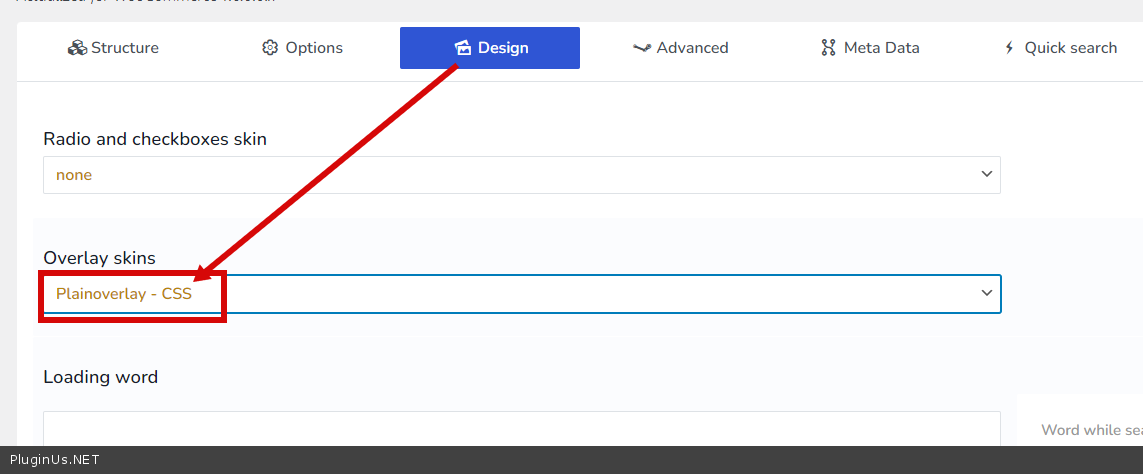
Try ti check this option - https://c2n.me/4ex3mAo.png
Quote from martynach89 on January 6, 2022, 12:38Please try again to access the site, it is fully functional...just entered and checked the option you have recommended - nothing changed.
the trouble is not in CSS or buttons only, but - if you could check the site - you would see that the URL functions as it it should but products are not getting filtered.
Please try again to access the site, it is fully functional...just entered and checked the option you have recommended - nothing changed.
the trouble is not in CSS or buttons only, but - if you could check the site - you would see that the URL functions as it it should but products are not getting filtered.
Quote from Pablo Borysenco on January 6, 2022, 12:59added a video to private data
added a video to private data
Quote from martynach89 on January 6, 2022, 13:33Oh ok it looks like my server is blocking your country, from accessing login pages as a server protection. I disabled this feature now. You should be able to access - sorry!
Oh ok it looks like my server is blocking your country, from accessing login pages as a server protection. I disabled this feature now. You should be able to access - sorry!
Quote from Pablo Borysenco on January 7, 2022, 13:39Hello
it looks like you are using Slim build of Jquery.
If you have optimized the JS please return everything to the original settings.
Hello
it looks like you are using Slim build of Jquery.
If you have optimized the JS please return everything to the original settings.
Quote from martynach89 on January 7, 2022, 18:28Hello,
thank you for your answer - I have linked to the Standard build of Jquery, in my console I get this:
JQMIGRATE: Migrate is installed, version 3.3.2
I have tried to return the plugin to the original settings, but I could not find the "reset to original" option, so I tried setting everything to "No", also "Yes" etc - I have set all the settings identical as on my other site, where it works - still no luck. The filter is still not working correctly. It does not filter products, the URL changes, but all products stay untouched, even though it is set to auto-send.
Hello,
thank you for your answer - I have linked to the Standard build of Jquery, in my console I get this:
JQMIGRATE: Migrate is installed, version 3.3.2
I have tried to return the plugin to the original settings, but I could not find the"reset to original" option, so I tried setting everything to"No", also"Yes" etc - I have set all the settings identical as on my other site, where it works - still no luck. The filter is still not working correctly. It does not filter products, the URL changes, but all products stay untouched, even though it is set to auto-send.
Quote from Pablo Borysenco on January 10, 2022, 12:31Hello
I have tried to return the plugin to the original settings - I meant optimization settings (not filter settings)
Yes, but I see errors that shouldn't appear in the normal version of jQuery.
how did you install wordpress?
I reinstalled wordpress core - https://c2n.me/4eyxxuU
Hello
I have tried to return the plugin to the original settings - I meant optimization settings (not filter settings)
Yes, but I see errors that shouldn't appear in the normal version of jQuery.
how did you install wordpress?
I reinstalled wordpress core - https://c2n.me/4eyxxuU
Quote from martynach89 on January 10, 2022, 12:48It was a standard autoinstallation of Wordpress, from my hosting panel.
what is the URL you use? It is showing you products with variation options from the start - it is not my shop page.
What you showing on the video works, as if "auto-send" was disabled, while it is enabled - so I assume the filter should work straight after I change chosen attributes, not after clicking "Filter".Please go to the shop URL given in private data - when you click on filter attribute, URL changes to:
mydomain/shop/?wyszukiwanie=1&pa_zastosowanie=kola-szosowe&paged=1but the products are not filtering still, when you click on Filter, it does Filter, but the actual Filter disappears and there is no option to get back to the functioning shop page.
It was a standard autoinstallation of Wordpress, from my hosting panel.
what is the URL you use? It is showing you products with variation options from the start - it is not my shop page.
What you showing on the video works, as if"auto-send" was disabled, while it is enabled - so I assume the filter should work straight after I change chosen attributes, not after clicking"Filter".
Please go to the shop URL given in private data - when you click on filter attribute, URL changes to:
mydomain/shop/?wyszukiwanie=1&pa_zastosowanie=kola-szosowe&paged=1
but the products are not filtering still, when you click on Filter, it does Filter, but the actual Filter disappears and there is no option to get back to the functioning shop page.
Quote from martynach89 on January 10, 2022, 20:42OK I managed to get the filter to work - it seems like inserting it by widget was the problem - I used [woof] shortcode and it works.
I have one last question - when I enable ajaxing the shop - I get weirdly looking results ( products with "Add to cart" buttons" ). When I switch "ajaxing" off - the results are looking as they should, but the filter disappear after choosing one option. Is there a way to have ajax working but not interferring with the product grid look?
Please have a look and test on the shop page - i left ajax on.
OK I managed to get the filter to work - it seems like inserting it by widget was the problem - I used [woof] shortcode and it works.
I have one last question - when I enable ajaxing the shop - I get weirdly looking results ( products with"Add to cart" buttons" ). When I switch"ajaxing" off - the results are looking as they should, but the filter disappear after choosing one option. Is there a way to have ajax working but not interferring with the product grid look?
Please have a look and test on the shop page - i left ajax on.
Quote from Pablo Borysenco on January 11, 2022, 11:34Hello
It was a standard autoinstallation of Wordpress, from my hosting panel. - This is the problem! I don't know why, but some hostings use an "improved" (they customize the core) version of Wordpress.
it seems like inserting it by widget was the problem - no. the problem is in your setup. Please check a option in the widget - https://share.pluginus.net/image/i20220111091146.png
Unfortunately, some templates are incompatible with ajax mode.
Please disable ajax mode and do a test now
Hello
It was a standard autoinstallation of Wordpress, from my hosting panel. - This is the problem! I don't know why, but some hostings use an"improved" (they customize the core) version of Wordpress.
it seems like inserting it by widget was the problem - no. the problem is in your setup. Please check a option in the widget - https://share.pluginus.net/image/i20220111091146.png

Unfortunately, some templates are incompatible with ajax mode.
Please disable ajax mode and do a test now