

Few Questions on Filter Behavior
The support doesn work on Saturdays and Sundays, so some Friday requests can be answered on Monday. If you have problems with registration ask help on contact us page pleaseIf you not got email within 24~36 business hours, firstly check your spam box, and if no any email from the support there - back to the forum and read answer here. DO NOT ANSWER ON EMAILS [noreply@pluginus.net] FROM THE FORUM!! Emails are just for your info, all answers should be published only here.
The support doesn work on Saturdays and Sundays, so some Friday requests can be answered on Monday.

Quote from simonbbs on March 26, 2026, 17:57Good Morning Guys,
We purchased the premium version of the plugin for the Dynamic Recount functionality, and that part is working great.
However, in our testing we have run into a few questions about the plugin.
1- On several category pages we see the "Price Range" filter go up to $600. However, there are no products in the category that cost $600.
For example the category pages here:
- https://discountvapepen.setupwp.io/product-category/cartridge-vape-battery/
- https://discountvapepen.setupwp.io/product-category/cartridge-vape-battery/bulk-vape-pens/
Most of the category pages properly cap that filter to the most expensive product, like the categories linked here:
- https://discountvapepen.setupwp.io/product-category/vaporizer-pens/sub-ohm-vape-kits/
- https://discountvapepen.setupwp.io/product-category/vaporizer-pens/pod-system-kits/
- https://discountvapepen.setupwp.io/product-category/blu-pods/
Are you able to tell why those top category pages are filtering up to $600, and is there a way we can fix that or manually cap that filter?
2 - On some category pages we do not see the "Categories" filter.
For example, the categories linked here:
- https://discountvapepen.setupwp.io/product-category/cartridge-vape-battery/stealth-cartridge-vapes/
- https://discountvapepen.setupwp.io/product-category/cartridge-vape-battery/vape-pens/
- https://discountvapepen.setupwp.io/product-category/vaporizer-pens/pod-system-kits/
I do not see any reason the category filter would not appear there. It properly appears on other category pages like:
- https://discountvapepen.setupwp.io/product-category/parts-and-acccessories/vaporizer-replacement-coils/
- https://discountvapepen.setupwp.io/product-category/vuse-pods/
- https://discountvapepen.setupwp.io/product-category/cartridge-vape-battery/
What determines whether or not that category filter appears? Is there something we can do to force it to appear everywhere.
3 - On some category pages, like the one linked here: https://discountvapepen.
setupwp.io/product-category/ hemp/disposable-weed-pens/), I see the filter section load correctly, but I see different sets of filters on desktop vs mobile. Here is what I see on the desktop filter: https://www.dropbox.com/scl/fi/xppi29ejk7meagl3ctpo4/Less-Filters-on-Desktop.png?rlkey=9sv7i9da7fyg6qwrjg0wrelra&st=udbs2fx5&dl=0
Here is what I see on the mobile filter: https://www.dropbox.com/scl/fi/226935s4gl29qjg262tv1/More-filters-on-mobile.jpg?rlkey=x5rbiyrqj37on3lflf696oeox&st=2y0dc866&dl=0
How can we keep those filters consistent between desktop & mobile?
Thanks so much!
-Simon
Good Morning Guys,
We purchased the premium version of the plugin for the Dynamic Recount functionality, and that part is working great.
However, in our testing we have run into a few questions about the plugin.
1- On several category pages we see the"Price Range" filter go up to $600. However, there are no products in the category that cost $600.
For example the category pages here:
- https://discountvapepen.setupwp.io/product-category/cartridge-vape-battery/
- https://discountvapepen.setupwp.io/product-category/cartridge-vape-battery/bulk-vape-pens/
Most of the category pages properly cap that filter to the most expensive product, like the categories linked here:
- https://discountvapepen.setupwp.io/product-category/vaporizer-pens/sub-ohm-vape-kits/
- https://discountvapepen.setupwp.io/product-category/vaporizer-pens/pod-system-kits/
- https://discountvapepen.setupwp.io/product-category/blu-pods/
Are you able to tell why those top category pages are filtering up to $600, and is there a way we can fix that or manually cap that filter?
2 - On some category pages we do not see the"Categories" filter.
For example, the categories linked here:
- https://discountvapepen.setupwp.io/product-category/cartridge-vape-battery/stealth-cartridge-vapes/
- https://discountvapepen.setupwp.io/product-category/cartridge-vape-battery/vape-pens/
- https://discountvapepen.setupwp.io/product-category/vaporizer-pens/pod-system-kits/
I do not see any reason the category filter would not appear there. It properly appears on other category pages like:
- https://discountvapepen.setupwp.io/product-category/parts-and-acccessories/vaporizer-replacement-coils/
- https://discountvapepen.setupwp.io/product-category/vuse-pods/
- https://discountvapepen.setupwp.io/product-category/cartridge-vape-battery/
What determines whether or not that category filter appears? Is there something we can do to force it to appear everywhere.
3 - On some category pages, like the one linked here: https://discountvapepen.
Here is what I see on the desktop filter: https://www.dropbox.com/scl/fi/xppi29ejk7meagl3ctpo4/Less-Filters-on-Desktop.png?rlkey=9sv7i9da7fyg6qwrjg0wrelra&st=udbs2fx5&dl=0

Here is what I see on the mobile filter: https://www.dropbox.com/scl/fi/226935s4gl29qjg262tv1/More-filters-on-mobile.jpg?rlkey=x5rbiyrqj37on3lflf696oeox&st=2y0dc866&dl=0

How can we keep those filters consistent between desktop & mobile?
Thanks so much!
-Simon

Quote from Alex Dovlatov on March 27, 2026, 13:54Hello Simon
Thank you for the detailed report. Let me go through each point.
1 - Regarding the $600 price cap on those two category pages.
The price range slider takes its maximum value from the raw price meta fields stored in the database, including _price and _min_variation_price for variable products. This means if any product in that category (or its subcategories) has a variation with a $600 price stored in the database, even if that variation is hidden, inactive, or was deleted incorrectly without cleaning up its meta, the slider will still pick it up.
The second possibility is a cached transient. HUSKY stores the min/max price values in a WordPress transient called woof_min_max_prices, and if it was generated at a time when a $600 product existed, it will keep showing $600 until cleared.
To fix this, please go to HUSKY settings and clear the price transient from there. If the problem persists after clearing the cache, then there is likely a leftover variable product or variation in that category with a $600 price sitting in the database.
If you are not sure which product it is, please share admin and FTP access in the private data section of this ticket and I will find it for you.
2 - Regarding the missing Categories filter on some pages.
This is expected behavior. The Categories filter only shows subcategories of the current category page. If the current category has no subcategories, or its subcategories contain no products after dynamic recount, the filter simply does not appear because there is nothing to filter by.
You can see the same behavior on our demo: https://demo.products-filter.com/product-category/clothing/man/pullover/ — the Categories filter is not shown there either because that category has no further subcategories.
3 - Regarding the different filters on desktop vs mobile.
This looks like there are two separate [woof] shortcode instances on those pages, one used for the desktop layout and a different one used for the mobile drawer. Each shortcode instance has its own set of filters configured independently, which is why you see different filters depending on the device.
Could you tell me how the filter was placed on the site? For example, was it added via a widget, a shortcode in the theme template, or through a page builder? It would also help to know if the mobile filter was set up separately from the desktop one.
My guess is that one of the two instances has dynamic recount disabled, which would explain why the counts and visible filters differ. Once I know how they were placed I can give you exact steps to sync them up.
Place please actual purchase code of the plugin into the private area of this ticket:
https://share.pluginus.net/image/i20230222134241.png
https://share.pluginus.net/image/i20230222134615.png
https://share.pluginus.net/image/i20230222134511.png
Hello Simon
Thank you for the detailed report. Let me go through each point.
1 - Regarding the $600 price cap on those two category pages.
The price range slider takes its maximum value from the raw price meta fields stored in the database, including _price and _min_variation_price for variable products. This means if any product in that category (or its subcategories) has a variation with a $600 price stored in the database, even if that variation is hidden, inactive, or was deleted incorrectly without cleaning up its meta, the slider will still pick it up.
The second possibility is a cached transient. HUSKY stores the min/max price values in a WordPress transient called woof_min_max_prices, and if it was generated at a time when a $600 product existed, it will keep showing $600 until cleared.
To fix this, please go to HUSKY settings and clear the price transient from there. If the problem persists after clearing the cache, then there is likely a leftover variable product or variation in that category with a $600 price sitting in the database.
If you are not sure which product it is, please share admin and FTP access in the private data section of this ticket and I will find it for you.
2 - Regarding the missing Categories filter on some pages.
This is expected behavior. The Categories filter only shows subcategories of the current category page. If the current category has no subcategories, or its subcategories contain no products after dynamic recount, the filter simply does not appear because there is nothing to filter by.
You can see the same behavior on our demo: https://demo.products-filter.com/product-category/clothing/man/pullover/ — the Categories filter is not shown there either because that category has no further subcategories.
3 - Regarding the different filters on desktop vs mobile.
This looks like there are two separate [woof] shortcode instances on those pages, one used for the desktop layout and a different one used for the mobile drawer. Each shortcode instance has its own set of filters configured independently, which is why you see different filters depending on the device.
Could you tell me how the filter was placed on the site? For example, was it added via a widget, a shortcode in the theme template, or through a page builder? It would also help to know if the mobile filter was set up separately from the desktop one.
My guess is that one of the two instances has dynamic recount disabled, which would explain why the counts and visible filters differ. Once I know how they were placed I can give you exact steps to sync them up.
Place please actual purchase code of the plugin into the private area of this ticket:
https://share.pluginus.net/image/i20230222134241.png
https://share.pluginus.net/image/i20230222134615.png
https://share.pluginus.net/image/i20230222134511.png


Quote from simonbbs on March 27, 2026, 21:57Good Afternoon Alex,
Thank you a ton for the information here.
I have added the purchase code, admin login information, and SFTP information to the private details of the thread.
1- Thank you for letting me know!
I could not find a way to clear the price data transient, however, I can confirm we had the "Optimize price filter" setting off previously.
I turned that setting "on" and cleared the data, however, I still see the $600 value here: https://discountvapepen.setupwp.io/product-category/cartridge-vape-battery/
I was unable to find any products in that category that had the $600 price. So if you are able to determine where that is coming from it would be extremely helpful!
2- Understood, thank you for letting me know!
3- You are correct that the desktop and mobile filters are added differently.
The desktop filter is added via the widget, while the mobile filter is added via a shortcode added to functions.php.
Here is the exact code in our functions file: https://www.dropbox.com/scl/fi/k2m9wlzzm6hzq8qzntwja/Code-from-functions-file.txt?rlkey=febt4r123edfq0t3eh6kzf074&st=zpx4bvgs&dl=0
Here is the widget settings for the desktop widget: https://www.dropbox.com/scl/fi/lvmlk1eifich8g1o2pa3e/Desktop-Widget-Settings.png?rlkey=16b0or9ncmbyn8pg5oc4gy25t&st=pvsru60b&dl=0
Here are the plugin settings for the desktop widget, that should be showing color & flavor: https://www.dropbox.com/scl/fi/arz0r0lubmpev7t8wlv2s/Desktop-Filter-settings-Should-see-color-and-flavor.png?rlkey=4bq85yjxty6uxp29600462nl0&st=16q802es&dl=0
Thanks so much!
-Simon
Good Afternoon Alex,
Thank you a ton for the information here.
I have added the purchase code, admin login information, and SFTP information to the private details of the thread.
1- Thank you for letting me know!
I could not find a way to clear the price data transient, however, I can confirm we had the"Optimize price filter" setting off previously.
I turned that setting"on" and cleared the data, however, I still see the $600 value here: https://discountvapepen.setupwp.io/product-category/cartridge-vape-battery/
I was unable to find any products in that category that had the $600 price. So if you are able to determine where that is coming from it would be extremely helpful!
2- Understood, thank you for letting me know!
3- You are correct that the desktop and mobile filters are added differently.
The desktop filter is added via the widget, while the mobile filter is added via a shortcode added to functions.php.
Here is the exact code in our functions file: https://www.dropbox.com/scl/fi/k2m9wlzzm6hzq8qzntwja/Code-from-functions-file.txt?rlkey=febt4r123edfq0t3eh6kzf074&st=zpx4bvgs&dl=0
Here is the widget settings for the desktop widget: https://www.dropbox.com/scl/fi/lvmlk1eifich8g1o2pa3e/Desktop-Widget-Settings.png?rlkey=16b0or9ncmbyn8pg5oc4gy25t&st=pvsru60b&dl=0

Here are the plugin settings for the desktop widget, that should be showing color & flavor: https://www.dropbox.com/scl/fi/arz0r0lubmpev7t8wlv2s/Desktop-Filter-settings-Should-see-color-and-flavor.png?rlkey=4bq85yjxty6uxp29600462nl0&st=16q802es&dl=0

Thanks so much!
-Simon
Quote from Alex Dovlatov on March 30, 2026, 15:28Hello Simon
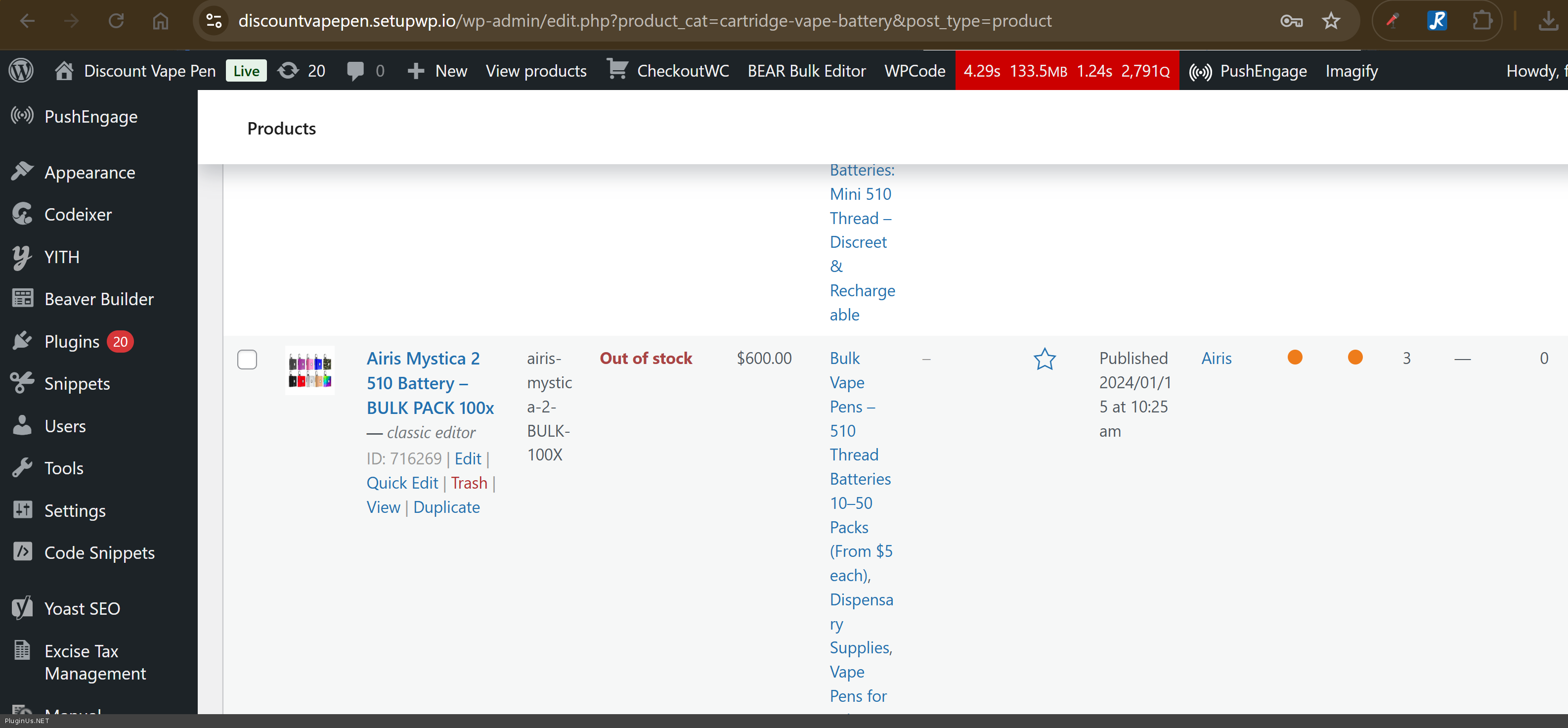
- I found the product for 600 USD: https://discountvapepen.setupwp.io/wp-admin/post.php?post=716269&action=edit&classic-editor
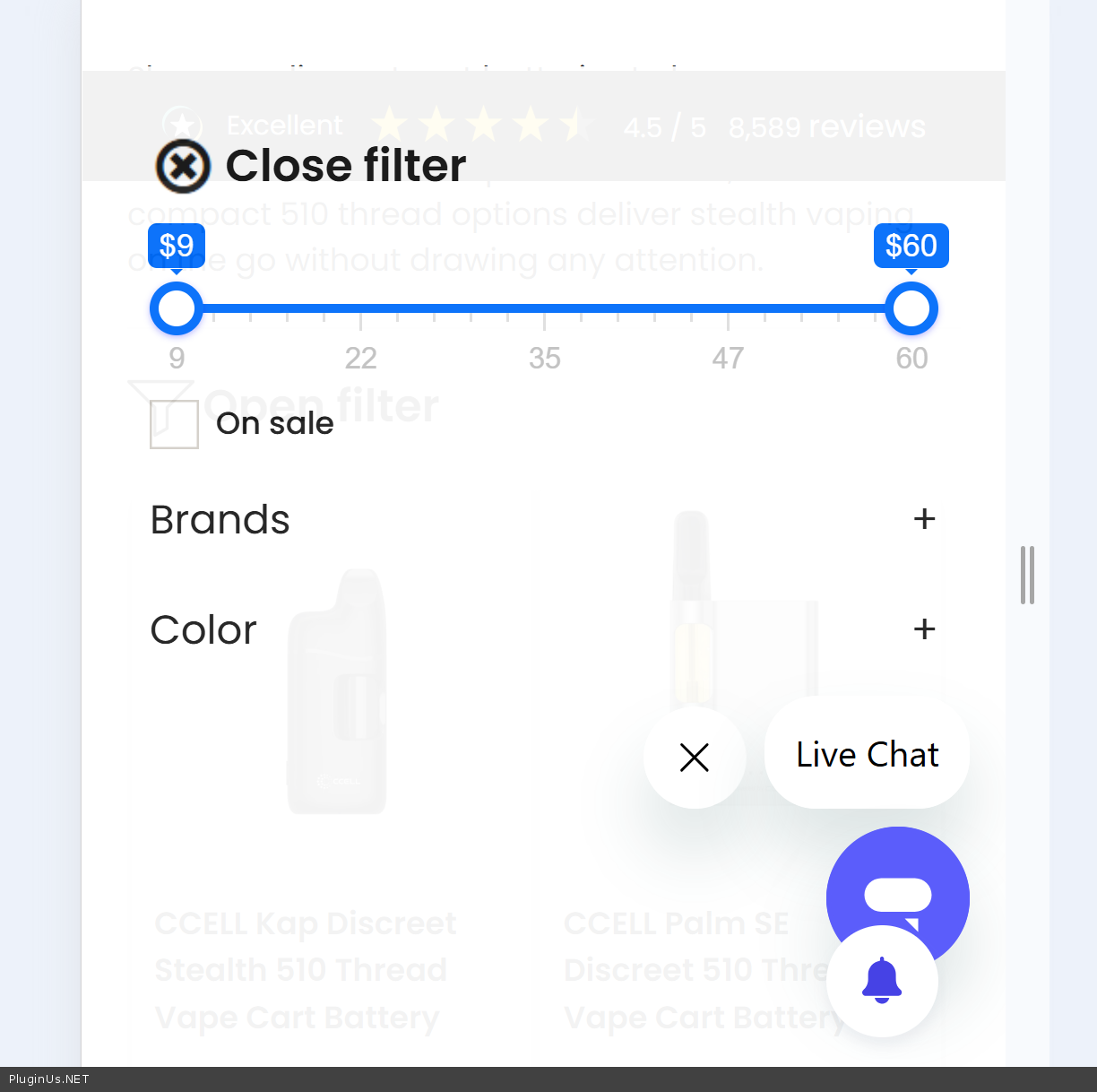
- What about links: https://discountvapepen.setupwp.io/product-category/cartridge-vape-battery/vape-pens/ and https://discountvapepen.setupwp.io/product-category/cartridge-vape-battery/stealth-cartridge-vapes/ - this categories do not have sub-categories, so no categories appears, also for mobile mode was working shortcode [woof sid="generator_698f8ac541b09" autohide="0" autosubmit="1" is_ajax="0" ajax_redraw="0" start_filtering_btn="0" btn_position="b" dynamic_recount="1" hide_terms_count_txt="0" mobile_mode="1" tax_only="pwb-brand,product_cat,product_tag,pa_color,pa_flavor" by_only="by_price,by_onsales"] with its own set of params by attributes tax_only and by_only - if you need the same set of filter sections you not need to set it, now it shows well
p.s. for tests next plugins were disabled: Convesio Caching, Object Cache Pro, Product Badges for WooCommerce also opcache > 0sec is enabled as I undertood, aftre updating code in functions.php its show previous code, so second upload of the file fix it
Please check it, and write me you feedback how is it
Hello Simon
- I found the product for 600 USD: https://discountvapepen.setupwp.io/wp-admin/post.php?post=716269&action=edit&classic-editor
- What about links: https://discountvapepen.setupwp.io/product-category/cartridge-vape-battery/vape-pens/ and https://discountvapepen.setupwp.io/product-category/cartridge-vape-battery/stealth-cartridge-vapes/ - this categories do not have sub-categories, so no categories appears, also for mobile mode was working shortcode [woof sid="generator_698f8ac541b09" autohide="0" autosubmit="1" is_ajax="0" ajax_redraw="0" start_filtering_btn="0" btn_position="b" dynamic_recount="1" hide_terms_count_txt="0" mobile_mode="1" tax_only="pwb-brand,product_cat,product_tag,pa_color,pa_flavor" by_only="by_price,by_onsales"] with its own set of params by attributes tax_only and by_only - if you need the same set of filter sections you not need to set it, now it shows well
p.s. for tests next plugins were disabled: Convesio Caching, Object Cache Pro, Product Badges for WooCommerce also opcache > 0sec is enabled as I undertood, aftre updating code in functions.php its show previous code, so second upload of the file fix it
Please check it, and write me you feedback how is it
Quote from simonbbs on March 30, 2026, 18:52Good Morning Alex,
Thank you a ton for the information.
We are almost all set here, I just have one more question about this category page: https://discountvapepen.setupwp.io/product-category/hemp/disposable-weed-pens/
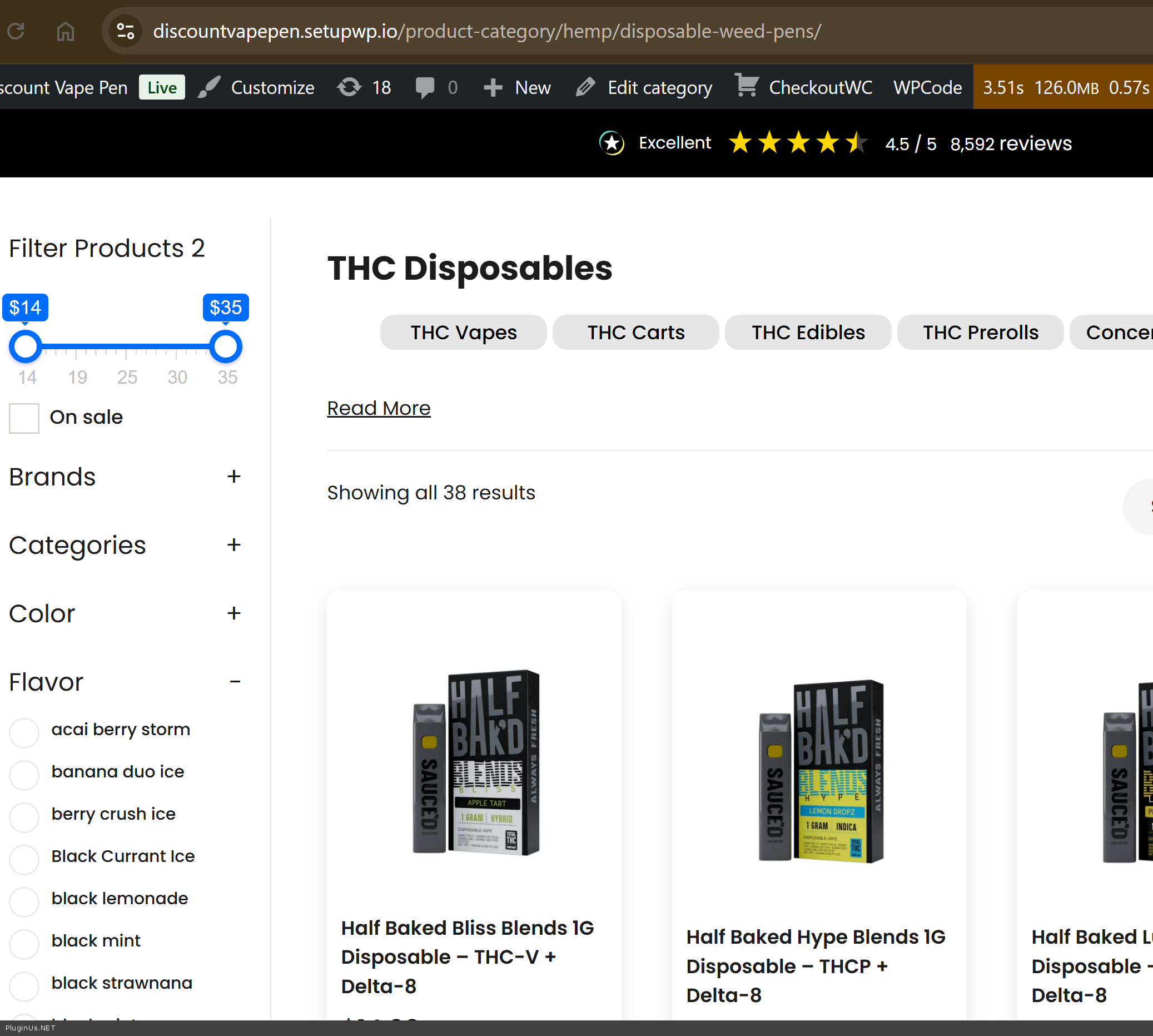
Before the updates you made that category page had been showing the "Flavor" and "Color" filters on mobile, but not on desktop.
After the updates you made that category page is not showing either the "Flavor" or "Color" filter on desktop OR mobile.
Ideally, we would like that category page to show BOTH the "Flavor" and "Color" filter on BOTH desktop & mobile.
How can we make that happen?
Thanks so much!
-Simon
Good Morning Alex,
Thank you a ton for the information.
We are almost all set here, I just have one more question about this category page: https://discountvapepen.setupwp.io/product-category/hemp/disposable-weed-pens/
Before the updates you made that category page had been showing the"Flavor" and"Color" filters on mobile, but not on desktop.
After the updates you made that category page is not showing either the"Flavor" or"Color" filter on desktop OR mobile.
Ideally, we would like that category page to show BOTH the"Flavor" and"Color" filter on BOTH desktop & mobile.
How can we make that happen?
Thanks so much!
-Simon
Quote from simonbbs on March 30, 2026, 18:58Hey Alex,
I apologize, one more question for you here: the product you found for $600 is out of stock.
Is there a way to make the price range filter ignore out of stock products, so it does not calculate in that $600 calue?
Thanks so much!
-Simon
Hey Alex,
I apologize, one more question for you here: the product you found for $600 is out of stock.
Is there a way to make the price range filter ignore out of stock products, so it does not calculate in that $600 calue?
Thanks so much!
-Simon
Quote from Alex Dovlatov on March 31, 2026, 12:45Good day Simon
had been showing the"Flavor" and"Color" filters - its mean that for this subcategory(-ies) no values for flavor and color, in HUSKY -> tab Options -> "Hide empty terms" - I set No (you can enabele it back) - and flavour and color appears, but not selectable, thats mean in this current category no such variations and better to hide them for customers
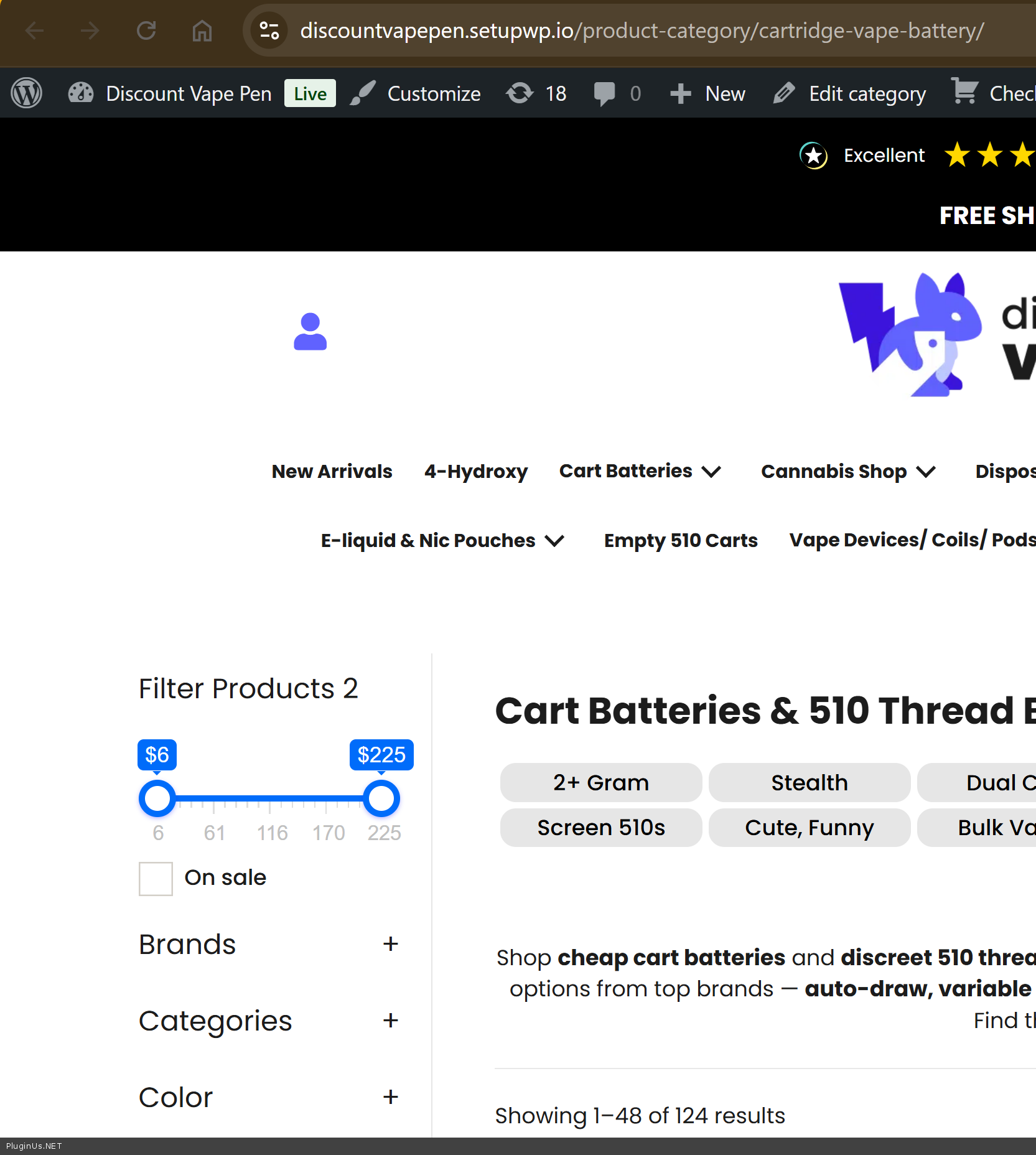
Regarding the out of stock product at $600 affecting the price range — this is not something that can be filtered natively in the plugin settings, but there is a custom solution you can apply.
I added the following code to your functions.php file:
add_filter('woof_get_filtered_price_query', function($sql) {
    global $wpdb;
    $sql .= " AND NOT EXISTS (
        SELECT 1 FROM {$wpdb->postmeta} AS stock_meta
        WHERE stock_meta.post_id = {$wpdb->posts}.ID
        AND stock_meta.meta_key = '_stock_status'
        AND stock_meta.meta_value = 'outofstock'
    )";
    return $sql;
});
This hooks into the price range query and excludes any product where the stock status is set to out of stock, so the $600 OOS product will no longer affect the slider maximum. This makes additional MySQL queries to database.
The NOT EXISTS subquery performs a lookup on wp_postmeta by post_id and meta_key together. If your store has a large number of products, you can speed this up by adding a composite index. Run this once in phpMyAdmin or via WP-CLI:
ALTER TABLE wp_postmeta ADD INDEX idx_woof_stock (post_id, meta_key(50));
Now it looks fine:
This feature will be reviewed as option in future updates.
Welcome!
Good day Simon
had been showing the"Flavor" and"Color" filters - its mean that for this subcategory(-ies) no values for flavor and color, in HUSKY -> tab Options ->"Hide empty terms" - I set No (you can enabele it back) - and flavour and color appears, but not selectable, thats mean in this current category no such variations and better to hide them for customers
Regarding the out of stock product at $600 affecting the price range — this is not something that can be filtered natively in the plugin settings, but there is a custom solution you can apply.
I added the following code to your functions.php file:
add_filter('woof_get_filtered_price_query', function($sql) {
    global $wpdb;
    $sql .=" AND NOT EXISTS (
        SELECT 1 FROM {$wpdb->postmeta} AS stock_meta
        WHERE stock_meta.post_id = {$wpdb->posts}.ID
        AND stock_meta.meta_key = '_stock_status'
        AND stock_meta.meta_value = 'outofstock'
    )";
    return $sql;
});
This hooks into the price range query and excludes any product where the stock status is set to out of stock, so the $600 OOS product will no longer affect the slider maximum. This makes additional MySQL queries to database.
The NOT EXISTS subquery performs a lookup on wp_postmeta by post_id and meta_key together. If your store has a large number of products, you can speed this up by adding a composite index. Run this once in phpMyAdmin or via WP-CLI:
ALTER TABLE wp_postmeta ADD INDEX idx_woof_stock (post_id, meta_key(50));
Now it looks fine:
This feature will be reviewed as option in future updates.
Welcome!