

Extensions Settings Not Saved When I Redeploy to Production Site
The support doesn work on Saturdays and Sundays, so some Friday requests can be answered on Monday. If you have problems with registration ask help on contact us page pleaseIf you not got email within 24~36 business hours, firstly check your spam box, and if no any email from the support there - back to the forum and read answer here. DO NOT ANSWER ON EMAILS [noreply@pluginus.net] FROM THE FORUM!! Emails are just for your info, all answers should be published only here.
The support doesn work on Saturdays and Sundays, so some Friday requests can be answered on Monday.

Quote from Adam on January 20, 2020, 08:49Hi, I use trellis and bedrock from roots.io for development and pushing changes to production.
When I redeploy my site from development to production, the production database and Uploads directory remain unchanged on the production server. The WOOF plugin folder is replaced from on the production server.
When I redeploy, I lose all settings related to WOOF extensions that I use (Searching by SKU, Searching by Text, and Meta filter) and have to set them back up manually each time. My other settings related to Categories and Attributes are fine.
Are there setting related to Extensions that are not stored in the database? Is there a file somewhere that these settings are stored that is getting lost when I replace the WOOF plugin folder on the production server?
Thanks,
Adam
Hi, I use trellis and bedrock from roots.io for development and pushing changes to production.
When I redeploy my site from development to production, the production database and Uploads directory remain unchanged on the production server. The WOOF plugin folder is replaced from on the production server.
When I redeploy, I lose all settings related to WOOF extensions that I use (Searching by SKU, Searching by Text, and Meta filter) and have to set them back up manually each time. My other settings related to Categories and Attributes are fine.
Are there setting related to Extensions that are not stored in the database? Is there a file somewhere that these settings are stored that is getting lost when I replace the WOOF plugin folder on the production server?
Thanks,
Adam

Quote from Pablo Borysenco on January 20, 2020, 15:02Hello Adam
Extension activation based on hashed keys. The basis of the key is the relative path to this extension (and therefore server changes should not affect this)
In your case, you can enable all extensions using the hardcode - \wp-content\plugins\woocommerce-products-filter\classes\ext.php add code - https://c2n.me/45Aras9.png
Hello Adam
Extension activation based on hashed keys. The basis of the key is the relative path to this extension (and therefore server changes should not affect this)
In your case, you can enable all extensions using the hardcode - \wp-content\plugins\woocommerce-products-filter\classes\ext.php add code - https://c2n.me/45Aras9.png
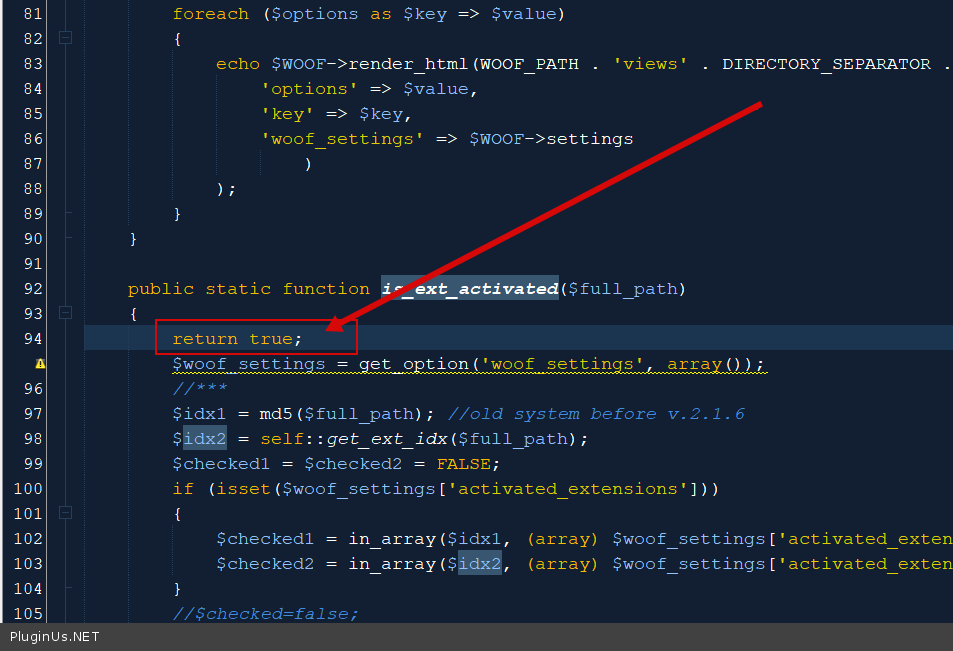
Quote from Adam on March 3, 2021, 17:50Hi Pablo,
I just updated to 2.2.4.2 and hard coded this workaround in that version as well, but the custom code now results in an error and the WOOF settings page will not load in the dashboard. Is there another way I can preserve the extensions continuing to work when I redeploy changes to my site?
Best,
Adam
Hi Pablo,
I just updated to 2.2.4.2 and hard coded this workaround in that version as well, but the custom code now results in an error and the WOOF settings page will not load in the dashboard. Is there another way I can preserve the extensions continuing to work when I redeploy changes to my site?
Best,
Adam
Quote from Pablo Borysenco on March 4, 2021, 12:00Hello Adam
I just updated to 2.2.4.2 and hard coded this workaround in that version as well - in this version we changed only the JS code, and this cannot cause such a problem
but the custom code now results in an error - then you did something wrong
Try to re-install (dellete/download) the plugin and paste this code again
If no luck - Please drop me wp-admin+FTP access - https://c2n.me/43SC6rb.png ->https://c2n.me/42BAoj4.png
Hello Adam
I just updated to 2.2.4.2 and hard coded this workaround in that version as well - in this version we changed only the JS code, and this cannot cause such a problem
but the custom code now results in an error - then you did something wrong
Try to re-install (dellete/download) the plugin and paste this code again
If no luck - Please drop me wp-admin+FTP access - https://c2n.me/43SC6rb.png ->https://c2n.me/42BAoj4.png


Quote from Adam on March 22, 2021, 17:34Hi Pablo, I just deleted the plugin and installed the latest version 2.2.5.1. I have not changed any code at all. I'm doing this on my dev system (localhost). Not, all extensions are enabled and I cannot disable them. I deselect the ones I don't want and save, but they remain active.
Adam
Hi Pablo, I just deleted the plugin and installed the latest version 2.2.5.1. I have not changed any code at all. I'm doing this on my dev system (localhost). Not, all extensions are enabled and I cannot disable them. I deselect the ones I don't want and save, but they remain active.
Adam
Quote from Pablo Borysenco on March 23, 2021, 13:09Hello Adam
Did you test on another server?
I need to investigate this.
Hello Adam
Did you test on another server?
I need to investigate this.
Quote from Adam on March 23, 2021, 15:31I have not yet had the opportunity to test on another server. Please let me know if there's anything I should try. Maybe something in my database?
Adam
I have not yet had the opportunity to test on another server. Please let me know if there's anything I should try. Maybe something in my database?
Adam
Quote from Pablo Borysenco on March 24, 2021, 11:54Hello Adam
it will be great if you move the site to an online server and give me access for research
Hello Adam
it will be great if you move the site to an online server and give me access for research
Quote from Adam on March 30, 2021, 18:39Thanks, Pablo. I'm having trouble finding the time to publish a demo of this publicly. I can add some notes thought... When I disable every single extension and save, all extensions get saved and are off. But then, if I enable even one single extension by selecting its checkbox and saving the settings, all extensions become active when the page reloads. Is there way way to completely remove all WOOF database entries so I can then reinstall the plugin and see if that helps?
Thanks, Pablo. I'm having trouble finding the time to publish a demo of this publicly. I can add some notes thought... When I disable every single extension and save, all extensions get saved and are off. But then, if I enable even one single extension by selecting its checkbox and saving the settings, all extensions become active when the page reloads. Is there way way to completely remove all WOOF database entries so I can then reinstall the plugin and see if that helps?
Quote from Pablo Borysenco on March 31, 2021, 12:35Hello
Please delete option - https://developer.wordpress.org/reference/functions/delete_option/
key - 'woof_settings'
Hello
Please delete option - https://developer.wordpress.org/reference/functions/delete_option/
key - 'woof_settings'