

Excessive PHP warnings from class-installer-theme.php
The support doesn work on Saturdays and Sundays, so some Friday requests can be answered on Monday. If you have problems with registration ask help on contact us page pleaseIf you not got email within 24~36 business hours, firstly check your spam box, and if no any email from the support there - back to the forum and read answer here. DO NOT ANSWER ON EMAILS [noreply@pluginus.net] FROM THE FORUM!! Emails are just for your info, all answers should be published only here.
The support doesn work on Saturdays and Sundays, so some Friday requests can be answered on Monday.

Quote from mattgivertz@gmail.com on February 21, 2026, 16:37Hi
We are seeing an excessive number of the following php warnings
PHP Warning: Trying to access array offset on value of type null in /nas/content/live/bagsofbomaster/wp-content/plugins/woocommerce-products-filter/installer/includes/class-installer-theme.php on line 565
I'm not sure how long this has been happening for as it has been raised by our hosting provider as being an issue. We have been successfully using the plugin for years and other than plugin updates our site configuration hasn't changed. What is this actually trying to do?
Please can you email responses to me. THanks
regards
Matt
Hi
We are seeing an excessive number of the following php warnings
PHP Warning: Trying to access array offset on value of type null in /nas/content/live/bagsofbomaster/wp-content/plugins/woocommerce-products-filter/installer/includes/class-installer-theme.php on line 565
I'm not sure how long this has been happening for as it has been raised by our hosting provider as being an issue. We have been successfully using the plugin for years and other than plugin updates our site configuration hasn't changed. What is this actually trying to do?
Please can you email responses to me. THanks
regards
Matt

Quote from Alex Dovlatov on February 23, 2026, 14:24Hello Matt
After checking this further — the file mentioned in the warning (
class-installer-theme.php) is part of an older version of WOOF and has since been removed in recent updates.The fix is straightforward: please update WOOF to the latest version via Plugins → Updates in your WordPress dashboard. After the update that file will no longer be present and the warnings will stop completely.
If for any reason you're already on the latest version, please let me know your exact WOOF version number and I'll investigate further.
OR if the plugin was customized and you need that old version share me please that installer file and I will make quick fix for that code row
Hello Matt
After checking this further — the file mentioned in the warning (class-installer-theme.php) is part of an older version of WOOF and has since been removed in recent updates.
The fix is straightforward: please update WOOF to the latest version via Plugins → Updates in your WordPress dashboard. After the update that file will no longer be present and the warnings will stop completely.
If for any reason you're already on the latest version, please let me know your exact WOOF version number and I'll investigate further.
OR if the plugin was customized and you need that old version share me please that installer file and I will make quick fix for that code row
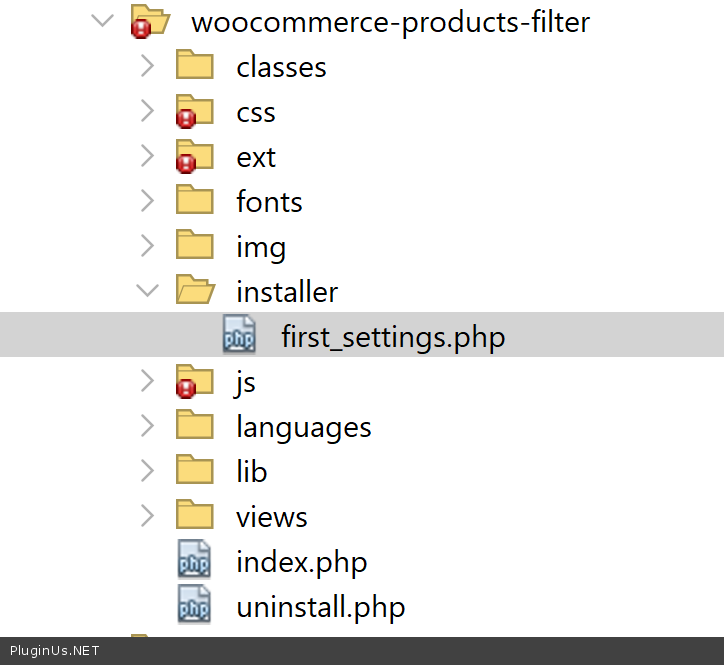
Quote from mattgivertz@gmail.com on February 23, 2026, 16:17Hi
I don't have a first_settings.php file however our installer.php file didn't reference class-installer-theme.php but I found a installer.class.php file in the installer/includes directory and this had a line include_once $this->plugin_path() . '/includes/class-installer-theme.php' I have remarked this line out so hopefully that will resolve the issue. We can't update to the most recent version as there is something added at some point that stops the filter working and while we haven't customised the plugin the customisations we have done on our website don't work on the most recent version but that's not a problem as the version we are using (2.2.1) does exactly what we need.
Regards
Matt
Hi
I don't have a first_settings.php file however our installer.php file didn't reference class-installer-theme.php but I found a installer.class.php file in the installer/includes directory and this had a line include_once $this->plugin_path() . '/includes/class-installer-theme.php' I have remarked this line out so hopefully that will resolve the issue. We can't update to the most recent version as there is something added at some point that stops the filter working and while we haven't customised the plugin the customisations we have done on our website don't work on the most recent version but that's not a problem as the version we are using (2.2.1) does exactly what we need.
Regards
Matt
Quote from Alex Dovlatov on February 24, 2026, 21:25Hey Matt!
I understand, if your fix helped you, that's great. If you decide to update to the latest version and need help, please contact support on this forum…
Welcome!
Hey Matt!
I understand, if your fix helped you, that's great. If you decide to update to the latest version and need help, please contact support on this forum…
Welcome!