

Euro prices not showing correctly on product, basket and checkout pages
The support doesn work on Saturdays and Sundays, so some Friday requests can be answered on Monday. If you have problems with registration ask help on contact us page pleaseIf you not got email within 24~36 business hours, firstly check your spam box, and if no any email from the support there - back to the forum and read answer here. DO NOT ANSWER ON EMAILS [noreply@pluginus.net] FROM THE FORUM!! Emails are just for your info, all answers should be published only here.
The support doesn work on Saturdays and Sundays, so some Friday requests can be answered on Monday.

Quote from Laura4 on December 22, 2020, 11:45After installing the paid plugin for the first time on my site I experienced the following two issues:
- Euro prices for different product variations are not showing correctly on some product pages but GBP and USD prices are working correctly when using the currency switcher.
- All Euro shipping prices are not showing on the basket and checkout pages but GBP and USD is working correctly
I have had to disable the plugin so that it does not confuse site visitors.
After installing the paid plugin for the first time on my site I experienced the following two issues:
- Euro prices for different product variations are not showing correctly on some product pages but GBP and USD prices are working correctly when using the currency switcher.
- All Euro shipping prices are not showing on the basket and checkout pages but GBP and USD is working correctly
I have had to disable the plugin so that it does not confuse site visitors.

Quote from Pablo Borysenco on December 22, 2020, 13:14Hello
Please read this - https://currency-switcher.com/currency-recounts-wrong-double-zero-and-others/
Do you use some plugins to change prices(discounts, add-ons, ....)?
Hello
Please read this - https://currency-switcher.com/currency-recounts-wrong-double-zero-and-others/
Do you use some plugins to change prices(discounts, add-ons, ....)?
Quote from Laura4 on December 22, 2020, 13:26Hello,
I looked at your link but found it confusing and difficult to understand. I'm not a web developer so don't want to mess around with my site when I'm not confident with what I'm doing. Are you able to please test it on my staging site if possible?
I do not use any plugins to change prices.
Hello,
I looked at your link but found it confusing and difficult to understand. I'm not a web developer so don't want to mess around with my site when I'm not confident with what I'm doing. Are you able to please test it on my staging site if possible?
I do not use any plugins to change prices.
Quote from Pablo Borysenco on December 23, 2020, 12:48Hello
Are you able to please test it on my staging site if possible? - Yes! Sure
Please drop me access to your test site and exact link to the product with the issue And describe in more detail what I should do to get the error
Hello
Are you able to please test it on my staging site if possible? - Yes! Sure
Please drop me access to your test site and exact link to the product with the issue And describe in more detail what I should do to get the error
Quote from Laura4 on December 30, 2020, 12:26I would like to send you screen shots which clearly shows the 2 issues I am experiencing with the paid version of the plugin on my live site but I cannot find a way to upload them here. Is there a way that I can send you these screen shots by email?
- The Euro prices are not showing on all fabric product pages for the different length variations (1 to 6 yards) but when I add fabric items to my basket the correct product prices show in Euros on the basket and checkout pages.
- The Euro shipping prices for all products are not showing on the basket and checkout pages but GBP and USD is working correctly
I have installed the free version of the plugin on my staging site and both issues have gone. I'm not sure why the free version of the plugin is working on my staging site but the paid version of the plugin is not working on my live site.
I tried to install the paid plugin on my staging site to see if the same 2 problems exist but it wouldn't work (probably because I have a regular licence for 1 site only). I don't want to delete the paid version of the plugin on the live site, as it took me several days to input all the different currencies manually for each product variation.
Please see the access details for my staging site.
I would like to send you screen shots which clearly shows the 2 issues I am experiencing with the paid version of the plugin on my live site but I cannot find a way to upload them here. Is there a way that I can send you these screen shots by email?
- The Euro prices are not showing on all fabric product pages for the different length variations (1 to 6 yards) but when I add fabric items to my basket the correct product prices show in Euros on the basket and checkout pages.
- The Euro shipping prices for all products are not showing on the basket and checkout pages but GBP and USD is working correctly
I have installed the free version of the plugin on my staging site and both issues have gone. I'm not sure why the free version of the plugin is working on my staging site but the paid version of the plugin is not working on my live site.
I tried to install the paid plugin on my staging site to see if the same 2 problems exist but it wouldn't work (probably because I have a regular licence for 1 site only). I don't want to delete the paid version of the plugin on the live site, as it took me several days to input all the different currencies manually for each product variation.
Please see the access details for my staging site.
Quote from Pablo Borysenco on December 30, 2020, 13:59Hello
Please drop me wp-admin access to your staging site
On your staging site delete the free version of the plugin and install the paid version ( everything should work )
you can use services to transfer images by link. an example - clip2net OR just create an page with your images on your stagimg site and drop me the link
(probably because I have a regular licence for 1 site only) - Yes! But there are no restrictions for subdomains. ( Your test site is a subdomain )
Hello
Please drop me wp-admin access to your staging site
On your staging site delete the free version of the plugin and install the paid version ( everything should work )
you can use services to transfer images by link. an example - clip2net OR just create an page with your images on your stagimg site and drop me the link
(probably because I have a regular licence for 1 site only) - Yes! But there are no restrictions for subdomains. ( Your test site is a subdomain )
Quote from Laura4 on December 30, 2020, 14:23Hello,
I have shared the staging site login details and a page link from the staging site showing the screen shots in the 'private data for this topic'. Please scroll down to the bottom to find it.
On the staging site, I already tried to delete the free version of the plugin before I installed the paid version and it still didn't work. I will keep trying and let you know if I manage to get it to work.
Thanks
Hello,
I have shared the staging site login details and a page link from the staging site showing the screen shots in the 'private data for this topic'. Please scroll down to the bottom to find it.
On the staging site, I already tried to delete the free version of the plugin before I installed the paid version and it still didn't work. I will keep trying and let you know if I manage to get it to work.
Thanks
Quote from Laura4 on December 30, 2020, 15:45I have deleted the free version of the plugin and installed the downloaded WordPress .zip file from Codecanyon and it still won't let me use more than 2 currencies. It keeps telling me to upgrade to the premium version of the plugin by visiting CodeCanyon's site, which I've already done. I'm not sure what else I can do.
I have deleted the free version of the plugin and installed the downloaded WordPress .zip file from Codecanyon and it still won't let me use more than 2 currencies. It keeps telling me to upgrade to the premium version of the plugin by visiting CodeCanyon's site, which I've already done. I'm not sure what else I can do.
Quote from Pablo Borysenco on December 31, 2020, 12:26Hello
It keeps telling me to upgrade to the premium version of the plugin by visiting CodeCanyon's site - Just press Ctrl+F5
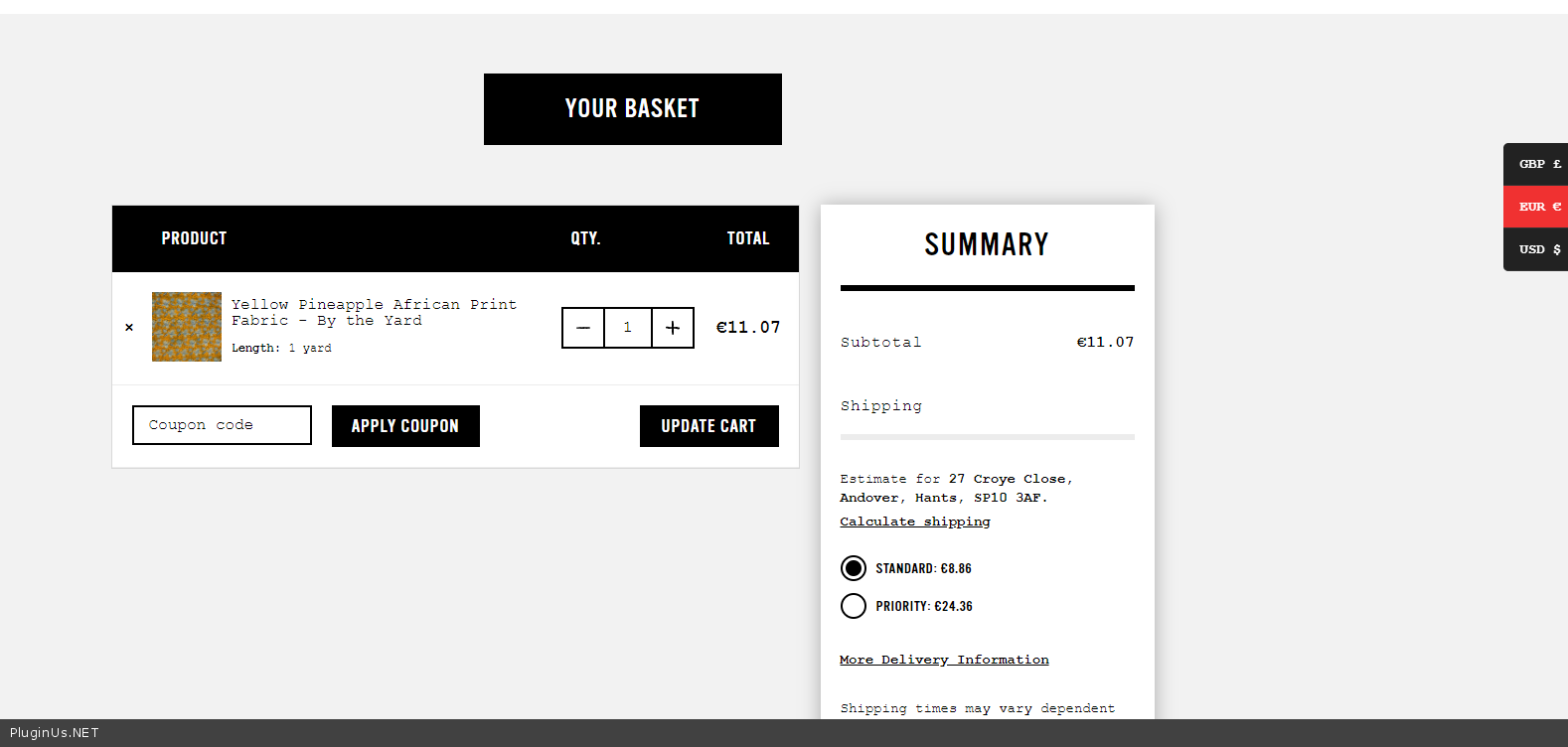
I did a test - https://c2n.me/4aqy3Au.mp4 - It looks like everything is working correctly.
Cart - https://c2n.me/4aqybp9.png
Hello
It keeps telling me to upgrade to the premium version of the plugin by visiting CodeCanyon's site - Just press Ctrl+F5
I did a test - https://c2n.me/4aqy3Au.mp4 - It looks like everything is working correctly.
Cart - https://c2n.me/4aqybp9.png
Quote from Laura4 on January 4, 2021, 13:48Hello,
I can see that the paid plugin on the staging site is now allowing more than 2 currencies.
The paid plugin on the staging site is working correctly however, the same issues still exist on the live site.
I just enabled the paid plugin on the live site and checked all the settings were exactly the same as the staging site and it did not help to fix the problems.
Please could you investigate why the paid plugin is not working correctly on my live site?
Thanks
Hello,
I can see that the paid plugin on the staging site is now allowing more than 2 currencies.
The paid plugin on the staging site is working correctly however, the same issues still exist on the live site.
I just enabled the paid plugin on the live site and checked all the settings were exactly the same as the staging site and it did not help to fix the problems.
Please could you investigate why the paid plugin is not working correctly on my live site?
Thanks
Quote from Pablo Borysenco on January 5, 2021, 11:46Hello
Settings on your live site - https://c2n.me/4asizBg.png
Video - https://c2n.me/4asiF9y.mp4
Please try to watch this video - https://currency-switcher.com/video-tutorials/#video_1
Hello
Settings on your live site - https://c2n.me/4asizBg.png
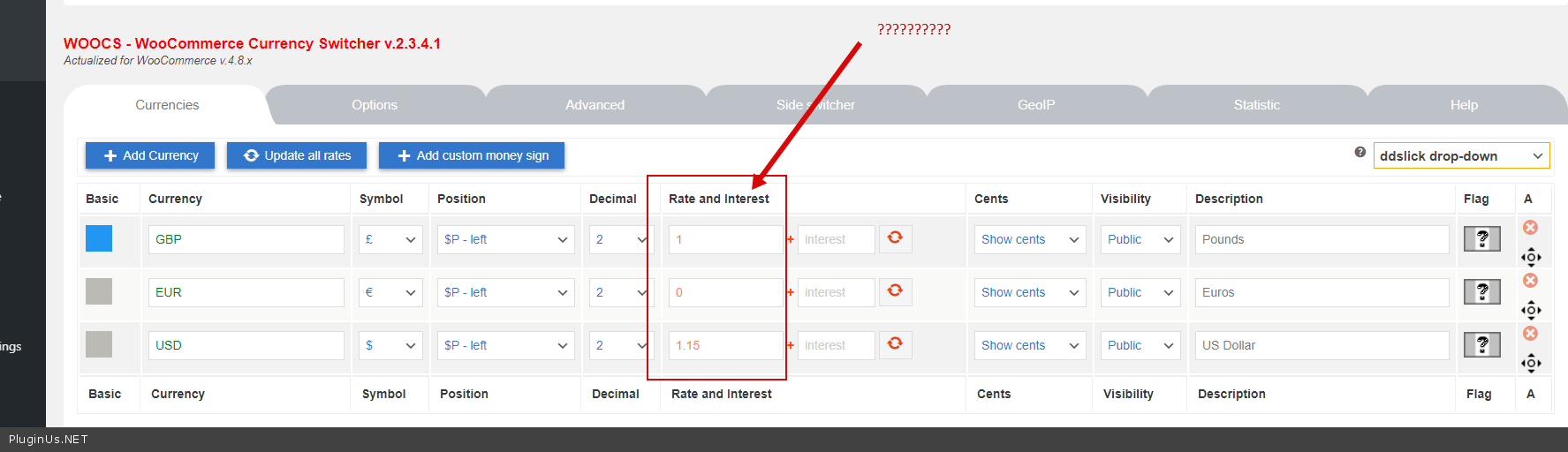
Video - https://c2n.me/4asiF9y.mp4
Please try to watch this video - https://currency-switcher.com/video-tutorials/#video_1
Quote from Laura4 on January 5, 2021, 15:02Hello,
I have made your suggested change and it now seems to be working correctly on the live site.
I would like to hide the currency switcher from certain pages including: home, blog, accounts, delivery, returns etc. When I enter the page names in 'Options' 'Disable on pages' with 'reverse use' selected the currency switcher disappears from all pages on the site.
How can I make the currency switcher appear only on product category pages, individual product pages, the basket page and checkout?
Thanks
Hello,
I have made your suggested change and it now seems to be working correctly on the live site.
I would like to hide the currency switcher from certain pages including: home, blog, accounts, delivery, returns etc. When I enter the page names in 'Options' 'Disable on pages' with 'reverse use' selected the currency switcher disappears from all pages on the site.
How can I make the currency switcher appear only on product category pages, individual product pages, the basket page and checkout?
Thanks
Quote from Pablo Borysenco on January 6, 2021, 12:07Hello
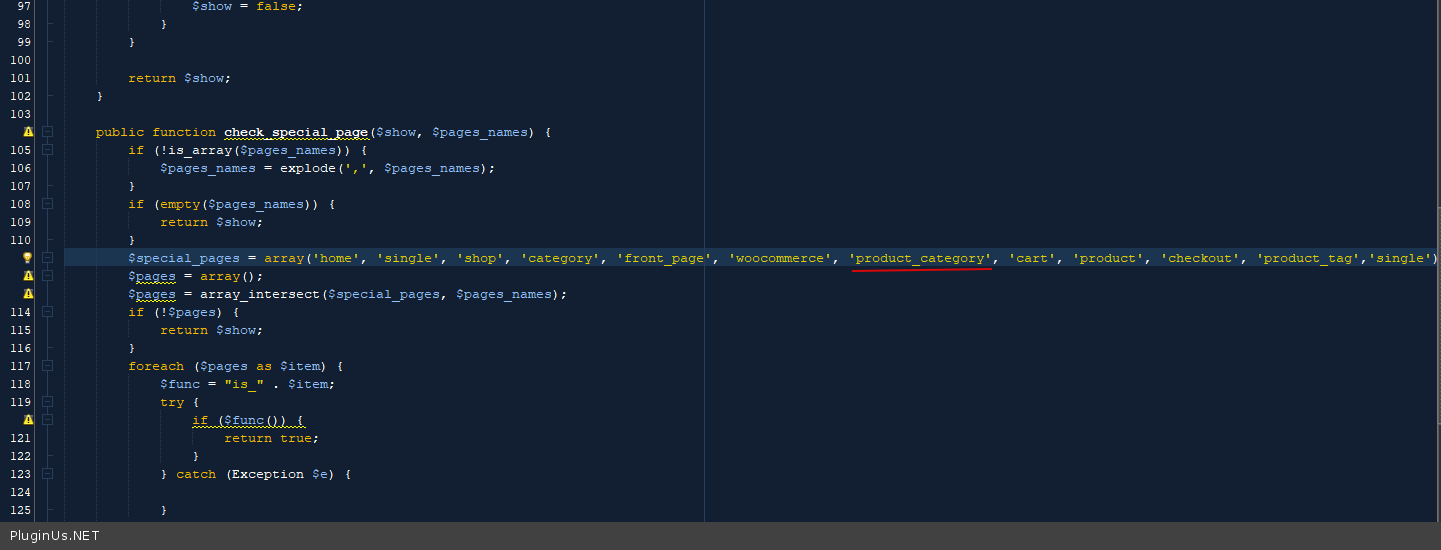
Try in file - \wp-content\plugins\woocommerce-currency-switcher\classes\auto_switcher.php - change code - https://c2n.me/4asTy4e.png (product_cat to product_category)
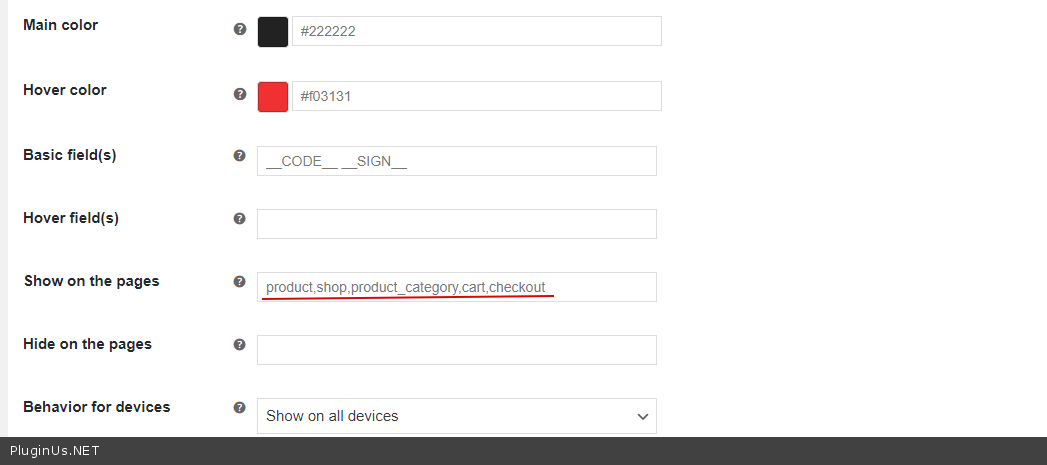
And use this settings - https://c2n.me/4asTDLY.png ( your test site )
Hello
Try in file - \wp-content\plugins\woocommerce-currency-switcher\classes\auto_switcher.php - change code - https://c2n.me/4asTy4e.png (product_cat to product_category)
And use this settings - https://c2n.me/4asTDLY.png ( your test site )
Quote from Laura4 on January 7, 2021, 18:15Hello,
Thank you for the instructions. I'm not sure how I can do the following though:
Try in file - \wp-content\plugins\woocommerce-currency-switcher\classes\auto_switcher.php - change code - https://c2n.me/4asTy4e.png (product_cat to product_category)
I'm not sure how I can access the screen in the link you provided (https://c2n.me/4asTy4e.png). Please can you help to give me clearer step by step instructions?
Thanks
Hello,
Thank you for the instructions. I'm not sure how I can do the following though:
Try in file - \wp-content\plugins\woocommerce-currency-switcher\classes\auto_switcher.php - change code - https://c2n.me/4asTy4e.png (product_cat to product_category)
I'm not sure how I can access the screen in the link you provided (https://c2n.me/4asTy4e.png). Please can you help to give me clearer step by step instructions?
Thanks
Quote from Pablo Borysenco on January 8, 2021, 12:33Hello
I changed code/ Please do a test
Hello
I changed code/ Please do a test
Quote from Laura4 on January 8, 2021, 17:41It is now working correctly. Thank you for your help.
I noticed that there is the option to turn on 'Individual fixed amount for shipping' in options. I tried this on my staging site and went to the shipping settings for Europe for example. At the bottom of the different shipping costs in GBP for the shipping classes there are two new fields called 'Fixed cost EUR' and Fixed cost USD'. Is it possible to enter the Euro and USD shipping prices manually for each shipping class as the costs are different depending on the weight of the parcel?
It is now working correctly. Thank you for your help.
I noticed that there is the option to turn on 'Individual fixed amount for shipping' in options. I tried this on my staging site and went to the shipping settings for Europe for example. At the bottom of the different shipping costs in GBP for the shipping classes there are two new fields called 'Fixed cost EUR' and Fixed cost USD'. Is it possible to enter the Euro and USD shipping prices manually for each shipping class as the costs are different depending on the weight of the parcel?
Quote from Pablo Borysenco on January 11, 2021, 12:32Hello
Is it possible to enter the Euro and USD shipping prices manually for each shipping class - Unfortunately the plugin does not have this feature.
Hello
Is it possible to enter the Euro and USD shipping prices manually for each shipping class - Unfortunately the plugin does not have this feature.
Quote from Laura4 on January 19, 2021, 14:14Noted that this feature does not help to round up/down all shipping prices per class. I will not use this feature.
Thank you for your help.
Noted that this feature does not help to round up/down all shipping prices per class. I will not use this feature.
Thank you for your help.
Quote from Pablo Borysenco on January 20, 2021, 11:49Hello
Welcome;)
Hello
Welcome;)