

error while setting a filter
The support doesn work on Saturdays and Sundays, so some Friday requests can be answered on Monday. If you have problems with registration ask help on contact us page pleaseIf you not got email within 24~36 business hours, firstly check your spam box, and if no any email from the support there - back to the forum and read answer here. DO NOT ANSWER ON EMAILS [noreply@pluginus.net] FROM THE FORUM!! Emails are just for your info, all answers should be published only here.
The support doesn work on Saturdays and Sundays, so some Friday requests can be answered on Monday.

Quote from Margot on May 19, 2023, 09:43When creating a filter in bear bulk editor, an error occures. " DataTables warning: table id=advanced-table - Ajax error. For more information about this error, please see http://datatables.net/tn/7 "
When creating a filter in bear bulk editor, an error occures. " DataTables warning: table id=advanced-table - Ajax error. For more information about this error, please see http://datatables.net/tn/7"

Quote from Pablo Borysenco on May 19, 2023, 11:55Hello
What plugin version number are you using?
To get error text you can install thos tool - https://wordpress.org/plugins/error-log-monitor/
Hello
What plugin version number are you using?
To get error text you can install thos tool - https://wordpress.org/plugins/error-log-monitor/
Quote from Margot on May 20, 2023, 10:07Just received the updatet version of the plugin, i will try that. Thank you and enjoy your day!
Just received the updatet version of the plugin, i will try that. Thank you and enjoy your day!
Quote from Margot on May 20, 2023, 10:20Unfortunately, updating did not solve the problem. I used the latest plugin version.
This is the log of the error;
Fatal error: Uncaught TypeError: strlen(
) : Argument #1 ( $str) must be of type string, array given in /home /hakednl /public_html /wp-content /plugins /woocommerce-bulk-editor /ext /filters /filters .php:1011 Stack Trace
1. WOOBE_FILTERS->woobe_apply_query_filter_data() /home /hakednl /public_html /wp-includes /class-wp-hook.php:308 2. WP_Hook->apply_filters() /home /hakednl /public_html /wp-includes /plugin.php:205 3. apply_filters() /home /hakednl /public_html /wp-content /plugins /woocommerce-bulk-editor /classes /models /products.php:113 4. WOOBE_PRODUCTS->gets() /home /hakednl /public_html /wp-content /plugins /woocommerce-bulk-editor /index.php:509 5. WOOBE->woobe_get_products() /home /hakednl /public_html /wp-includes /class-wp-hook.php:308 6. WP_Hook->apply_filters() /home /hakednl /public_html /wp-includes /class-wp-hook.php:332 7. WP_Hook->do_action() /home /hakednl /public_html /wp-includes /plugin.php:517 8. do_action() /home /hakednl /public_html /wp-admin /admin-ajax.php:188 9. {main} thrown in /home /hakednl /public_html /wp-content /plugins /woocommerce-bulk-editor /ext /filters /filters.php on line 1011
Unfortunately, updating did not solve the problem. I used the latest plugin version.
This is the log of the error;
Fatal error: Uncaught TypeError: strlen(
Stack Trace
| 1. | WOOBE_FILTERS->woobe_apply_query_filter_data() |
| 2. | WP_Hook->apply_filters() |
| 3. | apply_filters() |
| 4. | WOOBE_PRODUCTS->gets() |
| 5. | WOOBE->woobe_get_products() |
| 6. | WP_Hook->apply_filters() |
| 7. | WP_Hook->do_action() |
| 8. | do_action() |
| 9. | {main} |
| thrown in | |
Quote from Pablo Borysenco on May 22, 2023, 10:02Hello
Please add wp-admon+FTP access - https://share.pluginus.net/image/i20230222134241.png ->https://share.pluginus.net/image/i20230222134615.png - I will fix it
Hello
Please add wp-admon+FTP access - https://share.pluginus.net/image/i20230222134241.png ->https://share.pluginus.net/image/i20230222134615.png - I will fix it


Quote from Margot on May 23, 2023, 13:27Is it possible to give us instrustions? Whats we need to fix?
Or is it possible to setup a web meting so that we can monior the activities?
Is it possible to give us instrustions? Whats we need to fix?
Or is it possible to setup a web meting so that we can monior the activities?
Quote from Pablo Borysenco on May 24, 2023, 09:59Hello
Ok! try in file - wp-content\plugins\woocommerce-bulk-editor\ext\filters\filters.php - change this line - https://c2n.me/4iAMkCT.png New line:
if (intval($woobe_filter[$string_key]) === -1 OR (!is_array($woobe_filter[$string_key]) AND strlen($woobe_filter[$string_key])) === 0) {
Hello
Ok! try in file - wp-content\plugins\woocommerce-bulk-editor\ext\filters\filters.php - change this line - https://c2n.me/4iAMkCT.png New line:
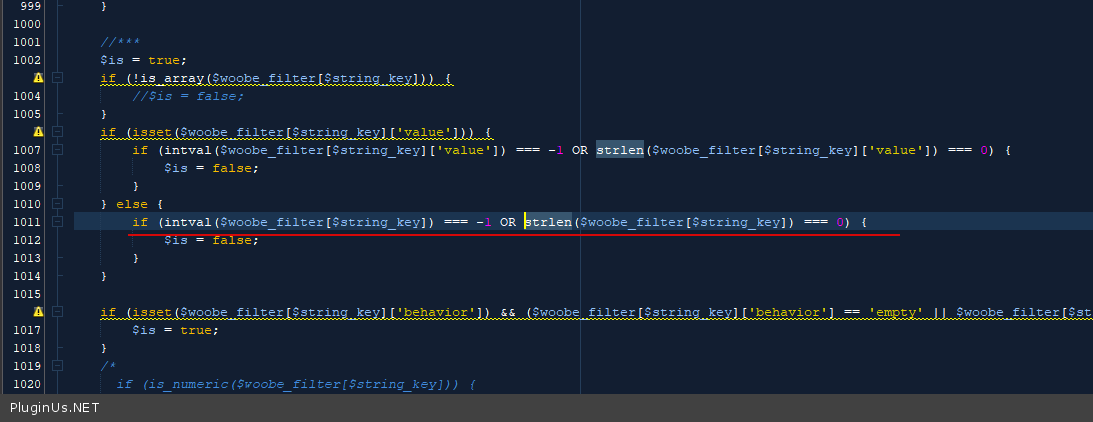
if (intval($woobe_filter[$string_key]) === -1 OR (!is_array($woobe_filter[$string_key]) AND strlen($woobe_filter[$string_key])) === 0) {
Quote from Margot on May 29, 2023, 20:25Thank you so much, this will do :-D
Thank you so much, this will do :-D