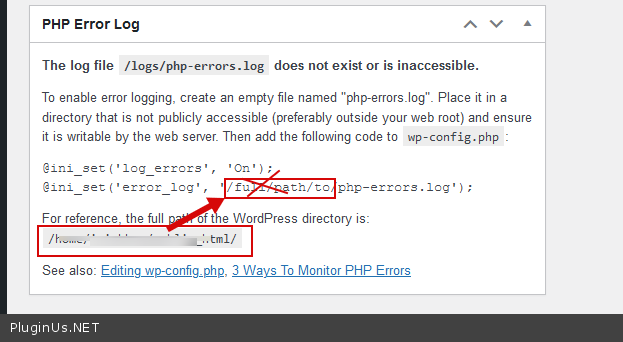
Error log
The support doesn work on Saturdays and Sundays, so some Friday requests can be answered on Monday. If you have problems with registration ask help on contact us page pleaseIf you not got email within 24~36 business hours, firstly check your spam box, and if no any email from the support there - back to the forum and read answer here. DO NOT ANSWER ON EMAILS [noreply@pluginus.net] FROM THE FORUM!! Emails are just for your info, all answers should be published only here.
The support doesn work on Saturdays and Sundays, so some Friday requests can be answered on Monday.

Quote from Shaun on March 26, 2021, 17:59Hi. I am getting a huge amount of the same error below:
[24-Mar-2021 17:59:03 UTC] WordPress database error Table 'irishhou_wp.wp_actionscheduler_claims' doesn't exist for query SHOW FULL COLUMNS FROM `wp_actionscheduler_claims` made by do_action_ref_array('action_scheduler_run_queue'), WP_Hook->do_action, WP_Hook->apply_filters, ActionScheduler_QueueRunner->run, ActionScheduler_QueueRunner->do_batch, ActionScheduler_DBStore->stake_claim, ActionScheduler_DBStore->generate_claim_id
[24-Mar-2021 17:59:03 UTC] WordPress database error Table 'irishhou_wp.wp_actionscheduler_claims' doesn't exist for query DELETE FROM `wp_actionscheduler_claims` WHERE `claim_id` = 0 made by do_action_ref_array('action_scheduler_run_queue'), WP_Hook->do_action, WP_Hook->apply_filters, ActionScheduler_QueueRunner->run, ActionScheduler_QueueRunner->do_batch, ActionScheduler_DBStore->release_claimEvery time a subscriber uses the filters and is creating a huge error_log file.
Thanks for your help.
Hi. I am getting a huge amount of the same error below:
[24-Mar-2021 17:59:03 UTC] WordPress database error Table 'irishhou_wp.wp_actionscheduler_claims' doesn't exist for query SHOW FULL COLUMNS FROM `wp_actionscheduler_claims` made by do_action_ref_array('action_scheduler_run_queue'), WP_Hook->do_action, WP_Hook->apply_filters, ActionScheduler_QueueRunner->run, ActionScheduler_QueueRunner->do_batch, ActionScheduler_DBStore->stake_claim, ActionScheduler_DBStore->generate_claim_id
[24-Mar-2021 17:59:03 UTC] WordPress database error Table 'irishhou_wp.wp_actionscheduler_claims' doesn't exist for query DELETE FROM `wp_actionscheduler_claims` WHERE `claim_id` = 0 made by do_action_ref_array('action_scheduler_run_queue'), WP_Hook->do_action, WP_Hook->apply_filters, ActionScheduler_QueueRunner->run, ActionScheduler_QueueRunner->do_batch, ActionScheduler_DBStore->release_claim
Every time a subscriber uses the filters and is creating a huge error_log file.
Thanks for your help.

Quote from Pablo Borysenco on March 29, 2021, 12:05Hello
Paste your license key here - https://c2n.me/43SC6rb.png -> https://c2n.me/42HBIt7.png and wp-admin access - https://c2n.me/42BAoj4.png
Hello
Paste your license key here - https://c2n.me/43SC6rb.png -> https://c2n.me/42HBIt7.png and wp-admin access - https://c2n.me/42BAoj4.png



Quote from Shaun on March 29, 2021, 19:32Hi Pablo
Just sent you the key and login information, Thanks, Shaun
Hi Pablo
Just sent you the key and login information, Thanks, Shaun
Quote from Pablo Borysenco on March 30, 2021, 12:33Hello
Please drop me a link to the page with filter
Update the plugin to latest version - https://products-filter.com/how-to-make-auto-update-for-wordpress-plugins-and-themes-bought-on-envato/
Hello
Please drop me a link to the page with filter
Update the plugin to latest version - https://products-filter.com/how-to-make-auto-update-for-wordpress-plugins-and-themes-bought-on-envato/
Quote from Shaun on March 30, 2021, 18:00Hi Pablo.
I have updated to 2.2.5.3, thanks error still occurs though.
link for page with the filter is https://irish-house-plans.ie/plan-catalogue/
If you need a login to vie the page , mine is in the private data
Thanks for your help
Hi Pablo.
I have updated to 2.2.5.3, thanks error still occurs though.
link for page with the filter is https://irish-house-plans.ie/plan-catalogue/
If you need a login to vie the page , mine is in the private data
Thanks for your help
Quote from Pablo Borysenco on March 31, 2021, 11:59Hello
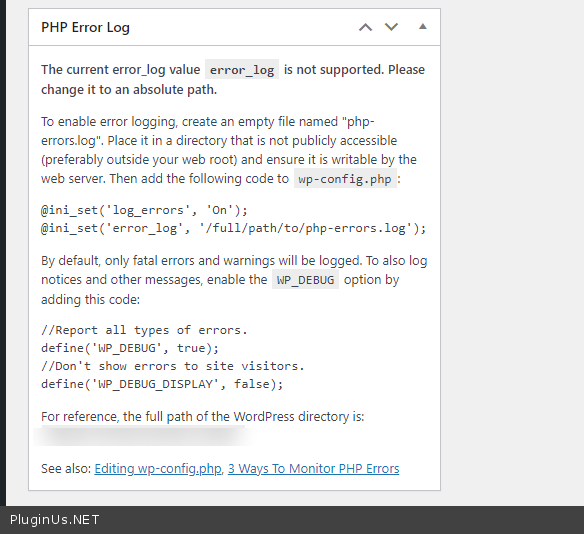
Ok! I instaled "Error Log Monitor" - so I can track these errors. please make these settings - https://c2n.me/4bvHfsl.png
Hello
Ok! I instaled "Error Log Monitor" - so I can track these errors. please make these settings - https://c2n.me/4bvHfsl.png
Quote from Shaun on March 31, 2021, 13:38Hi Pablo
I have added the error log file , the path is /logs/php-errors.log and included the changes to the wp-config file, /public_html/wp-config.php
Thanks again for your help.
Hi Pablo
I have added the error log file , the path is /logs/php-errors.log and included the changes to the wp-config file, /public_html/wp-config.php
Thanks again for your help.
Quote from Pablo Borysenco on April 1, 2021, 16:17Hello
You made the settings incorrectly - https://c2n.me/4bwWqUx.png
You need create a file
php-errors.login thepublic_htmlcatalogset this option in wp-config - https://c2n.me/4bwWAnD.png
Hello
You made the settings incorrectly - https://c2n.me/4bwWqUx.png
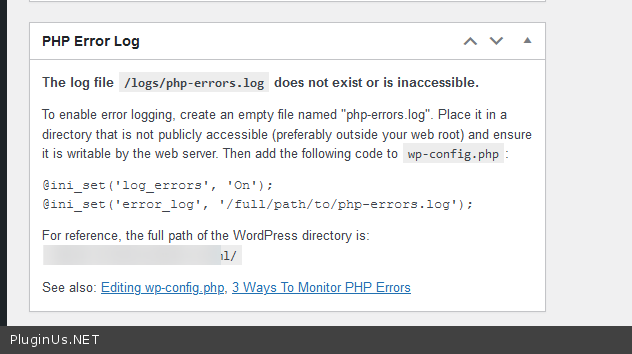
You need create a file php-errors.log in the public_html catalog
set this option in wp-config - https://c2n.me/4bwWAnD.png