PluginUs.Net - Business Tools for WooCommerce and WordPress

[realize your idea - make your dreams come true]

Support Forum

You need to log-in to create request (topic) to the support

Disable transition when clicking open/close filter

The support doesn work on Saturdays and Sundays, so some Friday requests can be answered on Monday. If you have problems with registration ask help on contact us page please
If you not got email within 24~36 business hours, firstly check your spam box, and if no any email from the support there - back to the forum and read answer here. DO NOT ANSWER ON EMAILS [noreply@pluginus.net] FROM THE FORUM!! Emails are just for your info, all answers should be published only here.
The support doesn work on Saturdays and Sundays, so some Friday requests can be answered on Monday.

How can I disable the opacity fade animation when opening/closing a filter? Tried to with css but didn't work.

Hello

Plugin does not have such animation

Please  drop  me  exact  link to  the  issue

Sure it does see example:

View post on imgur.com

There is a fade-in/fade-out instead of the list showing up instantly.

Hello

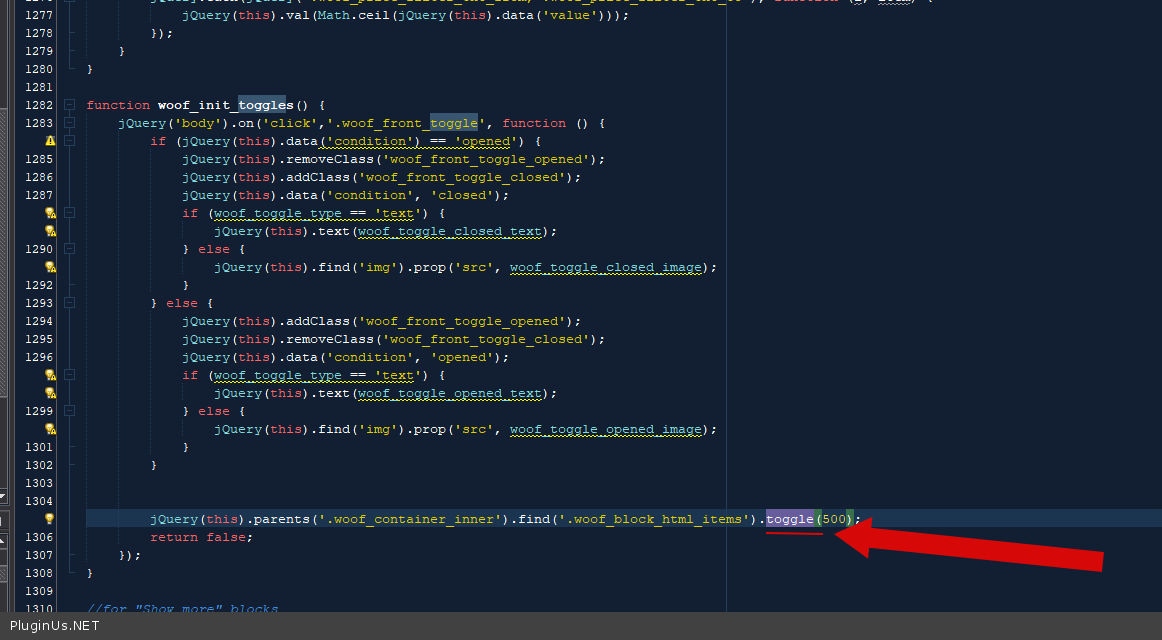
This  is  a JQ  function  toggle - https://api.jquery.com/toggle/

You  can  find this  code  in  file  - \wp-content\plugins\woocommerce-products-filter\js\front.js - https://c2n.me/4axdWo3.png

Thank you. I've been looking over the code but not seeing any way to change the opacity and transition?


function woof_init_toggles() {
jQuery('body').on('click','.woof_front_toggle', function () {
if (jQuery(this).data('condition') == 'opened') {
jQuery(this).removeClass('woof_front_toggle_opened');
jQuery(this).addClass('woof_front_toggle_closed');
jQuery(this).data('condition', 'closed');
if (woof_toggle_type == 'text') {
jQuery(this).text(woof_toggle_closed_text);
} else {
jQuery(this).find('img').prop('src', woof_toggle_closed_image);
}
} else {
jQuery(this).addClass('woof_front_toggle_opened');
jQuery(this).removeClass('woof_front_toggle_closed');
jQuery(this).data('condition', 'opened');
if (woof_toggle_type == 'text') {
jQuery(this).text(woof_toggle_opened_text);
} else {
jQuery(this).find('img').prop('src', woof_toggle_opened_image);
}
}


Hello

Read  this  please - https://api.jquery.com/toggle/  - Only this code matters - https://c2n.me/4axdWo3.png

Thank you that did the trick!

Hello

Great!  Welcome;)