

Deleting contents in Attributes are not saved
The support doesn work on Saturdays and Sundays, so some Friday requests can be answered on Monday. If you have problems with registration ask help on contact us page pleaseIf you not got email within 24~36 business hours, firstly check your spam box, and if no any email from the support there - back to the forum and read answer here. DO NOT ANSWER ON EMAILS [noreply@pluginus.net] FROM THE FORUM!! Emails are just for your info, all answers should be published only here.
The support doesn work on Saturdays and Sundays, so some Friday requests can be answered on Monday.

Quote from Nalas on January 13, 2021, 19:17I have used BEAR for some time, but I have a problem now. When changing contents in an attribute field the system writes saved as normal, but when using filter on the same product, the contents are not deleted, When changing to another text it works fine.
When using binding editing and using delete, all lines are deleted exept the first line.
I use the woocommerce 4.9.0
A work-a-round can be, changing more than one line, and making sure that the one line you change with binding editing already is emty - so choose more than one line, the line you change must already be emty because the first line is not changed - eventhoug it seem so when finished - when pressing filter again the field can be reset to the text and not a blank field
I have used BEAR for some time, but I have a problem now. When changing contents in an attribute field the system writes saved as normal, but when using filter on the same product, the contents are not deleted, When changing to another text it works fine.
When using binding editing and using delete, all lines are deleted exept the first line.
I use the woocommerce 4.9.0
A work-a-round can be, changing more than one line, and making sure that the one line you change with binding editing already is emty - so choose more than one line, the line you change must already be emty because the first line is not changed - eventhoug it seem so when finished - when pressing filter again the field can be reset to the text and not a blank field

Quote from Pablo Borysenco on January 14, 2021, 10:55Hello
Can you create a video with the issue?
I'm not sure that I understood how to replicate this error
Hello
Can you create a video with the issue?
I'm not sure that I understood how to replicate this error
Quote from Nalas on January 14, 2021, 14:06I have tried to create a video - https://shop.hunde-hotel.dk/wp-content/uploads/2021/01/Untitled-1.mp4
When changing a attribute to empty, the field you change seems to be changed when looking on screen, but when setting filter again (load the page again) the field is not empty.
When using binding editing, all fields are changed, exept for the one actived deleted.
Work a round, use binding editor, and choose another line to use to change the atribute.
Eg:
Line nr Attributetext
1 Test
2 Testing
- Stand on line 1 atribute - delete "test" field attribute "test" is now empty - update screen - now field has "test" again and is not empty.
- Choose both lines using binding editor. delete "test" - both "test" and "testing" is now empty - update screen, "test" is back, but "testing" is empty as planned.
- Choose both lines using binding editor. delete "testing" - both "test" and "testing" is now empty - update screen, "testing" is back, but "test" is empty as planned.
Please inform me when to delete video :D
I have tried to create a video - https://shop.hunde-hotel.dk/wp-content/uploads/2021/01/Untitled-1.mp4
When changing a attribute to empty, the field you change seems to be changed when looking on screen, but when setting filter again (load the page again) the field is not empty.
When using binding editing, all fields are changed, exept for the one actived deleted.
Work a round, use binding editor, and choose another line to use to change the atribute.
Eg:
Line nr Attributetext
1 Test
2 Testing
- Stand on line 1 atribute - delete"test" field attribute"test" is now empty - update screen - now field has"test" again and is not empty.
- Choose both lines using binding editor. delete"test" - both"test" and"testing" is now empty - update screen,"test" is back, but"testing" is empty as planned.
- Choose both lines using binding editor. delete"testing" - both"test" and"testing" is now empty - update screen,"testing" is back, but"test" is empty as planned.
Please inform me when to delete video :D
Quote from Pablo Borysenco on January 15, 2021, 11:30Hello
Thank you for info! You can delete the video
I will write to you as soon as we find a solution
Hello
Thank you for info! You can delete the video
I will write to you as soon as we find a solution
Quote from Pablo Borysenco on January 18, 2021, 19:24Hello
Try in file - wp-content\plugins\woocommerce-bulk-editor\index.php add this code - https://c2n.me/4aBiDbD.png
if(!isset($_REQUEST['value']) || $_REQUEST['value'] == null){
$_REQUEST['value'] = array();
}and do a test
Hello
Try in file - wp-content\plugins\woocommerce-bulk-editor\index.php add this code - https://c2n.me/4aBiDbD.png
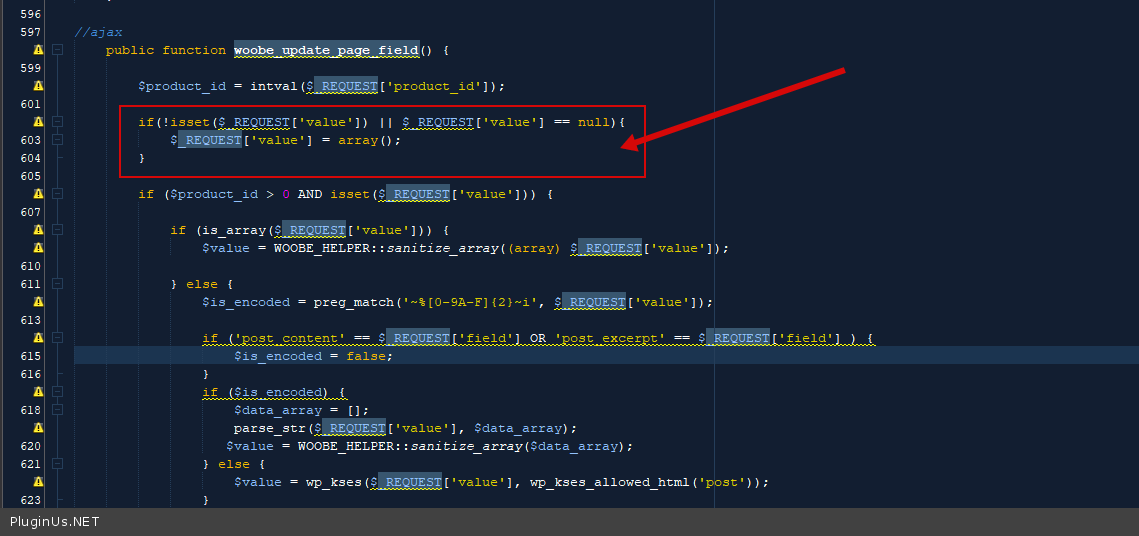
if(!isset($_REQUEST['value']) || $_REQUEST['value'] == null){
$_REQUEST['value'] = array();
}
and do a test
Quote from Nalas on January 23, 2021, 13:53Sorry for my late reply.
I have now tested with the code above, but nothing is changed unfortunally. Should I delete the code again or can it be there until next update?
Sorry for my late reply.
I have now tested with the code above, but nothing is changed unfortunally. Should I delete the code again or can it be there until next update?
Quote from Nalas on January 23, 2021, 17:40Seems like after clear cashe the correction seems to be working. Thank you so much you have helped me a lot and made my day so mush better. Do I need to keep the code after next update?
Seems like after clear cashe the correction seems to be working. Thank you so much you have helped me a lot and made my day so mush better. Do I need to keep the code after next update?
Quote from Pablo Borysenco on January 25, 2021, 11:40Hello
Do I need to keep the code after next update? - do not worry! this will be fixed in the next version
Welcome;)
Hello
Do I need to keep the code after next update? - do not worry! this will be fixed in the next version
Welcome;)