

Default Sort by bar of WooCommerce not working with WOOF
The support doesn work on Saturdays and Sundays, so some Friday requests can be answered on Monday. If you have problems with registration ask help on contact us page pleaseIf you not got email within 24~36 business hours, firstly check your spam box, and if no any email from the support there - back to the forum and read answer here. DO NOT ANSWER ON EMAILS [noreply@pluginus.net] FROM THE FORUM!! Emails are just for your info, all answers should be published only here.
The support doesn work on Saturdays and Sundays, so some Friday requests can be answered on Monday.

Quote from intwebsolution on August 15, 2020, 08:55Hello,
the default sort by bar of WooCommerce in the shop page does not work when WOOF is active.
https://www.digitaluxo.it/shop/
Please how can I fix it?
Thanks
Hello,
the default sort by bar of WooCommerce in the shop page does not work when WOOF is active.
https://www.digitaluxo.it/shop/
Please how can I fix it?
Thanks

Quote from Pablo Borysenco on August 17, 2020, 11:30Hello
Paste your license key here - https://c2n.me/43SC6rb.png -> https://c2n.me/42HBIt7.png
the default sort by bar - Not sure if this is the standard sort
Hello
Paste your license key here - https://c2n.me/43SC6rb.png -> https://c2n.me/42HBIt7.png


the default sort by bar - Not sure if this is the standard sort
Quote from intwebsolution on August 17, 2020, 12:35Hello,
I saved the license key to the private data area.
And I mean the default "sort by" bar at the top of WooCommerce shop page.
Thanks
Hello,
I saved the license key to the private data area.
And I mean the default"sort by" bar at the top of WooCommerce shop page.
Thanks
Quote from Pablo Borysenco on August 18, 2020, 10:56Hello
https://c2n.me/48MxzhF.jpg - This is not a standard sort!
You can test it - Please install another theme and do the test\
Please update the plugin to latest version - https://products-filter.com/how-to-make-auto-update-for-wordpress-plugins-and-themes-bought-on-envato/
Hello
https://c2n.me/48MxzhF.jpg - This is not a standard sort!
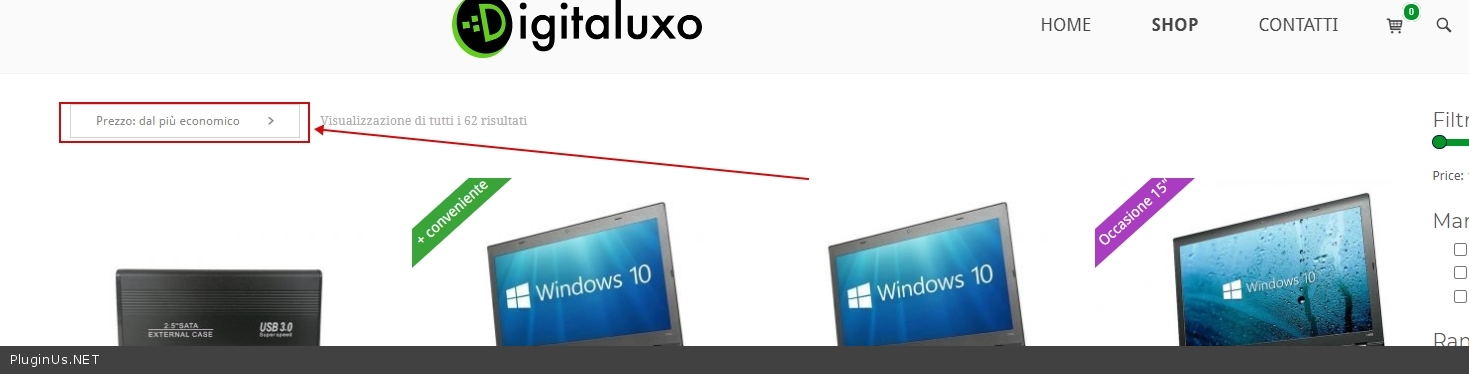
You can test it - Please install another theme and do the test\
Please update the plugin to latest version - https://products-filter.com/how-to-make-auto-update-for-wordpress-plugins-and-themes-bought-on-envato/
Quote from intwebsolution on August 18, 2020, 11:28Hello,
I’m not a developer, but I can say that when you install the default plugin of WooCommerce that bar shows up, if you change theme that bar is still on the shop page, so I do not know why you keep saying it’s not the default bar of WooCommerce. It is.
I just sopped my campaigns again and I just made another test. When everything is deactivated (except for WooCommerce and WOOF) the bar doesn’t work, when only the WOOF plugin is deactivated the bar works. I also tried to change theme, if there is no WOOF in the sidebar everything works properly.
Please could you help me to fix it? I need to fix it soon please.
Thanks
Hello,
I’m not a developer, but I can say that when you install the default plugin of WooCommerce that bar shows up, if you change theme that bar is still on the shop page, so I do not know why you keep saying it’s not the default bar of WooCommerce. It is.
I just sopped my campaigns again and I just made another test. When everything is deactivated (except for WooCommerce and WOOF) the bar doesn’t work, when only the WOOF plugin is deactivated the bar works. I also tried to change theme, if there is no WOOF in the sidebar everything works properly.
Please could you help me to fix it? I need to fix it soon please.
Thanks
Quote from Pablo Borysenco on August 18, 2020, 12:13OK! Please drop me wp-admin access - https://c2n.me/43SC6rb.png ->https://c2n.me/42BAoj4.png
Can I disable plugins/theme to test it?
OK! Please drop me wp-admin access - https://c2n.me/43SC6rb.png ->https://c2n.me/42BAoj4.png

Can I disable plugins/theme to test it?
Quote from intwebsolution on August 18, 2020, 12:40Hello, I uploaded the access.
I disabled my campaigns. There is Maintenance plugin, I’d like to keep that active if possible, except for that please you can do what you want. I have a full backup of my website.
Please let me know as soon as you finish.
Thanks
Hello, I uploaded the access.
I disabled my campaigns. There is Maintenance plugin, I’d like to keep that active if possible, except for that please you can do what you want. I have a full backup of my website.
Please let me know as soon as you finish.
Thanks
Quote from intwebsolution on August 18, 2020, 17:56Hello, do you have any update? Thanks
Hello, do you have any update? Thanks
Quote from Pablo Borysenco on August 19, 2020, 12:29Hello
Ok! I did test - https://c2n.me/48NrlrN - Everything works well with standard sorting.
Hello
Ok! I did test - https://c2n.me/48NrlrN - Everything works well with standard sorting.
Quote from intwebsolution on August 19, 2020, 14:03Hello,
if I disable just the WOOF plugin the standard sorting works fine. It seems that the North theme and WOOF doesn't get along. SiteOrigin says the North theme is ok, you say the WOOF plugin is ok but together the standard sorting does not work at all.
What can I do?
Thanks
Hello,
if I disable just the WOOF plugin the standard sorting works fine. It seems that the North theme and WOOF doesn't get along. SiteOrigin says the North theme is ok, you say the WOOF plugin is ok but together the standard sorting does not work at all.
What can I do?
Thanks
Quote from Pablo Borysenco on August 20, 2020, 11:36Hello
I already wrote to you that the theme uses non-standard sorting. We created a plugin for woocommerce and we can not be responsible if the third-party authors change functionality of woocommerce
Ask the theme developers if they can disable their custom sorting scripts.
Hello
I already wrote to you that the theme uses non-standard sorting. We created a plugin for woocommerce and we can not be responsible if the third-party authors change functionality of woocommerce
Ask the theme developers if they can disable their custom sorting scripts.
Quote from intwebsolution on August 20, 2020, 14:24Hello,
thanks, for your reply, which is not so kind.
Here's the SiteOrigin reply
" I've run a few tests and this issue appears to be a general issue with how WOOF handles sorting. It's using a really old method of handling and while this normally fine, due to the custom nature of our product sorting drop downs, it's not able to handle it and effectively "gives up". Unfortunately, we're not able to resolve this type of issue as it requires direct modifications to how woof handles filtering to resolve. You'll need to reach out to the developers of this plugin for assistance with this issue."
Considering that, plus your reply, I'll ask for a refund.
Thanks
Hello,
thanks, for your reply, which is not so kind.
Here's the SiteOrigin reply
" I've run a few tests and this issue appears to be a general issue with how WOOF handles sorting. It's using a really old method of handling and while this normally fine, due to the custom nature of our product sorting drop downs, it's not able to handle it and effectively"gives up". Unfortunately, we're not able to resolve this type of issue as it requires direct modifications to how woof handles filtering to resolve. You'll need to reach out to the developers of this plugin for assistance with this issue."
Considering that, plus your reply, I'll ask for a refund.
Thanks
Quote from Pablo Borysenco on August 21, 2020, 12:52Hello
What's wrong with my answer?
which is not so kind. - I really don’t understand what you didn’t like in the answer, I answered in fact and didn’t be rude to you
I'll ask for a refund. - Ok! Unfortunately, incompatibility with third-party software ( https://c2n.me/48OXn6y.png ) is not a reason for the refund. If you disagree with me please open a dispute on envato
Hello
What's wrong with my answer?
which is not so kind. - I really don’t understand what you didn’t like in the answer, I answered in fact and didn’t be rude to you
I'll ask for a refund. - Ok! Unfortunately, incompatibility with third-party software ( https://c2n.me/48OXn6y.png ) is not a reason for the refund. If you disagree with me please open a dispute on envato
