

Customizing Filter widgets
The support doesn work on Saturdays and Sundays, so some Friday requests can be answered on Monday. If you have problems with registration ask help on contact us page pleaseIf you not got email within 24~36 business hours, firstly check your spam box, and if no any email from the support there - back to the forum and read answer here. DO NOT ANSWER ON EMAILS [noreply@pluginus.net] FROM THE FORUM!! Emails are just for your info, all answers should be published only here.
The support doesn work on Saturdays and Sundays, so some Friday requests can be answered on Monday.

Quote from BT on April 1, 2021, 21:20Hello - I need to add some custom elements to the filters and was hoping you could provide some direction.
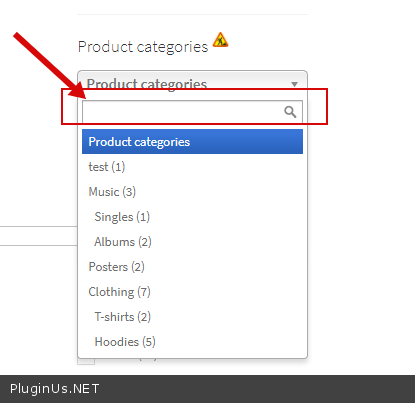
- I need to add the search feature inside the categories filter widget as well as a custom text link about the filter list links. Is there a way to do this?
- I would like to have the price filter have a min to max text input fields and below that prince range text links that perform the filtering. i.e. clicking on "$0 -$50" 0r "$50-$100" would filter by those prices.
I have screenshots to share for reference but I can seem to find a way to attach an image here, it is asking for the image source and no way to upload an image directly. If you can tell me how I can upload an image here I will do that as I think it would provide clarification on my questions.
Hello - I need to add some custom elements to the filters and was hoping you could provide some direction.
- I need to add the search feature inside the categories filter widget as well as a custom text link about the filter list links. Is there a way to do this?
- I would like to have the price filter have a min to max text input fields and below that prince range text links that perform the filtering. i.e. clicking on"$0 -$50" 0r"$50-$100" would filter by those prices.
I have screenshots to share for reference but I can seem to find a way to attach an image here, it is asking for the image source and no way to upload an image directly. If you can tell me how I can upload an image here I will do that as I think it would provide clarification on my questions.
Quote from BT on April 1, 2021, 22:15FYI: I added my plugin purchase code in the 'Private data for this topic'
FYI: I added my plugin purchase code in the 'Private data for this topic'
Quote from BT on April 1, 2021, 23:00One more clarification: I am a developer and can make edits to the code if needed (which I am am assuming is needed) to accomplish the above needs. I just need to know if it is possible and have some direction.
One more clarification: I am a developer and can make edits to the code if needed (which I am am assuming is needed) to accomplish the above needs. I just need to know if it is possible and have some direction.

Quote from Pablo Borysenco on April 2, 2021, 11:32Hello
to add screenshots please try to create a custom page with images and drop me the link
- Describe it in more detail
- Check option - https://c2n.me/4bxxpGG.png
Hello
to add screenshots please try to create a custom page with images and drop me the link
- Describe it in more detail
- Check option - https://c2n.me/4bxxpGG.png
Quote from BT on April 2, 2021, 14:18I added links to the screenshots in the 'Private data for this topic'. Hopefully that will provide more clarity on what I am looking to accomplish with this plugin.
I added links to the screenshots in the 'Private data for this topic'. Hopefully that will provide more clarity on what I am looking to accomplish with this plugin.
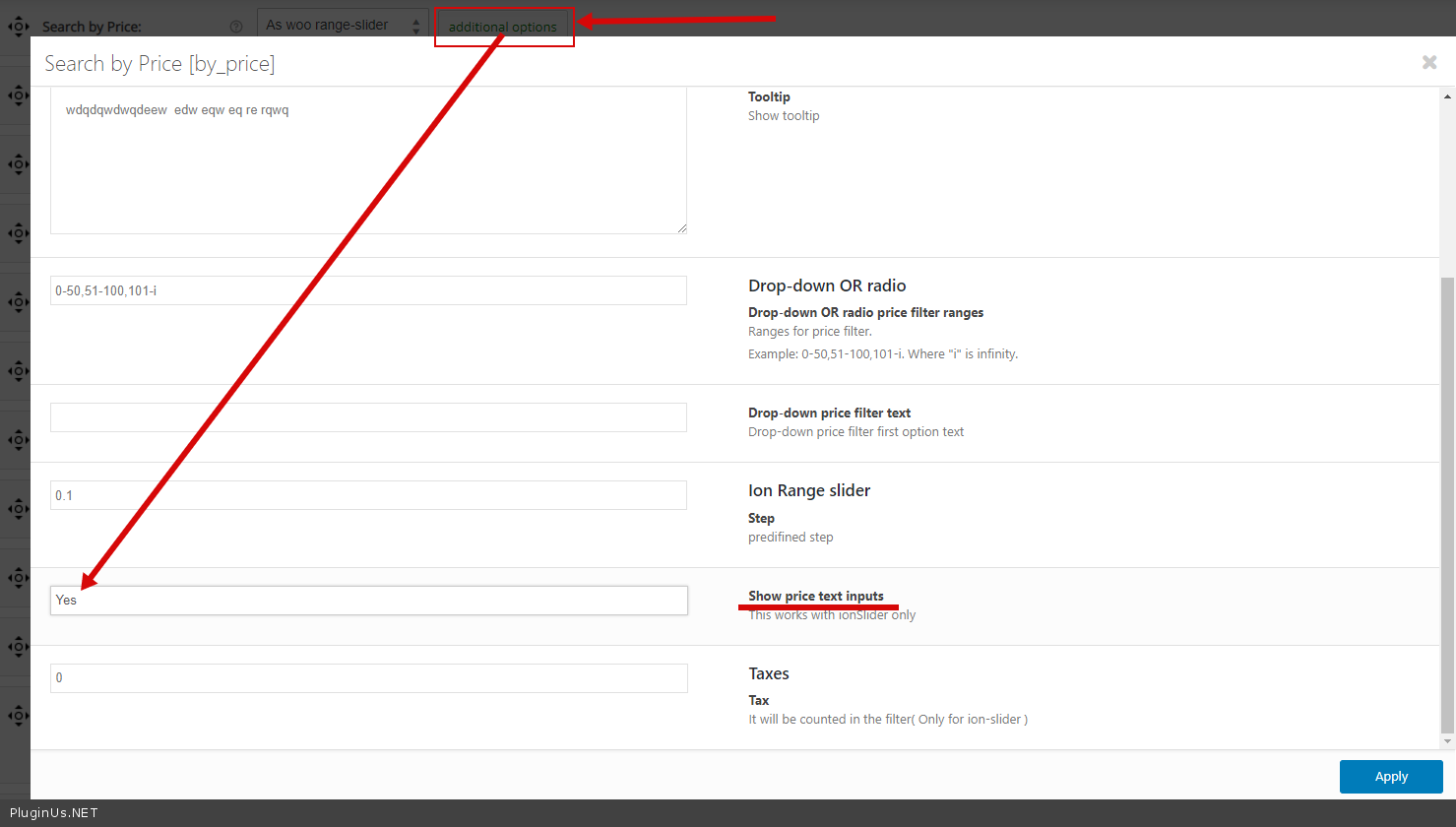
Quote from BT on April 2, 2021, 18:01In regard to the check option - https://c2n.me/4bxxpGG.png
This provides the text field I need but I also need to have additional price range text links that perform the filtering. for example, clicking on "$0 -$50" 0r "$50-$100", etc. would filter by those prices. (See screenshot in the 'Private data for this topic'.) Your timely response is appreciated.
In regard to the check option - https://c2n.me/4bxxpGG.png
This provides the text field I need but I also need to have additional price range text links that perform the filtering. for example, clicking on"$0 -$50" 0r"$50-$100", etc. would filter by those prices. (See screenshot in the 'Private data for this topic'.) Your timely response is appreciated.
Quote from Pablo Borysenco on April 5, 2021, 11:54Hello
- this is only possible in dropdown - https://c2n.me/4bzds4J.png
- the plugin does not have such a feature, you need customization of the code. To get an example - wp-content\plugins\woocommerce-products-filter\views\shortcodes\woof_price_filter_slider.php
Hello
- this is only possible in dropdown - https://c2n.me/4bzds4J.png
- the plugin does not have such a feature, you need customization of the code. To get an example - wp-content\plugins\woocommerce-products-filter\views\shortcodes\woof_price_filter_slider.php
Quote from BT on April 8, 2021, 18:39
- Can I display the new woof_quick_search_form inside the woof_widget?
- Can I create a custom version of the woof_widget add add features and html that I need? Can I do this without being overridden with future plugin updates?
- In order to customize the code for example " wp-content\plugins\woocommerce-products-filter\views\shortcodes\woof_price_filter_slider.php" how would I customize without being overridden with future plugin updates?
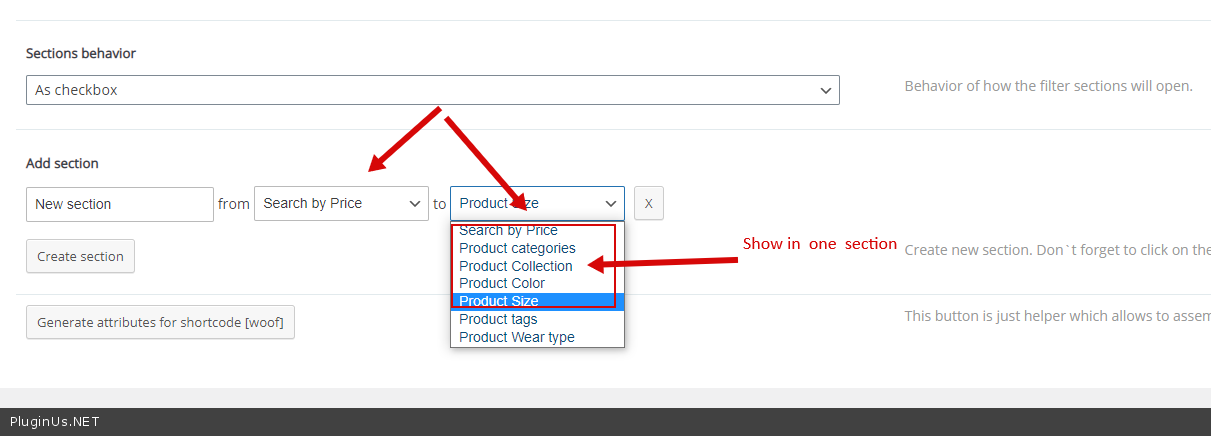
- For the new Sections feature, can I have more than one filter-element in one [close/open]-section?
- Can I display the new woof_quick_search_form inside the woof_widget?
- Can I create a custom version of the woof_widget add add features and html that I need? Can I do this without being overridden with future plugin updates?
- In order to customize the code for example" wp-content\plugins\woocommerce-products-filter\views\shortcodes\woof_price_filter_slider.php" how would I customize without being overridden with future plugin updates?
- For the new Sections feature, can I have more than one filter-element in one [close/open]-section?
Quote from Pablo Borysenco on April 9, 2021, 14:50Hello
- Unfortunately no
- There is no such feature for a widget. but you can make custom each filter - https://products-filter.com/can-i-override-any-extension-view-file-for-my-site-needs/
- read this - https://products-filter.com/hook/woof_price_slider_html/
- yes - https://c2n.me/4bDeA1J.png
Hello
- Unfortunately no
- There is no such feature for a widget. but you can make custom each filter - https://products-filter.com/can-i-override-any-extension-view-file-for-my-site-needs/
- read this - https://products-filter.com/hook/woof_price_slider_html/
- yes - https://c2n.me/4bDeA1J.png
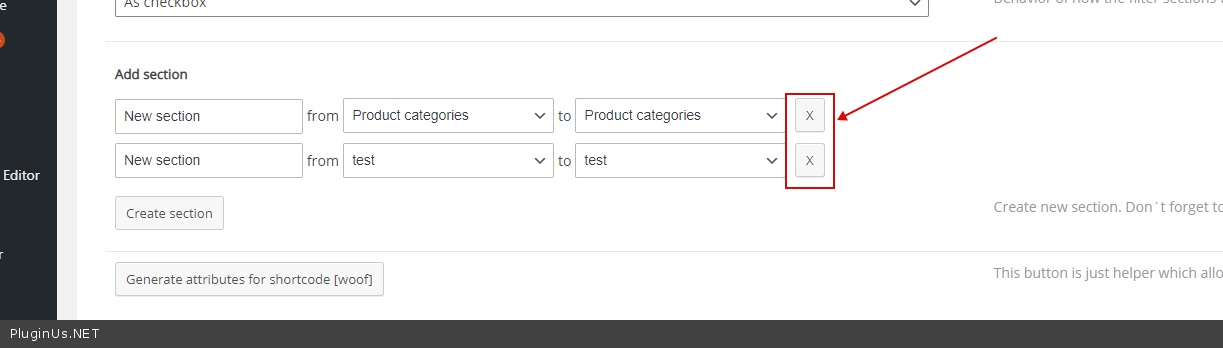
Quote from BT on April 29, 2021, 22:16I am having issues removing sections from the settings. When I click the "X" next to the section I want to remove nothing happens.
I am having issues removing sections from the settings. When I click the"X" next to the section I want to remove nothing happens.
Quote from Pablo Borysenco on April 30, 2021, 12:43Hello
Do you mean this - https://c2n.me/4bT7XXX.png
Can you drop me wp-admin access - https://c2n.me/43SC6rb.png ->https://c2n.me/42BAoj4.png
Hello
Do you mean this - https://c2n.me/4bT7XXX.png
Can you drop me wp-admin access - https://c2n.me/43SC6rb.png ->https://c2n.me/42BAoj4.png

