
Custom Ordering by meta_value seems not compatible with WOOF + Ajax
The support doesn work on Saturdays and Sundays, so some Friday requests can be answered on Monday. If you have problems with registration ask help on contact us page pleaseIf you not got email within 24~36 business hours, firstly check your spam box, and if no any email from the support there - back to the forum and read answer here. DO NOT ANSWER ON EMAILS [noreply@pluginus.net] FROM THE FORUM!! Emails are just for your info, all answers should be published only here.
The support doesn work on Saturdays and Sundays, so some Friday requests can be answered on Monday.

Quote from Tobias on August 23, 2021, 17:58Hello, we are using the premium Version of WOOF for our Onlineshop. I'm trying to add a new sorting option to the shop that sorts by a numeric custom meta_value (product_visit_count). Sorting at first works fine, but as soon as any ajax filtering is triggered WOOF defaults back to sorting by product name alphabetical.
This is the site: https://galerievoigt.de/produkt-kategorie/uhren/
The Default Sorting in WooCommerce is the newly added sorting order "Nach Beliebtheit (V)".
With the attached link, this product should be the first one: https://imgur.com/ZTtcE73
After changing any WOOF Filter the sorting seems to break.
This is the code that generates the sorting:
[spoiler]<?php
function skyverge_add_postmeta_ordering_args( $sort_args ) {
$orderby_value = isset( $_GET['orderby'] ) ? wc_clean( $_GET['orderby'] ) : apply_filters( 'woocommerce_default_catalog_orderby', get_option( 'woocommerce_default_catalog_orderby' ) );
switch( $orderby_value ) {
case 'visits':
$sort_args['orderby'] = 'meta_value_num';
$sort_args['order'] = 'desc';
$sort_args['meta_key'] = 'product_visit_count';
break;
}
return $sort_args;
}
add_filter( 'woocommerce_get_catalog_ordering_args', 'skyverge_add_postmeta_ordering_args' );// Add these new sorting arguments to the sortby options on the frontend
function skyverge_add_new_postmeta_orderby( $sortby ) {$sortby['visits'] = __( 'Nach Beliebtheit (V)', 'woocommerce' );
return $sortby;
}
add_filter( 'woocommerce_default_catalog_orderby_options', 'skyverge_add_new_postmeta_orderby' );
add_filter( 'woocommerce_catalog_orderby', 'skyverge_add_new_postmeta_orderby' );?>[/spoiler]
Thank you for your help!
Hello, we are using the premium Version of WOOF for our Onlineshop. I'm trying to add a new sorting option to the shop that sorts by a numeric custom meta_value (product_visit_count). Sorting at first works fine, but as soon as any ajax filtering is triggered WOOF defaults back to sorting by product name alphabetical.
This is the site: https://galerievoigt.de/produkt-kategorie/uhren/
The Default Sorting in WooCommerce is the newly added sorting order"Nach Beliebtheit (V)".
With the attached link, this product should be the first one: https://imgur.com/ZTtcE73
After changing any WOOF Filter the sorting seems to break.
This is the code that generates the sorting:
function skyverge_add_postmeta_ordering_args( $sort_args ) { // Add these new sorting arguments to the sortby options on the frontend $sortby['visits'] = __( 'Nach Beliebtheit (V)', 'woocommerce' ); ?>
$orderby_value = isset( $_GET['orderby'] ) ? wc_clean( $_GET['orderby'] ) : apply_filters( 'woocommerce_default_catalog_orderby', get_option( 'woocommerce_default_catalog_orderby' ) );
switch( $orderby_value ) {
case 'visits':
$sort_args['orderby'] = 'meta_value_num';
$sort_args['order'] = 'desc';
$sort_args['meta_key'] = 'product_visit_count';
break;
}
return $sort_args;
}
add_filter( 'woocommerce_get_catalog_ordering_args', 'skyverge_add_postmeta_ordering_args' );
function skyverge_add_new_postmeta_orderby( $sortby ) {
return $sortby;
}
add_filter( 'woocommerce_default_catalog_orderby_options', 'skyverge_add_new_postmeta_orderby' );
add_filter( 'woocommerce_catalog_orderby', 'skyverge_add_new_postmeta_orderby' );
Thank you for your help!
Quote from Tobias on August 24, 2021, 10:28Added Envato Order ID
Added Envato Order ID

Quote from Pablo Borysenco on August 24, 2021, 11:37Hello Tobias
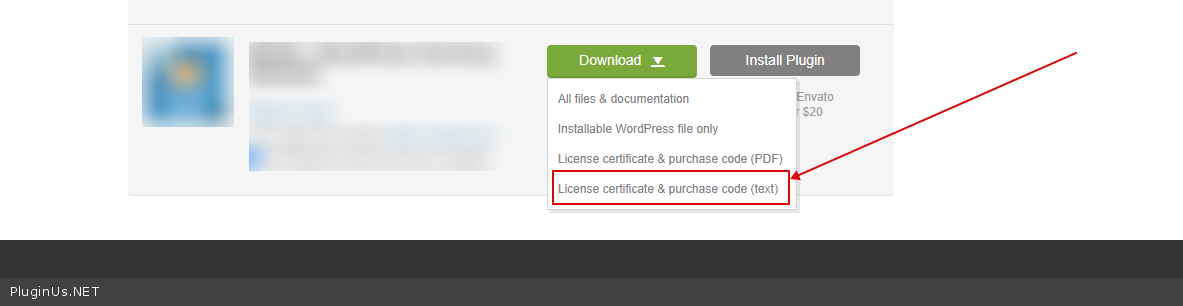
To get license key - https://codecanyon.net/downloads -> https://c2n.me/49ZXJv0.png
Paste your license key here - https://share.pluginus.net/image/i20210618130558.png -> https://share.pluginus.net/image/i20210618130614.png
Please update the plugin to latest version - https://products-filter.com/how-to-make-auto-update-for-wordpress-plugins-and-themes-bought-on-envato
Please use this hook - woof_order_catalog - https://products-filter.com/woof_order_catalog
OR this hook to add order data - woof_products_query
Hello Tobias
To get license key - https://codecanyon.net/downloads -> https://c2n.me/49ZXJv0.png
Paste your license key here - https://share.pluginus.net/image/i20210618130558.png -> https://share.pluginus.net/image/i20210618130614.png


Please update the plugin to latest version - https://products-filter.com/how-to-make-auto-update-for-wordpress-plugins-and-themes-bought-on-envato
Please use this hook - woof_order_catalog - https://products-filter.com/woof_order_catalog
OR this hook to add order data - woof_products_query
Quote from Tobias on August 24, 2021, 11:40Hi Pablo,
I've added the key to the private data.
I'll try the hook next and give you feedback. Thank you very much!
Hi Pablo,
I've added the key to the private data.
I'll try the hook next and give you feedback. Thank you very much!
Quote from Tobias on August 24, 2021, 11:44Could you give me an example how to hook into the function?
Could you give me an example how to hook into the function?
Quote from Pablo Borysenco on August 24, 2021, 12:41An example:
add_filter('woof_order_catalog', function( $sort_args){
$sort_args['orderby'] = 'meta_value_num';
$sort_args['order'] = 'desc';
$sort_args['meta_key'] = 'product_visit_count';return $sort_args;
},10);
An example:
add_filter('woof_order_catalog', function( $sort_args){
$sort_args['orderby'] = 'meta_value_num';
$sort_args['order'] = 'desc';
$sort_args['meta_key'] = 'product_visit_count';
return $sort_args;
},10);
Quote from Tobias on August 24, 2021, 16:20Worked, thank you very much!
Worked, thank you very much!