

Conditional Filtering
The support doesn work on Saturdays and Sundays, so some Friday requests can be answered on Monday. If you have problems with registration ask help on contact us page pleaseIf you not got email within 24~36 business hours, firstly check your spam box, and if no any email from the support there - back to the forum and read answer here. DO NOT ANSWER ON EMAILS [noreply@pluginus.net] FROM THE FORUM!! Emails are just for your info, all answers should be published only here.
The support doesn work on Saturdays and Sundays, so some Friday requests can be answered on Monday.

Quote from impixemsa on May 3, 2021, 17:19Hello
We have a website using the filtering with conditional rules.
How can we set the rules to only display the next set of filters based on the previous selection?
e.g the client will filter as follow:
- Select a brand
- Select a model of the brand your have selected in the previous filter.
The model selection will depend on the brand selectede.g. Brand: Teltonika model will be all teltonica models OR brand: Cisco model will be all the Cisco models
So no other brands's models will display ONLY the selected brands modeles.
please see www.poynting.tech/router-list
Hello
We have a website using the filtering with conditional rules.
How can we set the rules to only display the next set of filters based on the previous selection?
e.g the client will filter as follow:
- Select a brand
- Select a model of the brand your have selected in the previous filter.
The model selection will depend on the brand selected
e.g. Brand: Teltonika model will be all teltonica models OR brand: Cisco model will be all the Cisco models
So no other brands's models will display ONLY the selected brands modeles.
please see http://www.poynting.tech/router-list

Quote from Pablo Borysenco on May 4, 2021, 12:07Hello
In this case, all models must be in the same attribute
OR
paste all attributes of the models - https://c2n.me/4bUQvxq.png and options - https://c2n.me/4bUQAwm.png
Hello
In this case, all models must be in the same attribute
OR
paste all attributes of the models - https://c2n.me/4bUQvxq.png and options - https://c2n.me/4bUQAwm.png
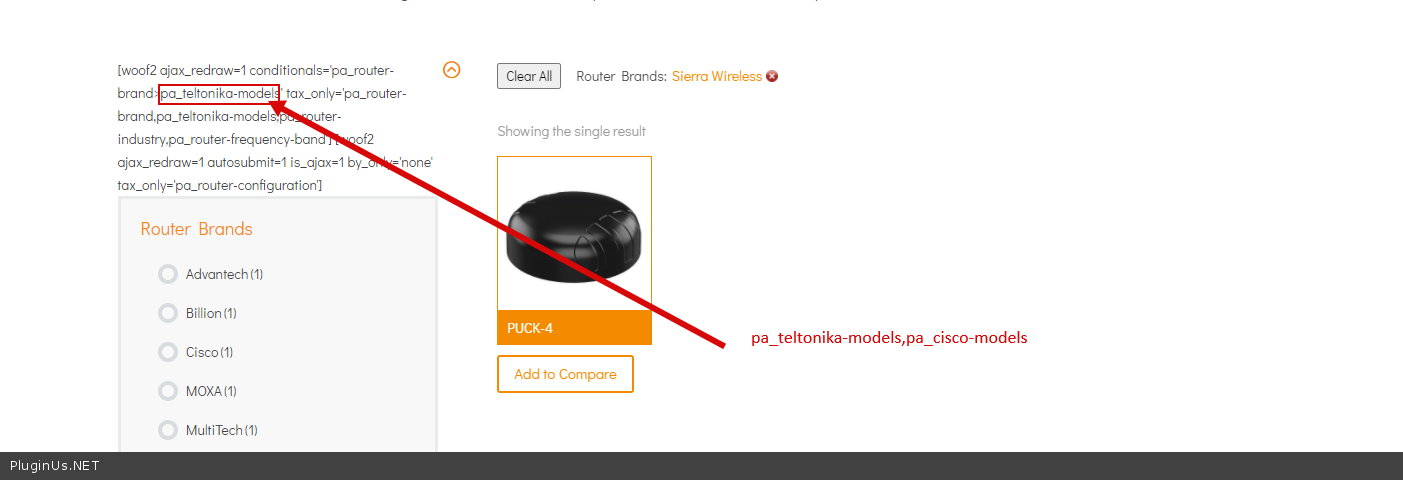
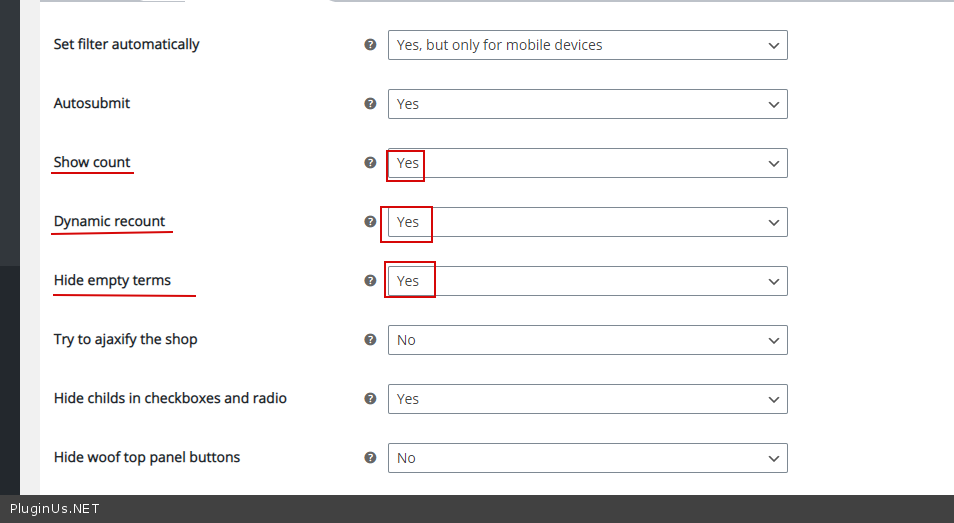
Quote from impixemsa on May 4, 2021, 14:42Hi Pablo,
Thank you have done the changes but its not working i kept the woof code at the top so you can see the settings i used.
I also updated the private window so you can login
Hi Pablo,
Thank you have done the changes but its not working i kept the woof code at the top so you can see the settings i used.
I also updated the private window so you can login
Quote from impixemsa on May 4, 2021, 17:37Hi I need a solution and fast please I have a deadline.
What we need is the best solution/configuration of selection of a brand, that selected brands models to appear and then the frequency band.
Hi I need a solution and fast please I have a deadline.
What we need is the best solution/configuration of selection of a brand, that selected brands models to appear and then the frequency band.
Quote from impixemsa on May 4, 2021, 17:49So what we need:
http://c2n.me/4bV6HPM
when cisco is selected ONLY CISCO should show NO OTHER BRANDS MODELS.
Please help
So what we need:
when cisco is selected ONLY CISCO should show NO OTHER BRANDS MODELS.
Please help
Quote from impixemsa on May 4, 2021, 17:59I cannot find a tutorial on how to create this one: http://c2n.me/4bV79Ma
I cannot find a tutorial on how to create this one: http://c2n.me/4bV79Ma
Quote from impixemsa on May 4, 2021, 23:16I have tried to configure the shortcode using the guide provided:https://products-filter.com/extencion/conditionals/
But just does not get it to work.
I have tried to configure the shortcode using the guide provided:https://products-filter.com/extencion/conditionals/
But just does not get it to work.
Quote from Pablo Borysenco on May 5, 2021, 13:36Hello
I set up a page - https://poynting.tech/test-woof/
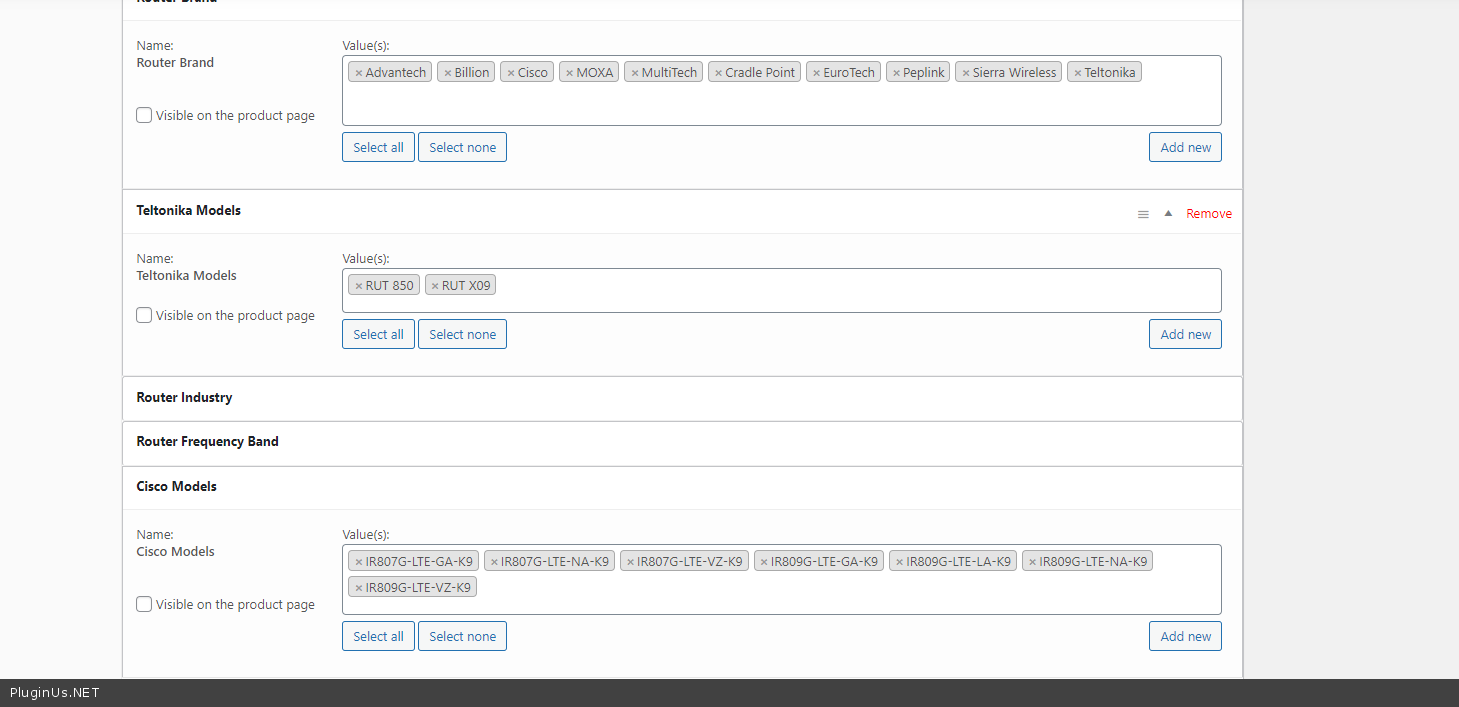
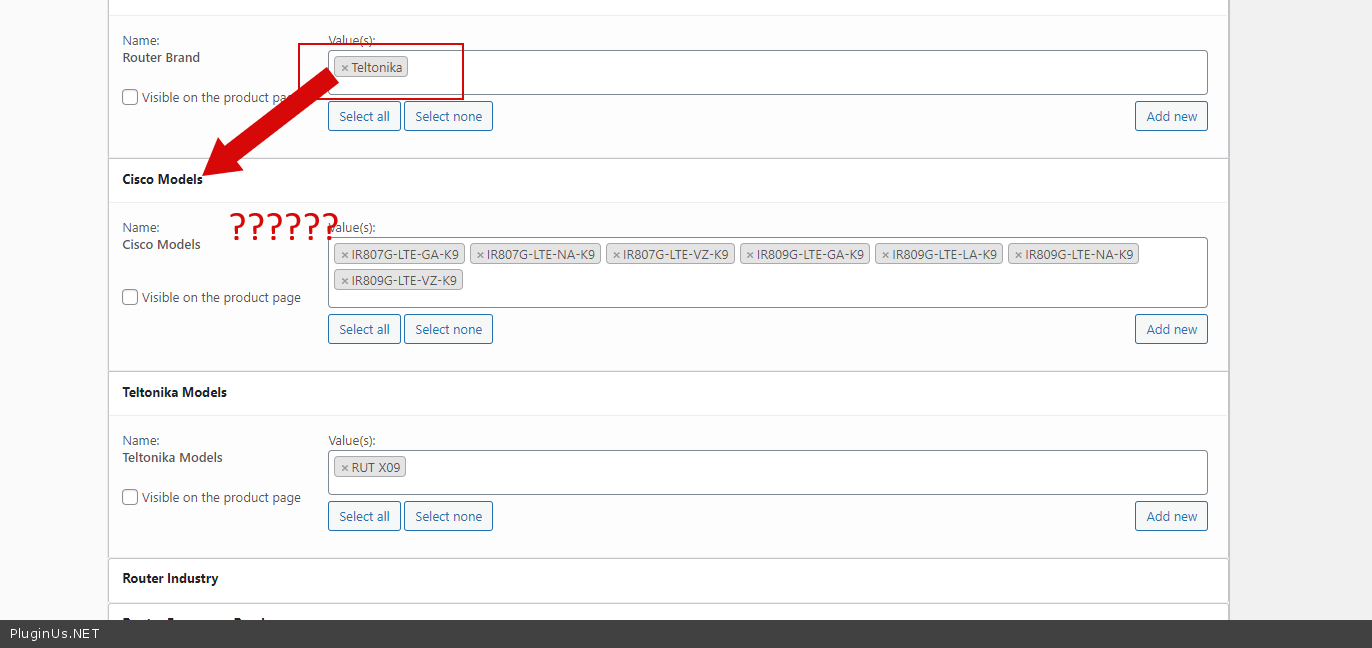
but your products are not made correctly = https://c2n.me/4bVCpuC.png and https://c2n.me/4bVCsMx.png your products may have several brands and models that are not related to these brands -
Hello
I set up a page - https://poynting.tech/test-woof/
but your products are not made correctly = https://c2n.me/4bVCpuC.png and https://c2n.me/4bVCsMx.png your products may have several brands and models that are not related to these brands -
Quote from impixemsa on May 5, 2021, 13:51Hi Pablo,
I have reviewed your page test-woof. But when selecting the brand teltonika the models of Cisco also appears... http://c2n.me/4bVCX9O
So we have 14 main brands each brand has their own set of models. Some products can be used with multi router brands e.g. Teltonika and Cisco etc. http://c2n.me/4bVDarD
But a client will always only have one router in their homes for internet so they will select only Teltonika or only Cisco then that selected brand's models should show not all 14 brands models as per this screen shot: http://c2n.me/4bVCX9O.
I have corrected the product in this screen shot but it did not make a difference. https://c2n.me/4bVCsMx.png
Hi Pablo,
I have reviewed your page test-woof. But when selecting the brand teltonika the models of Cisco also appears... http://c2n.me/4bVCX9O
So we have 14 main brands each brand has their own set of models. Some products can be used with multi router brands e.g. Teltonika and Cisco etc. http://c2n.me/4bVDarD
But a client will always only have one router in their homes for internet so they will select only Teltonika or only Cisco then that selected brand's models should show not all 14 brands models as per this screen shot: http://c2n.me/4bVCX9O.
I have corrected the product in this screen shot but it did not make a difference. https://c2n.me/4bVCsMx.png
Quote from Pablo Borysenco on May 6, 2021, 11:46Hello
The filter works 100% correctly. The problem is in the products! The filter shows the attributes that are relevant for the current search query. In this case, if you chose Teltonika - you have products that have Teltonika AND Cisco models.
So if products with Teltonika do not have Cisco models then the plugin will not show this filter because there are no products for this search query
Hello
The filter works 100% correctly. The problem is in the products! The filter shows the attributes that are relevant for the current search query. In this case, if you chose Teltonika - you have products that have Teltonika AND Cisco models.
So if products with Teltonika do not have Cisco models then the plugin will not show this filter because there are no products for this search query
Quote from impixemsa on May 6, 2021, 23:31Hi Pablo,
Thank you for your assistance.
So an update for future users that might experience the same issue:
based on the conditional function within the plugin the feature did not meet the requirements for our filter needs.
We ended up using Hierarchy drop-down. Now it took me a while to figure it out but here are my steps:
- Install the CPT UI plugin to create a custom taxonomie for your specific filter e.g. Brand
Under this taxonomie you can create sub categories that will server as the brand filtering e.g. Model > specific models- In your settings under woocoomerce > filtering > structure you need to activate your new taxonomie and select Hierarchy drop-down.
- Your [woof] should include the shortcode parm taxonomies=yourtaxomoniename e.g. [woof taxonomies=brands]
- For products the new taxonomie will reside on the left of your products where you need to assign the specific product to your custom taxonomie category.
Hope it will help someone.
Have a nice day.
Hi Pablo,
Thank you for your assistance.
So an update for future users that might experience the same issue:
based on the conditional function within the plugin the feature did not meet the requirements for our filter needs.
We ended up using Hierarchy drop-down. Now it took me a while to figure it out but here are my steps:
- Install the CPT UI plugin to create a custom taxonomie for your specific filter e.g. Brand
Under this taxonomie you can create sub categories that will server as the brand filtering e.g. Model > specific models - In your settings under woocoomerce > filtering > structure you need to activate your new taxonomie and select Hierarchy drop-down.
- Your [woof] should include the shortcode parm taxonomies=yourtaxomoniename e.g. [woof taxonomies=brands]
- For products the new taxonomie will reside on the left of your products where you need to assign the specific product to your custom taxonomie category.
Hope it will help someone.
Have a nice day.
Quote from Pablo Borysenco on May 7, 2021, 12:11Hello
Ok! Great Thank you for cooperation
Hello
Ok! Great Thank you for cooperation