
Colour not being picked up
The support doesn work on Saturdays and Sundays, so some Friday requests can be answered on Monday. If you have problems with registration ask help on contact us page pleaseIf you not got email within 24~36 business hours, firstly check your spam box, and if no any email from the support there - back to the forum and read answer here. DO NOT ANSWER ON EMAILS [noreply@pluginus.net] FROM THE FORUM!! Emails are just for your info, all answers should be published only here.
The support doesn work on Saturdays and Sundays, so some Friday requests can be answered on Monday.

Quote from KDS on January 6, 2021, 14:53My site is here and this is the link to the woof filter i have set up https://kitchendoorspecialist.co.uk/shop/
i have two problems, one is that the filter menu is greyed out and unasuable and the second is the colour section is pickingup 3 random colours and not the colours of my products (which are an attribute in the woo commerce set up)
I'm using elementor and woo commerce if that helps.
Thanks in advance.
My site is here and this is the link to the woof filter i have set up https://kitchendoorspecialist.co.uk/shop/
i have two problems, one is that the filter menu is greyed out and unasuable and the second is the colour section is pickingup 3 random colours and not the colours of my products (which are an attribute in the woo commerce set up)
I'm using elementor and woo commerce if that helps.
Thanks in advance.

Quote from Pablo Borysenco on January 7, 2021, 12:34Hello
Paste your license key here - https://c2n.me/43SC6rb.png -> https://c2n.me/42HBIt7.png
Please update plugin to latest version - https://products-filter.com/how-to-make-auto-update-for-wordpress-plugins-and-themes-bought-on-envato/
Hello
Paste your license key here - https://c2n.me/43SC6rb.png -> https://c2n.me/42HBIt7.png


Please update plugin to latest version - https://products-filter.com/how-to-make-auto-update-for-wordpress-plugins-and-themes-bought-on-envato/
Quote from KDS on January 8, 2021, 16:56i've just updated the plugin and its now seems to be working, although it shows that the count of products is zero which is incorrect.
I also need help with the colour section still though as its picking up 3 colours and not using the attribute colour that each product has.
i've post the code i think let me know if its not the thing you need.
i've just updated the plugin and its now seems to be working, although it shows that the count of products is zero which is incorrect.
I also need help with the colour section still though as its picking up 3 colours and not using the attribute colour that each product has.
i've post the code i think let me know if its not the thing you need.
Quote from Pablo Borysenco on January 11, 2021, 12:21Hello
Please disable turbo mode and do a test
If no luck - drop me wp-admin access - https://c2n.me/43SC6rb.png ->https://c2n.me/42BAoj4.png
Hello
Please disable turbo mode and do a test
If no luck - drop me wp-admin access - https://c2n.me/43SC6rb.png ->https://c2n.me/42BAoj4.png

Quote from KDS on January 11, 2021, 14:53i have disabled turbo mode and it still didnt work.
i have posted the log in access in the private data bit
i have disabled turbo mode and it still didnt work.
i have posted the log in access in the private data bit
Quote from Pablo Borysenco on January 12, 2021, 11:56Hello
https://c2n.me/4awgyuA.png - I can't check my plugin settings
Hello
https://c2n.me/4awgyuA.png - I can't check my plugin settings
Quote from KDS on January 12, 2021, 13:04i have updated the user role on the website.
i have updated the user role on the website.
Quote from Pablo Borysenco on January 12, 2021, 13:28I checked it
You only have three colors, and there are no products with these colors - https://c2n.me/4awnrLc.png
I checked it
You only have three colors, and there are no products with these colors - https://c2n.me/4awnrLc.png

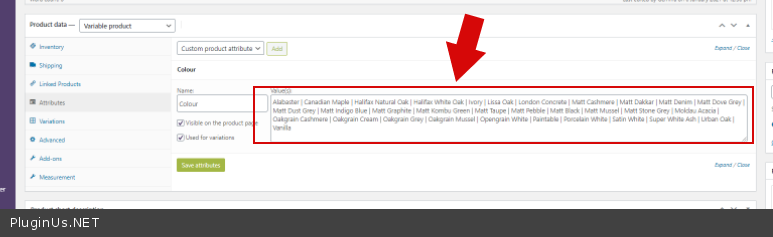
Quote from KDS on January 12, 2021, 13:36so all my products are variable products and the colour is an attribute defined here
so all my products are variable products and the colour is an attribute defined here

Quote from Pablo Borysenco on January 13, 2021, 11:37Hello
Attributes must be taxonomies to filter.
There is no such (does not exist) filter that filters by such attributes - https://c2n.me/4axaETu.png - it's just text that only applies to one product
Hello
Attributes must be taxonomies to filter.
There is no such (does not exist) filter that filters by such attributes - https://c2n.me/4axaETu.png - it's just text that only applies to one product
Quote from KDS on January 25, 2021, 17:13How can i get a refund for this plugin as it doesnt do what i needed please. We dont use taxonomies on our site and wanted to filter on the variable product attribute?
How can i get a refund for this plugin as it doesnt do what i needed please. We dont use taxonomies on our site and wanted to filter on the variable product attribute?
Quote from Pablo Borysenco on January 26, 2021, 13:31Hello
a refund for this plugin as it doesnt do what i needed please - unfortunately this is not a reason for the refund. If you disagree with me - please open a dispute on.
For such cases, we have a free version of the plugin, but you did not use this.
As an alternative solution:
As I already wrote to you above, there are no filters that will work with this kind of attributes. But you still need to use a filter (not necessarily mine) I advise you to transfer these attributes to the taxonomy
Hello
a refund for this plugin as it doesnt do what i needed please - unfortunately this is not a reason for the refund. If you disagree with me - please open a dispute on.
For such cases, we have a free version of the plugin, but you did not use this.
As an alternative solution:
As I already wrote to you above, there are no filters that will work with this kind of attributes. But you still need to use a filter (not necessarily mine) I advise you to transfer these attributes to the taxonomy