definiteimage(@definiteimage)
24 Posts
Customers
Quote from definiteimage on February 12, 2021, 22:34
In my shop right now, i am using the "colors" option to display different brands and products in my store as filters, however as you can see here they are all stacked on top of eachother in one column. How can i make them appear like in the demo where theyre are a few in a row?
In my shop right now, i am using the"colors" option to display different brands and products in my store as filters, however as you can see here they are all stacked on top of eachother in one column. How can i make them appear like in the demo where theyre are a few in a row?

Pablo Borysenco(@pavlo_borysenco)
34,196 Posts
Quote from Pablo Borysenco on February 15, 2021, 13:15
Hello
Paste your license key here - https://c2n.me/43SC6rb.png -> https://c2n.me/42HBIt7.png
Hello
Paste your license key here - https://c2n.me/43SC6rb.png -> https://c2n.me/42HBIt7.png
definiteimage(@definiteimage)
24 PostsTopic Author
Customers
Quote from definiteimage on February 15, 2021, 20:26
Hi, I bought it on codecanyon, where can i find the license number to show you?
Hi, I bought it on codecanyon, where can i find the license number to show you?
Pablo Borysenco(@pavlo_borysenco)
34,196 Posts
Quote from Pablo Borysenco on February 16, 2021, 11:32
Hello
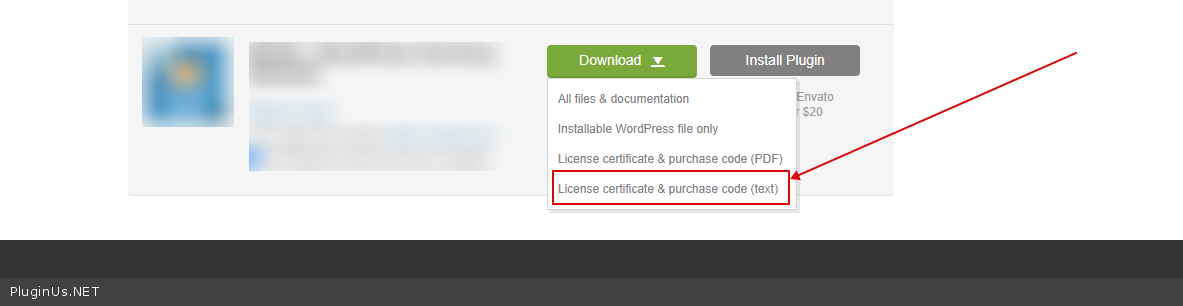
To get license key - https://codecanyon.net/downloads -> https://c2n.me/49ZXJv0.png
Hello
To get license key - https://codecanyon.net/downloads -> https://c2n.me/49ZXJv0.png
definiteimage(@definiteimage)
24 PostsTopic Author
Customers
Quote from definiteimage on February 16, 2021, 16:25
ok, done
ok, done
Pablo Borysenco(@pavlo_borysenco)
34,196 Posts
Quote from Pablo Borysenco on February 17, 2021, 11:56
Hello
Please add this CSS
.sidebar .widget .woof ul.woof_list_color li
display: inline-block;
Hello
Please add this CSS
.sidebar .widget .woof ul.woof_list_color li
display: inline-block;