The support doesn work on Saturdays and Sundays, so some Friday requests can be answered on Monday. If you have problems with registration ask help on contact us page please If you not got email within 24~36 business hours, firstly check your spam box, and if no any email from the support there - back to the forum and read answer here. DO NOT ANSWER ON EMAILS [noreply@pluginus.net] FROM THE FORUM!! Emails are just for your info, all answers should be published only here. The support doesn work on Saturdays and Sundays, so some Friday requests can be answered on Monday.
idigitalise(@idigitalise)
2 Posts
Customers
March 4, 2020, 15:16
Quote from idigitalise on March 4, 2020, 15:16
Hi -
We are having issues with updating and/or importing variations into our WooCommerce Catalog.
Steps:
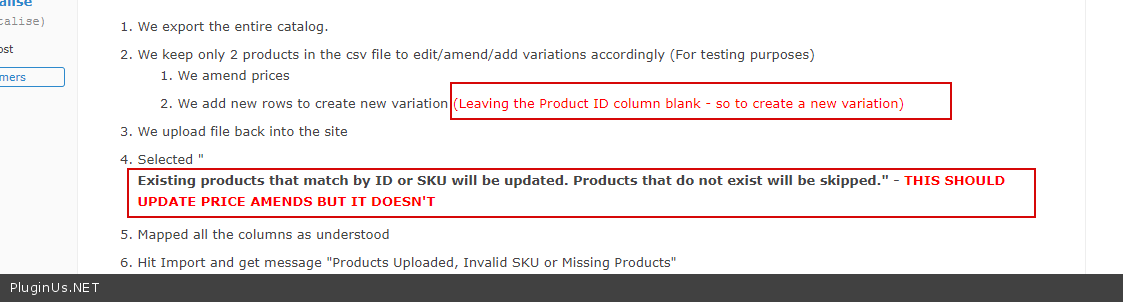
We export the entire catalog.
We keep only 2 products in the csv file to edit/amend/add variations accordingly (For testing purposes)
We amend prices
We add new rows to create new variation (Leaving the Product ID column blank - so to create a new variation)
We upload file back into the site
Selected "
Mapped all the columns as understood
Hit Import and get message "Products Uploaded, Invalid SKU or Missing Products"
When we check the products again there are missing from WooCommerce and also from the database.
Second attempt without selecting "
Please help me understand what are we doing wrong on importing. Our clients are getting frustrated as they have over 7000 line items to update and this plugins issue is delaying their launch.
Thanks
Hi -
We are having issues with updating and/or importing variations into our WooCommerce Catalog.
Steps:
We export the entire catalog.
We keep only 2 products in the csv file to edit/amend/add variations accordingly (For testing purposes)
We amend prices
We add new rows to create new variation (Leaving the Product ID column blank - so to create a new variation)
We upload file back into the site
Selected"
Mapped all the columns as understood
Hit Import and get message"Products Uploaded, Invalid SKU or Missing Products"
When we check the products again there are missing from WooCommerce and also from the database.
Second attempt without selecting"
Please help me understand what are we doing wrong on importing. Our clients are getting frustrated as they have over 7000 line items to update and this plugins issue is delaying their launch.
Thanks
Pablo Borysenco(@pavlo_borysenco)
34,196 Posts
March 5, 2020, 11:25
Quote from Pablo Borysenco on March 5, 2020, 11:25
Hello
For imports, we use native woocommerce functionality.
https://c2n.me/46jgCzc.png - It doesn’t work like that
If no luck - drop me wp-admin access. I will try to add my product
idigitalise(@idigitalise)
2 PostsTopic Author
Customers
March 5, 2020, 15:58
Quote from idigitalise on March 5, 2020, 15:58
Hi Pablo -
Thanks for getting back to me, I didn't think this was the case (i.e using WordPress Importer) when we purchased the plugin as it clearly stated it's an Import/Export plugin. :(
We needed a plugin that would do it all for us without using the WooCommerce Importer.
Unfortunately, this doesn't help our client.
Could you please advise on the next steps.
Thanks
Hi Pablo -
Thanks for getting back to me, I didn't think this was the case (i.e using WordPress Importer) when we purchased the plugin as it clearly stated it's an Import/Export plugin. :(
We needed a plugin that would do it all for us without using the WooCommerce Importer.
Unfortunately, this doesn't help our client.
Could you please advise on the next steps.
Thanks
Pablo Borysenco(@pavlo_borysenco)
34,196 Posts
March 6, 2020, 11:32
Quote from Pablo Borysenco on March 6, 2020, 11:32
Hello
Looks like I didn’t understand you
This plugin uses the native WooCommerce Importer. For correct import work you should read the documentation and act as described in the documentation. Unfortunately, there is no other way.
Hello
Looks like I didn’t understand you
This plugin uses the native WooCommerce Importer. For correct import work you should read the documentation and act as described in the documentation. Unfortunately, there is no other way.
We use cookies to ensure that we give you the best experience on our website. If you continue to use this site we will assume that you are happy with it.