

Brand filter (custom taxonomy) doesn't show on search results pages
The support doesn work on Saturdays and Sundays, so some Friday requests can be answered on Monday. If you have problems with registration ask help on contact us page pleaseIf you not got email within 24~36 business hours, firstly check your spam box, and if no any email from the support there - back to the forum and read answer here. DO NOT ANSWER ON EMAILS [noreply@pluginus.net] FROM THE FORUM!! Emails are just for your info, all answers should be published only here.
The support doesn work on Saturdays and Sundays, so some Friday requests can be answered on Monday.

Quote from stephane on January 13, 2021, 14:41Hi Pablo,
Me again...
I have a couple of issues, I hope you can help:1) The brand filter ("marques" custom taxonomy) appears on the shop page https://lamaisondezazou.com/boutique
but not on a search page e.g. https://lamaisondezazou.com/?product_cat=&s=Puzzle+d%27observation&post_type=product.
2) When use the Woof Filter and click on Filter button, the list of brands (marques) isn't filtered i.e. all brands are showing and therefore it ignores the results of the search.
Many thanks!
Stéphane
Hi Pablo,
Me again...
I have a couple of issues, I hope you can help:
1) The brand filter ("marques" custom taxonomy) appears on the shop page https://lamaisondezazou.com/boutique
but not on a search page e.g. https://lamaisondezazou.com/?product_cat=&s=Puzzle+d%27observation&post_type=product.
2) When use the Woof Filter and click on Filter button, the list of brands (marques) isn't filtered i.e. all brands are showing and therefore it ignores the results of the search.
Many thanks!
Stéphane

Quote from Pablo Borysenco on January 14, 2021, 11:42Hello Stéphane
- Ok! try this link - https://lamaisondezazou.com/?s=Puzzle+d%27observation&post_type=product as you can see, third-party text search adds an unnecessary attribute - product_cat
- My test - https://c2n.me/4ay5rfa
Do you use this plugin? - https://wordpress.org/plugins/perfect-woocommerce-brands/
Hello Stéphane
- Ok! try this link - https://lamaisondezazou.com/?s=Puzzle+d%27observation&post_type=product as you can see, third-party text search adds an unnecessary attribute - product_cat
- My test - https://c2n.me/4ay5rfa
Do you use this plugin? - https://wordpress.org/plugins/perfect-woocommerce-brands/
Quote from stephane on January 14, 2021, 12:04Hello Pablo, thanks for your prompt reply.
1) How can we solve this issue then?2) Sorry this seems to have been misinterpreted.
So the scenario is as follows. You do a search and end up on the search results page and the brand filter (marques) is missing on the left). https://lamaisondezazou.com/?s=Puzzle+d%27observation&post_type=product%C2%A0
If you click on the filter button from that page, the page reloads and now you see the brand (marques) filter on the left but all the brands are showing not just the ones for the products of the search results.
https://lamaisondezazou.com/?min_price=1&max_price=290&s=Puzzle+d%27observation&post_type=productNo the brands are a custom taxonomy, no third party plugin are used for it.
Thanks for your help!
Hello Pablo, thanks for your prompt reply.
1) How can we solve this issue then?
2) Sorry this seems to have been misinterpreted.
So the scenario is as follows. You do a search and end up on the search results page and the brand filter (marques) is missing on the left). https://lamaisondezazou.com/?s=Puzzle+d%27observation&post_type=product
If you click on the filter button from that page, the page reloads and now you see the brand (marques) filter on the left but all the brands are showing not just the ones for the products of the search results.
https://lamaisondezazou.com/?min_price=1&max_price=290&s=Puzzle+d%27observation&post_type=product
No the brands are a custom taxonomy, no third party plugin are used for it.
Thanks for your help!
Quote from Pablo Borysenco on January 15, 2021, 12:21Hello
1 you should ask in support of this third party plugin. Or use woof text search - https://products-filter.com/shortcode/woof_text_filter/
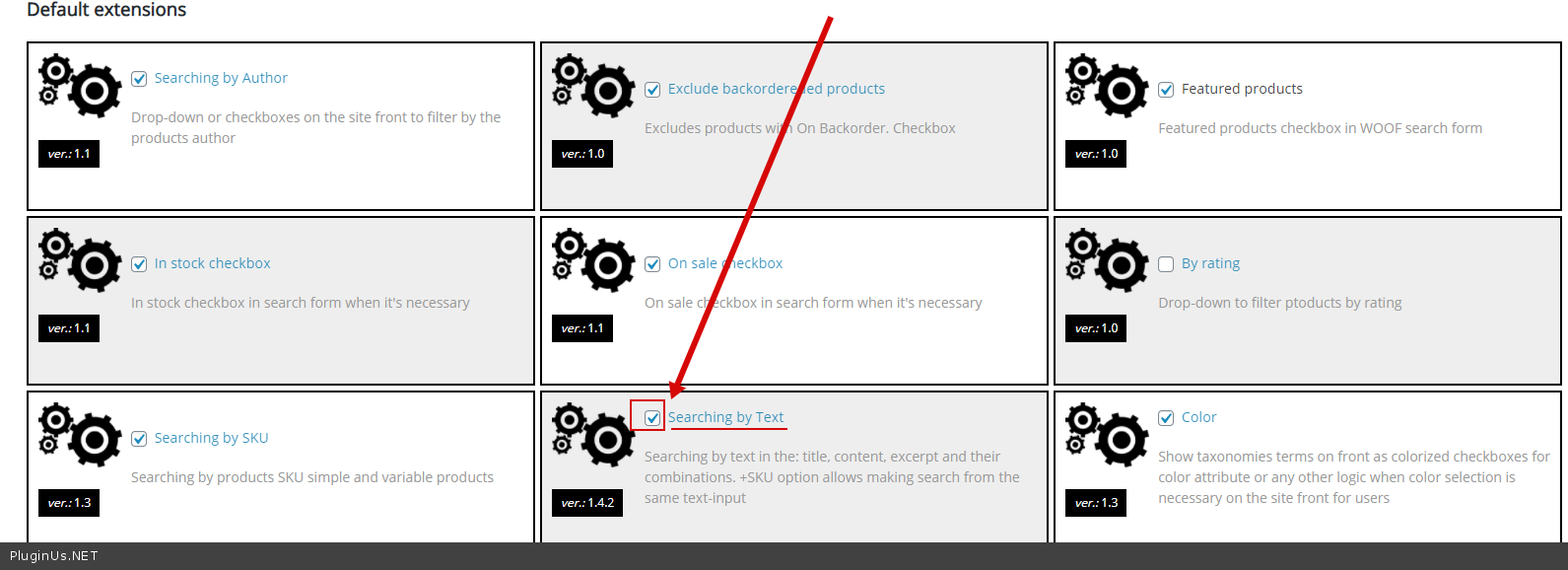
2 Please activate extension - https://c2n.me/4az30Lm.png Do you use "WOOF by category"?
Hello
1 you should ask in support of this third party plugin. Or use woof text search - https://products-filter.com/shortcode/woof_text_filter/
2 Please activate extension - https://c2n.me/4az30Lm.png Do you use "WOOF by category"?
Quote from stephane on January 15, 2021, 18:40Hello
- I'll try to deactivate the search module on the test site to see if it helps (this weekend)
- I did, but no change. I don't use WOOF by category (as far as I know anyway)
Hello
- I'll try to deactivate the search module on the test site to see if it helps (this weekend)
- I did, but no change. I don't use WOOF by category (as far as I know anyway)
Quote from Pablo Borysenco on January 18, 2021, 12:00Hello
Please drop me wp-admin access - https://c2n.me/43SC6rb.png ->https://c2n.me/42BAoj4.png I will check your settings
Hello
Please drop me wp-admin access - https://c2n.me/43SC6rb.png ->https://c2n.me/42BAoj4.png I will check your settings


Quote from stephane on January 18, 2021, 13:49Hello.
Thanks, I just added the private data as requested with admin access details.
Hello.
Thanks, I just added the private data as requested with admin access details.
Quote from Pablo Borysenco on January 19, 2021, 13:12Hello
Please update plugin to latest version - https://products-filter.com/how-to-make-auto-update-for-wordpress-plugins-and-themes-bought-on-envato/
clear all cache and do a test
Hello
Please update plugin to latest version - https://products-filter.com/how-to-make-auto-update-for-wordpress-plugins-and-themes-bought-on-envato/
clear all cache and do a test