
Basic question
The support doesn work on Saturdays and Sundays, so some Friday requests can be answered on Monday. If you have problems with registration ask help on contact us page pleaseIf you not got email within 24~36 business hours, firstly check your spam box, and if no any email from the support there - back to the forum and read answer here. DO NOT ANSWER ON EMAILS [noreply@pluginus.net] FROM THE FORUM!! Emails are just for your info, all answers should be published only here.
The support doesn work on Saturdays and Sundays, so some Friday requests can be answered on Monday.
Quote from Andre on October 2, 2020, 12:02Hello !
I just purchased your plug-in from Envato. Found really great all the tutorials
I have been watching your tutorial videos for a while before asking this question, and I am sorry, but I simply can't find the way to add a filter to the original list of filters shown by default.
I would like a slider for my product length values. How do I do that ?
Or simply add a filter... Usually there is a + button if you want to add a filter.... and - if you want to delete it. That leads to my other question : how do I delete one or 2 filters that I don't want ?
Is it possible to create 2 different set of filters, one for snowboard products for example and one for skis ?
Thanks for your precious help.
André M.
Hello !
I just purchased your plug-in from Envato. Found really great all the tutorials
I have been watching your tutorial videos for a while before asking this question, and I am sorry, but I simply can't find the way to add a filter to the original list of filters shown by default.
I would like a slider for my product length values. How do I do that ?
Or simply add a filter... Usually there is a + button if you want to add a filter.... and - if you want to delete it. That leads to my other question : how do I delete one or 2 filters that I don't want ?
Is it possible to create 2 different set of filters, one for snowboard products for example and one for skis ?
Thanks for your precious help.
André M.

Quote from Pablo Borysenco on October 2, 2020, 12:33Hello André
I would like a slider for my product length values. - If you mean this - https://c2n.me/49igeay.png - please read - https://products-filter.com/extencion/woocommerce-filter-by-meta-fields/
create a taxonomy(attribute) and the filter will automatically appear in the structure/ To enable/disable filter - https://c2n.me/49igtzT.png
Is it possible to create 2 different set of filters - only one filter can be displayed on one page
Hello André
I would like a slider for my product length values. - If you mean this - https://c2n.me/49igeay.png - please read - https://products-filter.com/extencion/woocommerce-filter-by-meta-fields/
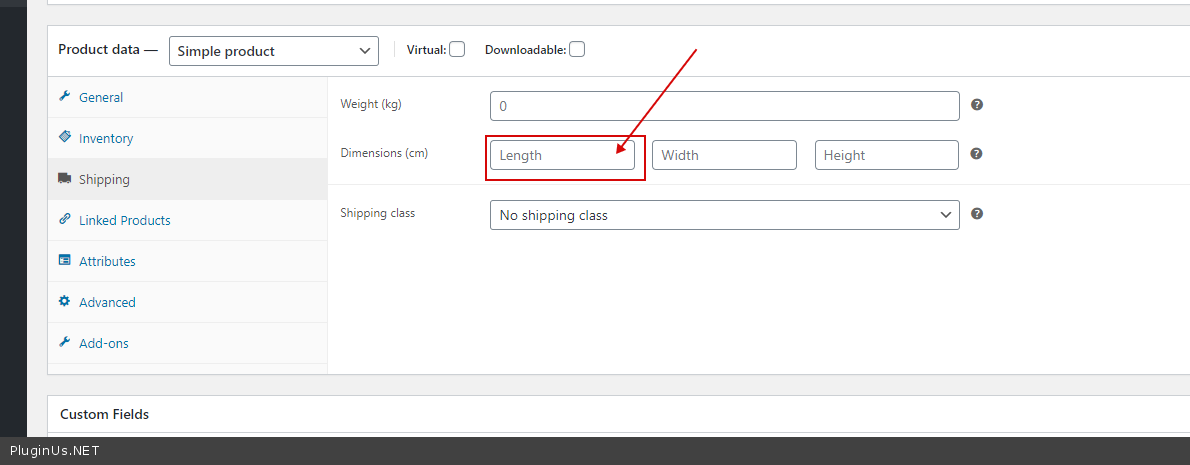
create a taxonomy(attribute) and the filter will automatically appear in the structure/ To enable/disable filter - https://c2n.me/49igtzT.png
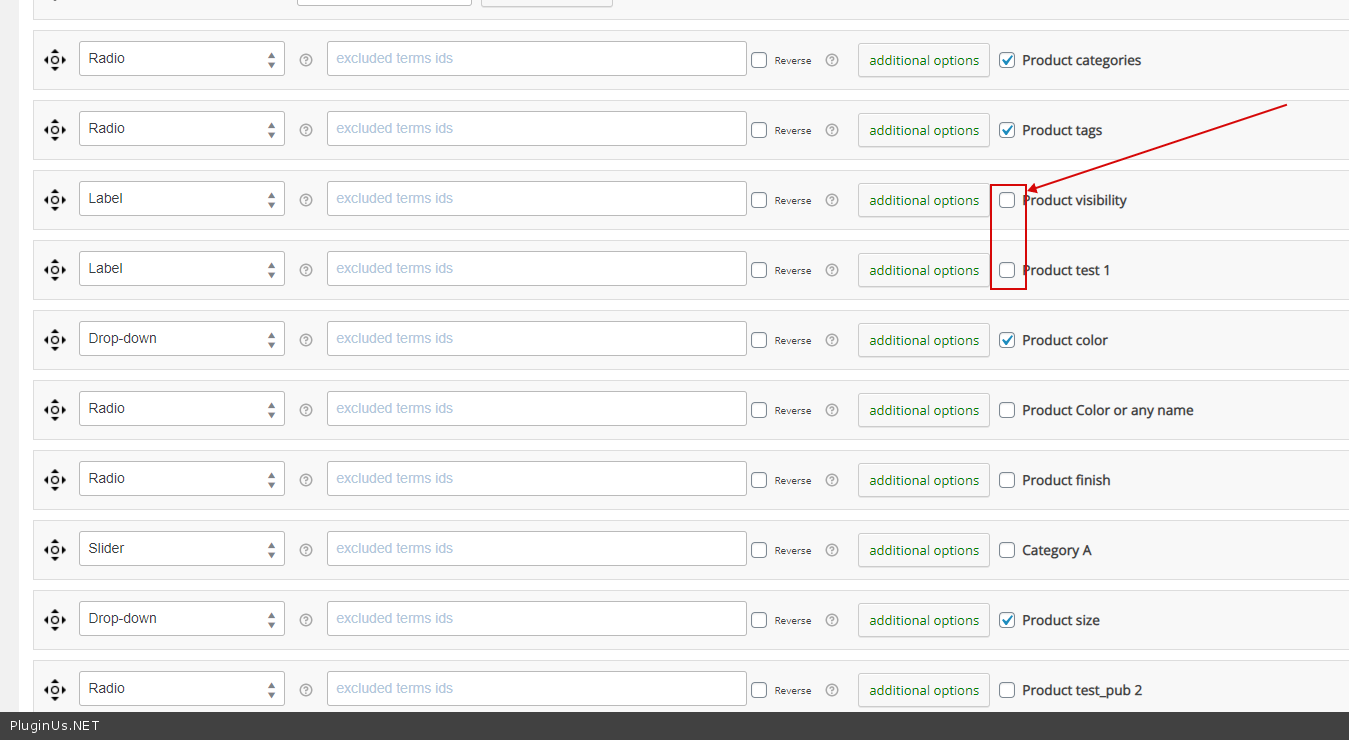
Is it possible to create 2 different set of filters - only one filter can be displayed on one page
Quote from Andre on October 2, 2020, 14:13Yes, with taxonomy or simply with an attribute that has a numerical value. Is it OK with attribute as well ?
How can I create 2 sets of filters, for 2 different pages. One page will only show "snowboard" category products, and the other page will only show "ski" category products.
Thanks for your fast answers, I appreciate.
Yes, with taxonomy or simply with an attribute that has a numerical value. Is it OK with attribute as well ?
How can I create 2 sets of filters, for 2 different pages. One page will only show"snowboard" category products, and the other page will only show"ski" category products.
Thanks for your fast answers, I appreciate.
Quote from Pablo Borysenco on October 5, 2020, 11:47Hello
with taxonomy or simply with an attribute that has a numerical value. Is it OK with attribute as well ? - attribute is a taxonomy. yes it will work
1) In category pages use shortcode - [woof_products] with attribute : taxonomies=product_cat:X Where X id your product category. ( if you use custom page )
2) In widgets use shortcode [woof] with attribute : * taxonomies=product_cat:X
+
tax_only - write taxonomies or products slug using comma
+
by_only - write any by-filter-elements there using comma: by_text,by_price,by_sku,by_author,by_insales,by_instock. Of course firstly user should enable extensions for that by-filter-elements
*- Do not forget set the same condition in [woof_products]3) For show or hide widgets on different pages - http://www.woocommerce-filter.com/how-to-show-or-hide-widget-only-on-selected-site-pages/
You can read more about shortcodes - http://www.woocommerce-filter.com/documentation/#!/section_3_1
Hello
with taxonomy or simply with an attribute that has a numerical value. Is it OK with attribute as well ? - attribute is a taxonomy. yes it will work
1) In category pages use shortcode - [woof_products] with attribute : taxonomies=product_cat:X Where X id your product category. ( if you use custom page )
2) In widgets use shortcode [woof] with attribute : * taxonomies=product_cat:X
+
tax_only - write taxonomies or products slug using comma
+
by_only - write any by-filter-elements there using comma: by_text,by_price,by_sku,by_author,by_insales,by_instock. Of course firstly user should enable extensions for that by-filter-elements
*- Do not forget set the same condition in [woof_products]
3) For show or hide widgets on different pages - http://www.woocommerce-filter.com/how-to-show-or-hide-widget-only-on-selected-site-pages/
You can read more about shortcodes - http://www.woocommerce-filter.com/documentation/#!/section_3_1