Autosubmit on desktop only
The support doesn work on Saturdays and Sundays, so some Friday requests can be answered on Monday. If you have problems with registration ask help on contact us page pleaseIf you not got email within 24~36 business hours, firstly check your spam box, and if no any email from the support there - back to the forum and read answer here. DO NOT ANSWER ON EMAILS [noreply@pluginus.net] FROM THE FORUM!! Emails are just for your info, all answers should be published only here.
The support doesn work on Saturdays and Sundays, so some Friday requests can be answered on Monday.

Quote from jgoss on October 27, 2020, 12:12Sorry if it's already been answered but is it possible to enable autosubmit on desktop only ?
Thanks
Sorry if it's already been answered but is it possible to enable autosubmit on desktop only ?
Thanks

Quote from Pablo Borysenco on October 27, 2020, 13:37Hello
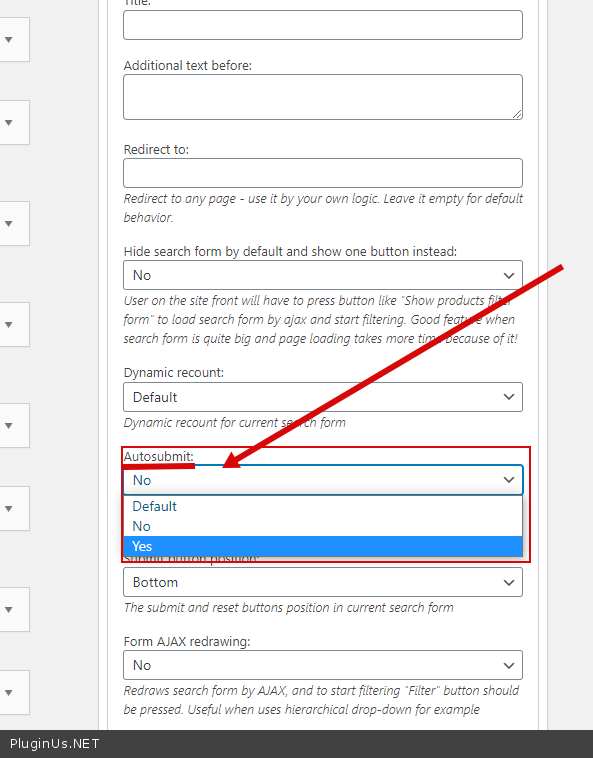
add 2 widgets with settings - https://c2n.me/49AOVhx.png
For show or hide widgets on different devices - http://www.woocommerce-filter.com/how-to-show-or-hide-widget-only-on-selected-site-pages/
Hello
add 2 widgets with settings - https://c2n.me/49AOVhx.png
For show or hide widgets on different devices - http://www.woocommerce-filter.com/how-to-show-or-hide-widget-only-on-selected-site-pages/
Quote from jgoss on October 27, 2020, 15:30Works great, thanks.
I finally used 2 different sidebars with different options and visibility :
register_sidebar(array(
 'name' => __('Shop sidebar (Desktop)'),
 'id' => 'shop-sidebar',
 'before_widget' => '<div class="show-for-large">',
 'after_widget' => '</div>',
 'before_title' => '<h3>',
 'after_title' => '</h3>',
));

register_sidebar(array(
 'name' => __('Shop sidebar (Mobile)'),
 'id' => 'shop-mobile-sidebar',
 'before_widget' => '<div class="hide-for-large">',
 'after_widget' => '</div>',
 'before_title' => '<h3>',
 'after_title' => '</h3>',
));
Works great, thanks.
I finally used 2 different sidebars with different options and visibility :
register_sidebar(array(
 'name' => __('Shop sidebar (Desktop)'),
 'id' => 'shop-sidebar',
 'before_widget' => '<div class="show-for-large">',
 'after_widget' => '</div>',
 'before_title' => '<h3>',
 'after_title' => '</h3>',
));

register_sidebar(array(
 'name' => __('Shop sidebar (Mobile)'),
 'id' => 'shop-mobile-sidebar',
 'before_widget' => '<div class="hide-for-large">',
 'after_widget' => '</div>',
 'before_title' => '<h3>',
 'after_title' => '</h3>',
));Quote from Pablo Borysenco on October 28, 2020, 13:46Hello
Ok! Great!
Welcome;)
http://codecanyon.net/downloads - rate please the plugin if you liked it ...
Hello
Ok! Great!
Welcome;)
http://codecanyon.net/downloads - rate please the plugin if you liked it ...
Quote from jgoss on November 6, 2020, 15:19Hi,
I think i checked this a little bit too quickly... Not working as expected.
I have 2 differents filters : 1 for mobile / 1 for desktop, hidden respectively by CSS (link in private). But autosearch is triggered on both even though it's disabled for mobile. I think it would be triggered only for the one on desktop. Looks like a bug to me. Can you have a look please ?
Hi,
I think i checked this a little bit too quickly... Not working as expected.
I have 2 differents filters : 1 for mobile / 1 for desktop, hidden respectively by CSS (link in private). But autosearch is triggered on both even though it's disabled for mobile. I think it would be triggered only for the one on desktop. Looks like a bug to me. Can you have a look please ?
Quote from jgoss on November 6, 2020, 15:21Oh and it's not possible to use is_mobile() conditionnal tag for that, because it's not cache complient (server side rendered).
Oh and it's not possible to use is_mobile() conditionnal tag for that, because it's not cache complient (server side rendered).
Quote from jgoss on November 9, 2020, 10:34Hi,
Any update on that issue, please ?
Thanks
Hi,
Any update on that issue, please ?
Thanks
Quote from Pablo Borysenco on November 9, 2020, 13:31Hello
it's not possible to use is_mobile() conditionnal tag - In this case, I don't know how to do it. To change the settings, you need to find out the device in the php code
Hello
it's not possible to use is_mobile() conditionnal tag - In this case, I don't know how to do it. To change the settings, you need to find out the device in the php code
Quote from jgoss on November 9, 2020, 15:05It's not possible to do this using PHP because of caching (for exemple : mobile filters can be cached and displayed on desktop). That's why i did it with CSS.
But when there are 2 sets of filters on the same page, one with autosubmit=true and the other one with autosubmit=false, the autosubmit is triggered on both : clicking on the filter with autosubmit=false does submit the form. Do you think this can be fixed ? That's a real issue to me.
Each filter form should have an ID or something so that javascript triggers only apply to the one concerned.
It's not possible to do this using PHP because of caching (for exemple : mobile filters can be cached and displayed on desktop). That's why i did it with CSS.
But when there are 2 sets of filters on the same page, one with autosubmit=true and the other one with autosubmit=false, the autosubmit is triggered on both : clicking on the filter with autosubmit=false does submit the form. Do you think this can be fixed ? That's a real issue to me.
Each filter form should have an ID or something so that javascript triggers only apply to the one concerned.
Quote from Pablo Borysenco on November 10, 2020, 13:26Hello
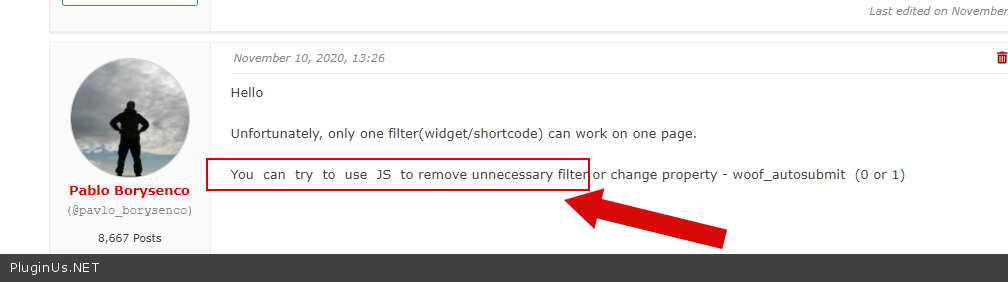
Unfortunately, only one filter(widget/shortcode) can work on one page.
You can try to use JS to remove unnecessary filter or change property - woof_autosubmit (0 or 1)
Hello
Unfortunately, only one filter(widget/shortcode) can work on one page.
You can try to use JS to remove unnecessary filter or change property - woof_autosubmit (0 or 1)
Quote from jgoss on November 12, 2020, 11:15Hello,
Ok, this does work :
    $(window).on('resize load', function () {
        if (Math.max(document.documentElement.clientWidth, window.innerWidth || 0) < 640) {
            woof_autosubmit = 0;
        } else {
            woof_autosubmit = 1;
        }
    });
Hello,
Ok, this does work :
    $(window).on('resize load', function () {
        if (Math.max(document.documentElement.clientWidth, window.innerWidth || 0) < 640) {
            woof_autosubmit = 0;
        } else {
            woof_autosubmit = 1;
        }
    });
Quote from Pablo Borysenco on November 12, 2020, 13:31Hello
this code should be included in wp-head before front.js
OR try - https://c2n.me/49NpCqk.png
Hello
this code should be included in wp-head before front.js
OR try - https://c2n.me/49NpCqk.png