PluginUs.Net - Business Tools for WooCommerce and WordPress

[realize your idea - make your dreams come true]

Support Forum

You need to log-in to create request (topic) to the support

Autoclose dropdown after selection

The support doesn work on Saturdays and Sundays, so some Friday requests can be answered on Monday. If you have problems with registration ask help on contact us page please
If you not got email within 24~36 business hours, firstly check your spam box, and if no any email from the support there - back to the forum and read answer here. DO NOT ANSWER ON EMAILS [noreply@pluginus.net] FROM THE FORUM!! Emails are just for your info, all answers should be published only here.
The support doesn work on Saturdays and Sundays, so some Friday requests can be answered on Monday.

Hello

I have installed your free version on a website and I want to buy the premium one but I have a problem. I have created three dropdowns, one for color, another for brand and a third for size. When I choose for example a color the dropdown remains open and I have to close it by myself and then open the brand. I want to know if there is a setting where after choosing an option from one of the dropdowns it autocloses and you can go and choose options from the other ones.

Thank you!


Hello

 the dropdown remains open and I have to close it by myself - Please  drop  me  exact  link to  the  issue

This is an example of the filter
https://www.flashboutique.gr/product-category/rouxa/pantelonia/

Hello

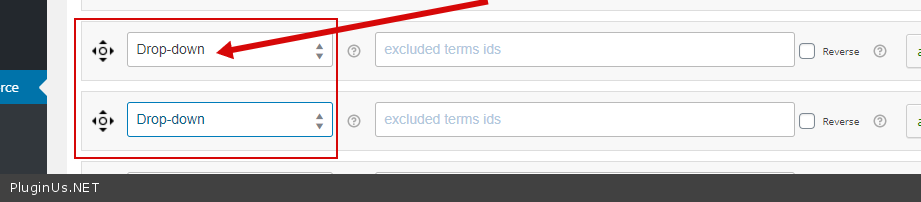
 I have created three dropdowns  - These are not drop downs. If you need this behavior please use dropdowns - https://c2n.me/4aglK67.png

I am sorry, you are correct. I have used check boxes. But still I need that same functionality. Autoclose the check box list after a selection. Is it possible?


Thank you!

In  this  case you  need  code  customization

I have modified the first one as as multiple dropdown but still cannot get that functionality. If a select one option it loads again but the dropdown remains open. You can see it here. Is there some setting I have to modify in order to get that result?


Hello

Please  update  plugin  to  latest  version

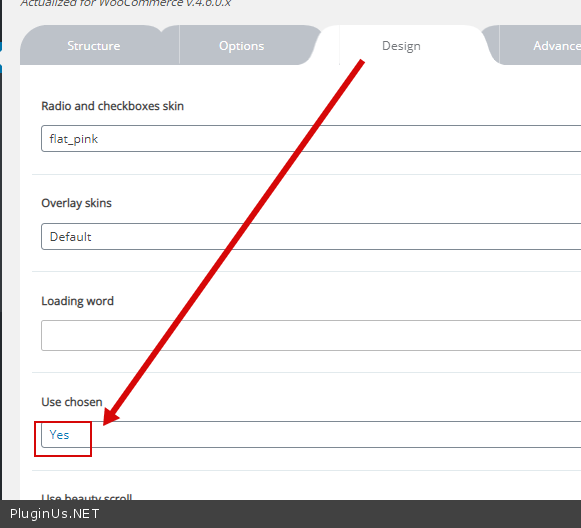
Use  this option  - https://c2n.me/4apbLAw.png

a test -  https://c2n.me/4apbSbS