

Auto scroll to products after reset filters
The support doesn work on Saturdays and Sundays, so some Friday requests can be answered on Monday. If you have problems with registration ask help on contact us page pleaseIf you not got email within 24~36 business hours, firstly check your spam box, and if no any email from the support there - back to the forum and read answer here. DO NOT ANSWER ON EMAILS [noreply@pluginus.net] FROM THE FORUM!! Emails are just for your info, all answers should be published only here.
The support doesn work on Saturdays and Sundays, so some Friday requests can be answered on Monday.

Quote from kureman on February 3, 2022, 11:36Hi,
First of all, thank you for this plugin !
I found how to auto scroll to products after their filtering in redirect mode, I add the code on my website and it's working fine. However, I replaced "woof_products_top_panel_content" by ".widget.widget-woof", since, for an unknown reason, .woof_products_top_panel_content doesn't appear if I use the WooCommerce shortcode [products] on my page. Anyway, it's working fine.
Now I would like to auto scroll after I press on the RESET button, is it possible?
Hi,
First of all, thank you for this plugin !
I found how to auto scroll to products after their filtering in redirect mode, I add the code on my website and it's working fine. However, I replaced"woof_products_top_panel_content" by".widget.widget-woof", since, for an unknown reason, .woof_products_top_panel_content doesn't appear if I use the WooCommerce shortcode [products] on my page. Anyway, it's working fine.
Now I would like to auto scroll after I press on the RESET button, is it possible?

Quote from Pablo Borysenco on February 3, 2022, 12:32Hello
Now I would like to auto scroll after I press on the RESET button, is it possible? - only in ajax mode.
Hello
Now I would like to auto scroll after I press on the RESET button, is it possible? - only in ajax mode.
Quote from kureman on February 3, 2022, 16:04Thank you for your answer but sorry, I don't understand...
I guess it means that I have to switch "Try to ajaxify the shop" to "yes" but then what should I do?
I am not familiar with ajax so I don't understand the consequences of this option... more so because of the warning in the tooltip..
Thank you for your answer but sorry, I don't understand...
I guess it means that I have to switch"Try to ajaxify the shop" to"yes" but then what should I do?
I am not familiar with ajax so I don't understand the consequences of this option... more so because of the warning in the tooltip..
Quote from Pablo Borysenco on February 4, 2022, 12:36Hello
If you want scrolling to work after pressing any filter and resetting the search, you should enable ajax mode - https://c2n.me/4ePB0Kt.png
and add your code here - https://c2n.me/4ePB561.png
Hello
If you want scrolling to work after pressing any filter and resetting the search, you should enable ajax mode - https://c2n.me/4ePB0Kt.png
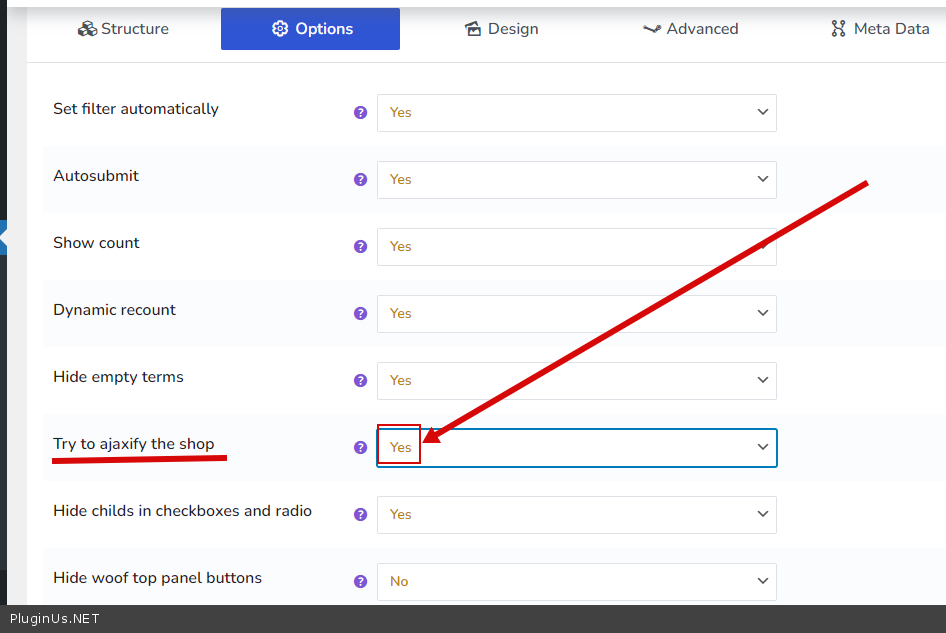
and add your code here - https://c2n.me/4ePB561.png
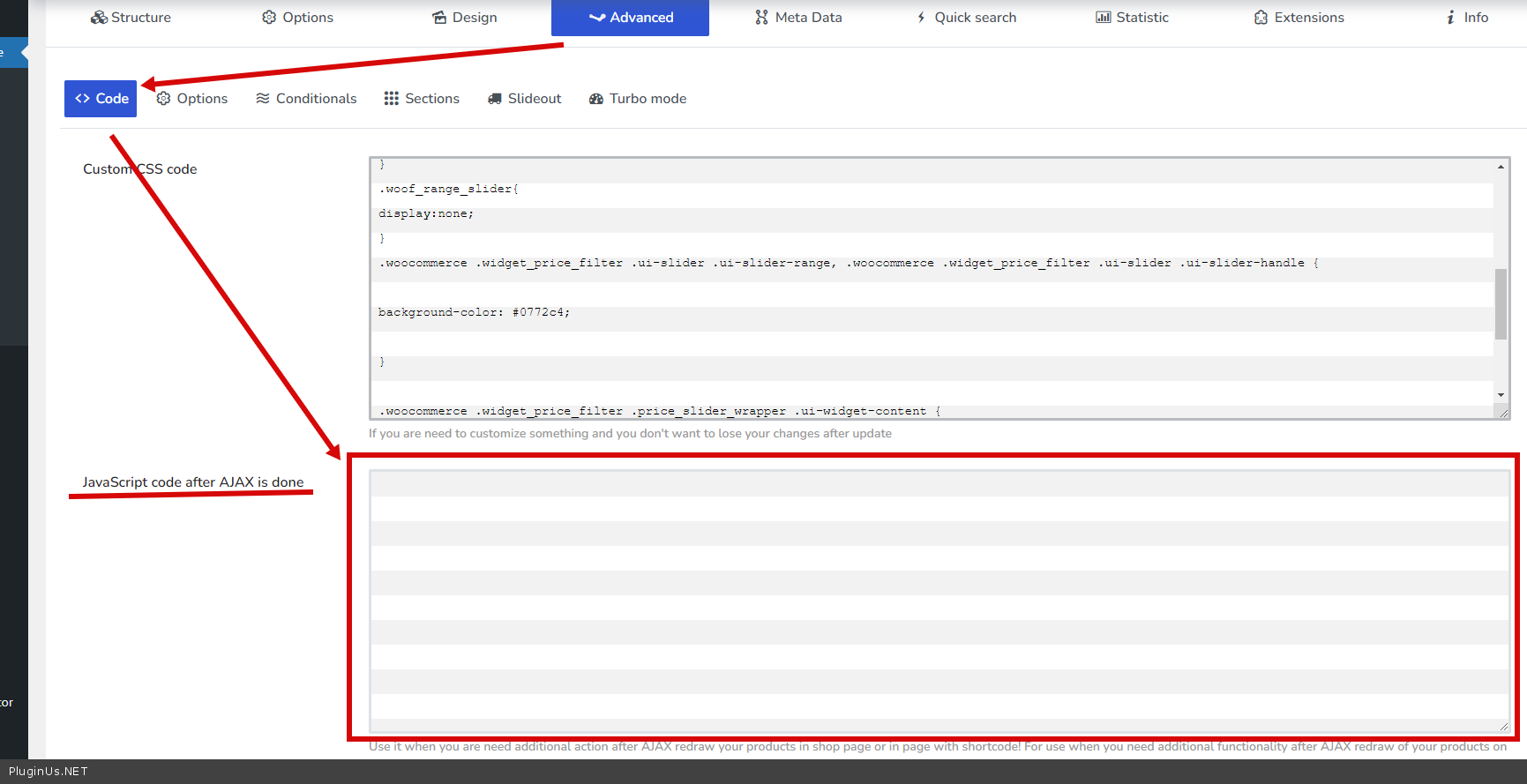
Quote from kureman on February 4, 2022, 13:36Hello,
Thank you again.
One more question, what is the risk of enabling ajax mode?
The tooltip warns: "Select "Yes" if you want to TRY make filtering in your shop by AJAX. Not compatible for 100% of all wp themes, so test it well if you are going to buy premium version of the plugin because incompatibility is not fixable!"
So, I'm afraid of breaking something and doing an irreversible action...
Hello,
Thank you again.
One more question, what is the risk of enabling ajax mode?
The tooltip warns:"Select"Yes" if you want to TRY make filtering in your shop by AJAX. Not compatible for 100% of all wp themes, so test it well if you are going to buy premium version of the plugin because incompatibility is not fixable!"
So, I'm afraid of breaking something and doing an irreversible action...
Quote from Pablo Borysenco on February 4, 2022, 13:52Don't worry, you can always turn off ajax mode and everything will work as before (this setting does not make permanent changes)
What can happen in ajax mode (most often): Incorrect display of products(template) after filtering, Pagination not working after filtering, some JS functions not working
Don't worry, you can always turn off ajax mode and everything will work as before (this setting does not make permanent changes)
What can happen in ajax mode (most often): Incorrect display of products(template) after filtering, Pagination not working after filtering, some JS functions not working
Quote from kureman on February 4, 2022, 14:20ok cool :)
I have tried to paste the code here https://c2n.me/4ePB561.png but when I save the settings it disappears and it seems to have no effect. I am probably doing something wrong.
ok cool :)
I have tried to paste the code here https://c2n.me/4ePB561.png but when I save the settings it disappears and it seems to have no effect. I am probably doing something wrong.
Quote from Pablo Borysenco on February 7, 2022, 12:15hello
Read this please - https://products-filter.com/auto-scroll-to-element-after-ajax-is-done
hello
Read this please - https://products-filter.com/auto-scroll-to-element-after-ajax-is-done
Quote from kureman on February 7, 2022, 16:04Hello !
Great thanks :)
Ok, it's working fine on standard WooCommerce shop pages !
However, this code is unfortunately not working on an other page I designed with Elementor. In a inner section I put the WOOF filter widget in the left column and the shortcode [products] from WooCommerce in the right column.
The first code (without AJAX) (https://products-filter.com/auto-scroll-to-products-after-their-filtering-in-redirect-mode) is working for both pages, except the fact that there is not auto scroll after pressing on the reset button.
I guess the shortcode [products] behavior is different from the standard shop pages and there is nothing we could do about that..
Hello !
Great thanks :)
Ok, it's working fine on standard WooCommerce shop pages !
However, this code is unfortunately not working on an other page I designed with Elementor. In a inner section I put the WOOF filter widget in the left column and the shortcode [products] from WooCommerce in the right column.
The first code (without AJAX) (https://products-filter.com/auto-scroll-to-products-after-their-filtering-in-redirect-mode) is working for both pages, except the fact that there is not auto scroll after pressing on the reset button.
I guess the shortcode [products] behavior is different from the standard shop pages and there is nothing we could do about that..
Quote from Pablo Borysenco on February 8, 2022, 11:45Hello
Please drop me exact link to the issue
Hello
Please drop me exact link to the issue
Quote from kureman on February 9, 2022, 09:54Hello,
My site is not ready to be online yet :\
I could send you a private access to your mail if you want?
Hello,
My site is not ready to be online yet :\
I could send you a private access to your mail if you want?
Quote from Pablo Borysenco on February 9, 2022, 13:21You cam add access here - https://share.pluginus.net/image/i20210618130558.png ->https://share.pluginus.net/image/i20210618130637.png
You cam add access here - https://share.pluginus.net/image/i20210618130558.png ->https://share.pluginus.net/image/i20210618130637.png


Quote from kureman on February 9, 2022, 15:21Hello thank you very much, I wrote something there
Hello thank you very much, I wrote something there
Quote from Pablo Borysenco on February 10, 2022, 13:18Hello
To show products try to use this shortcode on the custom page - [woof_products is_ajax=1]
Hello
To show products try to use this shortcode on the custom page - [woof_products is_ajax=1]
Quote from kureman on February 10, 2022, 13:23Hello,
Wow, perfect!
It's exactly what I was looking for, thank you so much!Where does this shortcode come from?
Hello,
Wow, perfect!
It's exactly what I was looking for, thank you so much!
Where does this shortcode come from?
Quote from Pablo Borysenco on February 11, 2022, 12:04Hello
Docs - https://products-filter.com/shortcode/woof_products
Welcome;)
Hello
Docs - https://products-filter.com/shortcode/woof_products
Welcome;)