
Attributes not showing in the Title column
The support doesn work on Saturdays and Sundays, so some Friday requests can be answered on Monday. If you have problems with registration ask help on contact us page pleaseIf you not got email within 24~36 business hours, firstly check your spam box, and if no any email from the support there - back to the forum and read answer here. DO NOT ANSWER ON EMAILS [noreply@pluginus.net] FROM THE FORUM!! Emails are just for your info, all answers should be published only here.
The support doesn work on Saturdays and Sundays, so some Friday requests can be answered on Monday.

Quote from Eventations on January 22, 2021, 13:57) the attributes are not showing next to the variations in the title column, so it is difficult to add pictures and SKU codes to variable products because I am not sure which product is which. (Idea – can’t the places where the red crossed out area show this information as it will make it so its easy to see – attributes don’t have to be editable, but just visible) – I do see there is a code that you can put in the functions.php but I am way to scared to do that as I am not a coder.
2) I want to delete a certain variation the two attributes within a variable – all shirts that are sleeveless and pink, but when I do this, I can’t get it right. In the videos, he speaks and clicks everywhere so quick and I try to follow but its difficult to keep up.
So sorry for the long post, I just really need some help, I can’t do this manually as there are at least 700 combinations per shirt and I have many that I’d like to add to my website and hoping, this plugin can help speed up the process for me.
Thank you in advance.
) the attributes are not showing next to the variations in the title column, so it is difficult to add pictures and SKU codes to variable products because I am not sure which product is which. (Idea – can’t the places where the red crossed out area show this information as it will make it so its easy to see – attributes don’t have to be editable, but just visible) – I do see there is a code that you can put in the functions.php but I am way to scared to do that as I am not a coder.
2) I want to delete a certain variation the two attributes within a variable – all shirts that are sleeveless and pink, but when I do this, I can’t get it right. In the videos, he speaks and clicks everywhere so quick and I try to follow but its difficult to keep up.
So sorry for the long post, I just really need some help, I can’t do this manually as there are at least 700 combinations per shirt and I have many that I’d like to add to my website and hoping, this plugin can help speed up the process for me.
Thank you in advance.
Quote from Eventations on January 22, 2021, 14:30with regards to point 2.
I would like you to explain how to do this so that I can continue to do it myself, as I will be adding a lot more products like this.
Scenario example:
I have a variable product (shirt) with multiple attributes (shirt type, shirt colour, shirt size, etc...). The problem is that not all attributes will have the same attributes as others, eg: a long sleeved shirt is available in all the colours listed in the shirt colour attribute, as well as shirt sizes, BUT a sleeveless shirt is available in only 4 of the colours.
I want to create all the available variations and then afterwards, go in to Bulk editor and remove a specific selection in bulk that has the two attributes I have listed even if it is linked to other attributes... so if I choose the attributes - (shirt type: sleeveless) and (Shirt colour: aqua), it will delete ALL variations with these two attributes in the product no matter what other attribute is linked to it. (so all sleeveless + aqua shirts in all shirt sizes will be deleted) I don't want to have to choose the individual sizes to delete it, because then I can just do this on the actual page, one by one.
I hope this makes sense.
with regards to point 2.
I would like you to explain how to do this so that I can continue to do it myself, as I will be adding a lot more products like this.
Scenario example:
I have a variable product (shirt) with multiple attributes (shirt type, shirt colour, shirt size, etc...). The problem is that not all attributes will have the same attributes as others, eg: a long sleeved shirt is available in all the colours listed in the shirt colour attribute, as well as shirt sizes, BUT a sleeveless shirt is available in only 4 of the colours.
I want to create all the available variations and then afterwards, go in to Bulk editor and remove a specific selection in bulk that has the two attributes I have listed even if it is linked to other attributes... so if I choose the attributes - (shirt type: sleeveless) and (Shirt colour: aqua), it will delete ALL variations with these two attributes in the product no matter what other attribute is linked to it. (so all sleeveless + aqua shirts in all shirt sizes will be deleted) I don't want to have to choose the individual sizes to delete it, because then I can just do this on the actual page, one by one.
I hope this makes sense.

Quote from Pablo Borysenco on January 25, 2021, 11:09Hello
- Please add FTP access
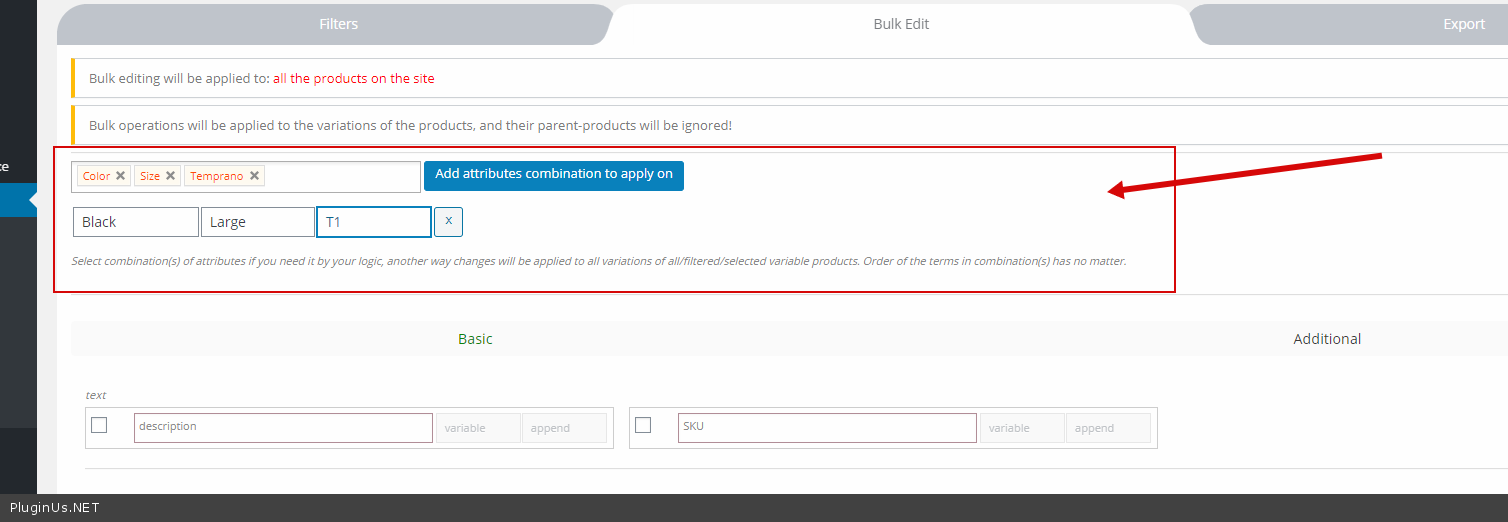
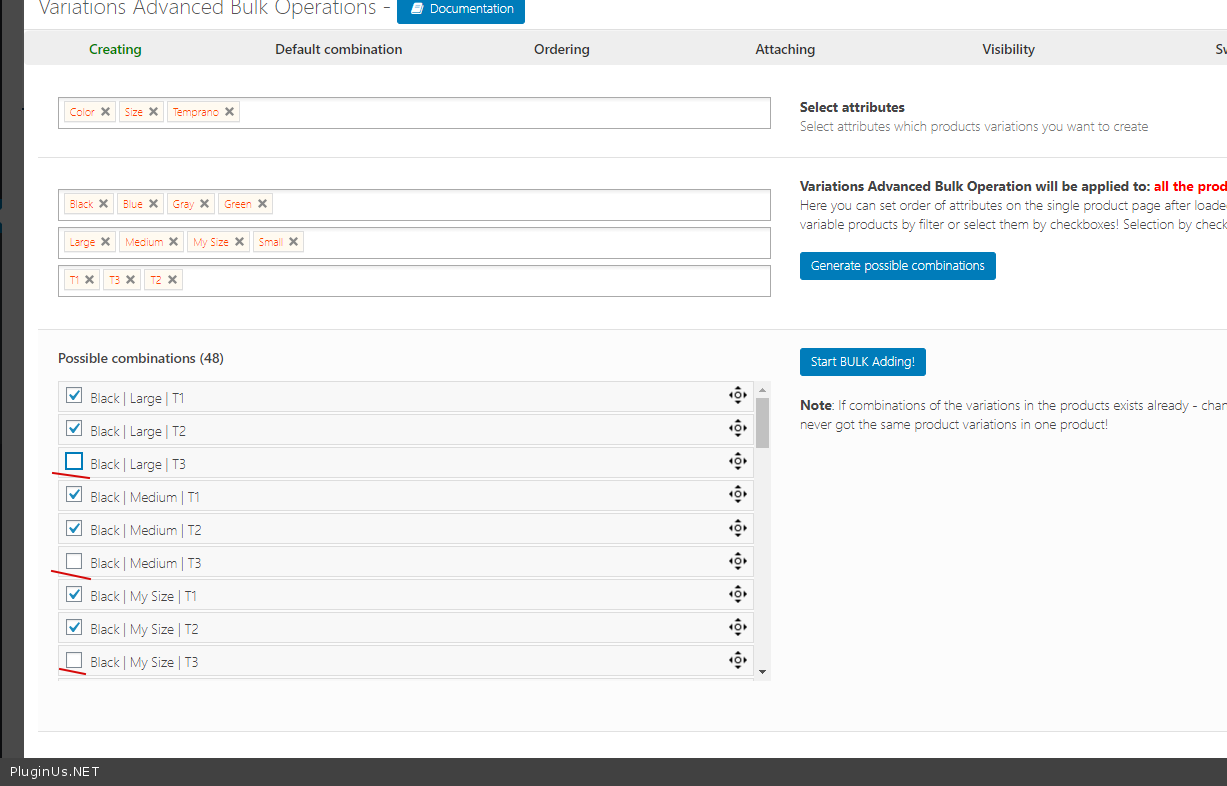
- To manipulate variations, you need to select all attributes - https://c2n.me/4aGhinx.png But it will probably be faster to create only the necessary variations - https://c2n.me/4aGhDj2.png
I cannot check anything on your site - https://c2n.me/4aGhKxN.jpg
Hello
- Please add FTP access
- To manipulate variations, you need to select all attributes - https://c2n.me/4aGhinx.png But it will probably be faster to create only the necessary variations - https://c2n.me/4aGhDj2.png
I cannot check anything on your site - https://c2n.me/4aGhKxN.jpg
Quote from Eventations on January 31, 2021, 18:15Hi Pablo,
Apologies for the delay in response.
- Do I make you an admin?
- I did it the longer way and just added per shirt type, which is ok for now, thank you.
Hi Pablo,
Apologies for the delay in response.
- Do I make you an admin?
- I did it the longer way and just added per shirt type, which is ok for now, thank you.
Quote from Pablo Borysenco on February 1, 2021, 10:31Hello
- Yes and add FTP access please
Hello
- Yes and add FTP access please
Quote from Eventations on February 5, 2021, 08:04Hi Pablo, I hope all is well.
Thank you for your patience, I am not really good at the backend development side of things, I am waiting on my hosting company to tell me how to give you FTP access because I don't know how to do this part.
Kindest, Tania
Hi Pablo, I hope all is well.
Thank you for your patience, I am not really good at the backend development side of things, I am waiting on my hosting company to tell me how to give you FTP access because I don't know how to do this part.
Kindest, Tania
Quote from Pablo Borysenco on February 5, 2021, 11:49Hello Tania
Ok! I'll be waiting for FTP access. Because changing code without FTP is not safe
Write me if you have any questions
Hello Tania
Ok! I'll be waiting for FTP access. Because changing code without FTP is not safe
Write me if you have any questions