MarketDirACI(@marketdiraci)
10 Posts
Customers
Quote from MarketDirACI on September 18, 2020, 14:18
Good Morning,
Our team uses the premium WOOBE Bulk plugin in. We mass uploaded a new attribute to corresponding products and it applied it to the products but it does not show up on the product filter, we are using WOOF for our filter system. We have tried several trouble shooting options, form deleting the attribute and adding it in again to manually adding the attribute to select products to see if the plugin was the issue and it indeed seems to be the problem. How may we get the attributes to catch with the WOOF filter system? We appreciate any and all help.
Thank you for your time.
Gracefully,
Ronald Ryan
Marketing Assistant
Ph: 954.921.1171 ext. 426
Good Morning,
Our team uses the premium WOOBE Bulk plugin in. We mass uploaded a new attribute to corresponding products and it applied it to the products but it does not show up on the product filter, we are using WOOF for our filter system. We have tried several trouble shooting options, form deleting the attribute and adding it in again to manually adding the attribute to select products to see if the plugin was the issue and it indeed seems to be the problem. How may we get the attributes to catch with the WOOF filter system? We appreciate any and all help.
Thank you for your time.
Gracefully,
Ronald Ryan
Marketing Assistant
Ph: 954.921.1171 ext. 426

Pablo Borysenco(@pavlo_borysenco)
34,196 Posts
Quote from Pablo Borysenco on September 21, 2020, 09:57
Hello Ronald
Paste your license key here - https://c2n.me/43SC6rb.png -> https://c2n.me/42HBIt7.png and wp-admin access - https://c2n.me/42BAoj4.png
Hello Ronald
Paste your license key here - https://c2n.me/43SC6rb.png -> https://c2n.me/42HBIt7.png and wp-admin access - https://c2n.me/42BAoj4.png
MarketDirACI(@marketdiraci)
10 PostsTopic Author
Customers
Quote from MarketDirACI on September 22, 2020, 14:46
Hi Pablo,
Where can I find the licensing key?
I have the codecanyon zip file but there is no actual key in the licensing folder.
-Ana
Marketing Director
Hi Pablo,
Where can I find the licensing key?
I have the codecanyon zip file but there is no actual key in the licensing folder.
-Ana
Marketing Director
Pablo Borysenco(@pavlo_borysenco)
34,196 Posts
Quote from Pablo Borysenco on September 23, 2020, 09:51
Hello Ana
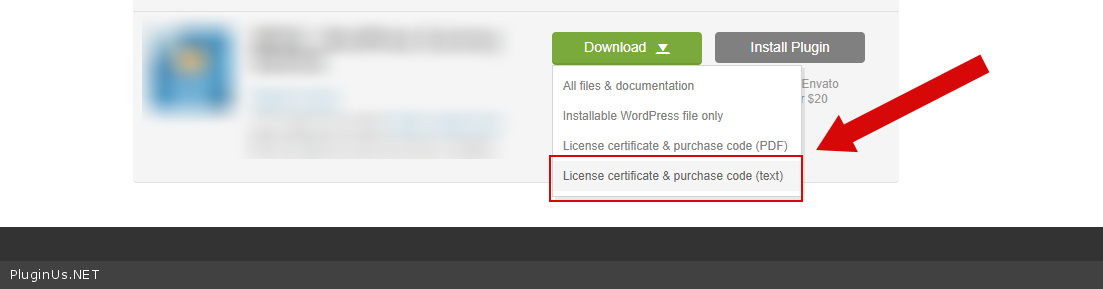
To get license key - https://codecanyon.net/downloads - https://c2n.me/46i7Aam.png
Paste your license key here - https://c2n.me/43SC6rb.png -> https://c2n.me/42HBIt7.png and wp-admin access - https://c2n.me/42BAoj4.png
Hello Ana
To get license key - https://codecanyon.net/downloads - https://c2n.me/46i7Aam.png
Paste your license key here - https://c2n.me/43SC6rb.png -> https://c2n.me/42HBIt7.png and wp-admin access - https://c2n.me/42BAoj4.png
MarketDirACI(@marketdiraci)
10 PostsTopic Author
Customers
Quote from MarketDirACI on September 23, 2020, 14:30
Thanks, Pablo. It's done.
Thanks, Pablo. It's done.
Pablo Borysenco(@pavlo_borysenco)
34,196 Posts
Quote from Pablo Borysenco on September 24, 2020, 09:10
Hello Ana
Your link - HTTP ERROR 403
Perhaps you have an IP restriction?
Hello Ana
Your link - HTTP ERROR 403
Perhaps you have an IP restriction?
MarketDirACI(@marketdiraci)
10 PostsTopic Author
Customers
Quote from MarketDirACI on September 24, 2020, 17:58
You can access now
You can access now
Pablo Borysenco(@pavlo_borysenco)
34,196 Posts
Quote from Pablo Borysenco on September 25, 2020, 10:41
Hello
Now the site does not load at all
Hello
Now the site does not load at all
MarketDirACI(@marketdiraci)
10 PostsTopic Author
Customers
Quote from MarketDirACI on September 25, 2020, 15:50
We will need to know your IP address and also the address of the site you are trying to access just be sure you are not mistyping it.
https://www.acihoist.com/wp-login.php
We will need to know your IP address and also the address of the site you are trying to access just be sure you are not mistyping it.
https://www.acihoist.com/wp-login.php
Pablo Borysenco(@pavlo_borysenco)
34,196 Posts
Quote from Pablo Borysenco on September 28, 2020, 09:47
Hello
I added in private data
Hello
I added in private data
MarketDirACI(@marketdiraci)
10 PostsTopic Author
Customers
Quote from MarketDirACI on September 28, 2020, 15:39
You should be good to access the site. If you have any issues, please screenshot what the error is that you get so I can investigate.
You should be good to access the site. If you have any issues, please screenshot what the error is that you get so I can investigate.
Pablo Borysenco(@pavlo_borysenco)
34,196 Posts
Quote from Pablo Borysenco on September 29, 2020, 10:01
Hello
I did a test - https://c2n.me/49fobqr - It looks like everything is working correctly.
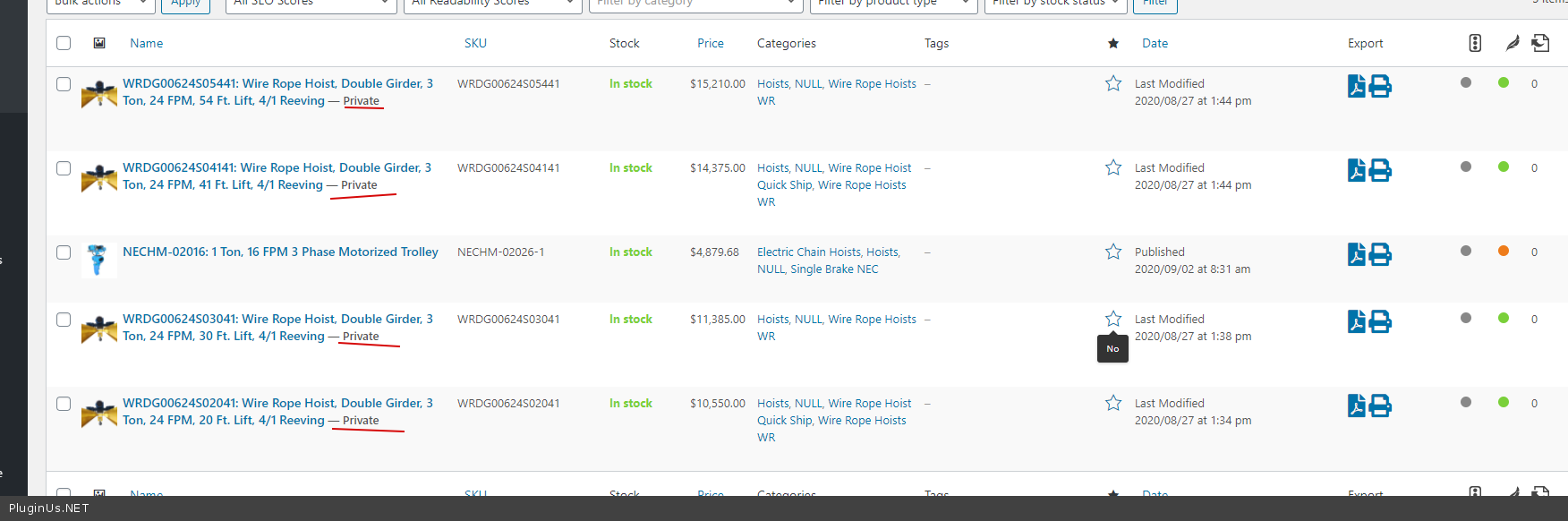
The counter is equal to one because four products are private - https://c2n.me/49foziJ.png
Hello
I did a test - https://c2n.me/49fobqr - It looks like everything is working correctly.
The counter is equal to one because four products are private - https://c2n.me/49foziJ.png
MarketDirACI(@marketdiraci)
10 PostsTopic Author
Customers
Quote from MarketDirACI on September 29, 2020, 21:21
Thank you.
Thank you.
Pablo Borysenco(@pavlo_borysenco)
34,196 Posts
Quote from Pablo Borysenco on September 30, 2020, 09:46
Welcome;)
Welcome;)