
Archive category disappears in body class when filter set
The support doesn work on Saturdays and Sundays, so some Friday requests can be answered on Monday. If you have problems with registration ask help on contact us page pleaseIf you not got email within 24~36 business hours, firstly check your spam box, and if no any email from the support there - back to the forum and read answer here. DO NOT ANSWER ON EMAILS [noreply@pluginus.net] FROM THE FORUM!! Emails are just for your info, all answers should be published only here.
The support doesn work on Saturdays and Sundays, so some Friday requests can be answered on Monday.

Quote from Julien on September 3, 2020, 19:59Hello,
When I'm on a WooCommerce category archive page, I can find the product category in CSS from the body classes (e.g. body.archive.tax-product_cat.term-shoes for Shoes category): https://prnt.sc/ub1oj7
But when I select a filter on the same page, I loose the information about the product category in the CSS: https://prnt.sc/ub1r0a
I need to get the category information somewhere in the CSS to style the elements based on the category. For example to hide the filters specific to other categories (below to hide the wear size filter on shoes category page):
body.archive.tax-product_cat.term-shoes .woof_container_pa_size-wear{
display: none;
}Is there any way to keep the category information in the CSS when a filter is applied?
Thanks!
Hello,
When I'm on a WooCommerce category archive page, I can find the product category in CSS from the body classes (e.g. body.archive.tax-product_cat.term-shoes for Shoes category): https://prnt.sc/ub1oj7
But when I select a filter on the same page, I loose the information about the product category in the CSS: https://prnt.sc/ub1r0a
I need to get the category information somewhere in the CSS to style the elements based on the category. For example to hide the filters specific to other categories (below to hide the wear size filter on shoes category page):
body.archive.tax-product_cat.term-shoes .woof_container_pa_size-wear{
display: none;
}
Is there any way to keep the category information in the CSS when a filter is applied?
Thanks!

Quote from Pablo Borysenco on September 4, 2020, 12:14Hello
Please try this option ->Advanced->Options - https://c2n.me/48Yc7jw.png and do a test
Hello
Please try this option ->Advanced->Options - https://c2n.me/48Yc7jw.png and do a test
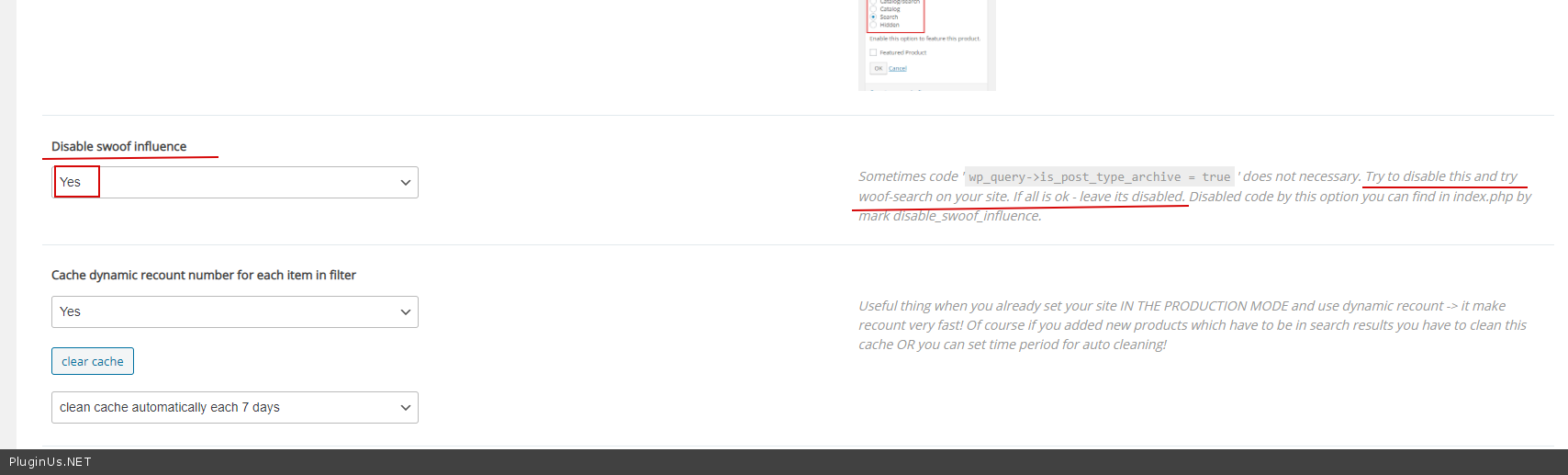
Quote from Julien on September 4, 2020, 20:14Thanks for the reply. It doesn't seem to fix the issue, I'm loosing the category information in the body CSS classes.
I've added WooCommerce admin credentials and plugin purchase code in private data for this topic, can you please have a look?
Thanks!
Thanks for the reply. It doesn't seem to fix the issue, I'm loosing the category information in the body CSS classes.
I've added WooCommerce admin credentials and plugin purchase code in private data for this topic, can you please have a look?
Thanks!

Quote from admin on September 7, 2020, 15:26Hello
Lets clarify the question:
- https://lacednew.wpengine.com/categorie-produit/shoes/?swoof=1&orderby=price&stock=instock&pa_pointures=37&really_curr_tax=23-product_cat
- https://lacednew.wpengine.com/categorie-produit/shoes/
Both of the in tag body has css classes:
- archive tax-product_cat term-shoes term-23 theme-laced-run-new woocommerce woocommerce-page woocommerce-js woof_search_is_going
- archive tax-product_cat term-shoes term-23 logged-in admin-bar theme-laced-run-new woocommerce woocommerce-page woocommerce-js customize-support
So do you mean loosing of the class: customize-support
Hello
Lets clarify the question:
- https://lacednew.wpengine.com/categorie-produit/shoes/?swoof=1&orderby=price&stock=instock&pa_pointures=37&really_curr_tax=23-product_cat
- https://lacednew.wpengine.com/categorie-produit/shoes/
Both of the in tag body has css classes:
- archive tax-product_cat term-shoes term-23 theme-laced-run-new woocommerce woocommerce-page woocommerce-js woof_search_is_going
- archive tax-product_cat term-shoes term-23 logged-in admin-bar theme-laced-run-new woocommerce woocommerce-page woocommerce-js customize-support
So do you mean loosing of the class: customize-support
Quote from admin on September 7, 2020, 15:27Just remade and found that set of classes is equal, but with WOOF filtering appears one more class woof_search_is_going
Just remade and found that set of classes is equal, but with WOOF filtering appears one more class woof_search_is_going
Quote from Julien on September 7, 2020, 16:04Hi @realmag777 , thanks for having looked at the site. So the category classes seem to be kept when filtering by size (pointure), but the problem is when filtering by brand:
archive tax-pwb-brand term-avnier term-45 logged-in admin-bar theme-laced-run-new woocommerce woocommerce-page woocommerce-js woof_search_is_going customize-support
Hi @realmag777 , thanks for having looked at the site. So the category classes seem to be kept when filtering by size (pointure), but the problem is when filtering by brand:
archive tax-pwb-brand term-avnier term-45 logged-in admin-bar theme-laced-run-new woocommerce woocommerce-page woocommerce-js woof_search_is_going customize-support
Quote from admin on September 8, 2020, 14:15Hello
I found the reason, it is in CSS rule: https://clip2net.com/s/490GqAf
Add next rule:
body.archive .liste-produits__div .product-card2__image {
  object-fit: cover;
}
Current rule doesn work as it need CSS class 'tax-product_cat' which not generates on brands pages
Hello
I found the reason, it is in CSS rule: https://clip2net.com/s/490GqAf
Add next rule:
body.archive .liste-produits__div .product-card2__image {
  object-fit: cover;
}
Current rule doesn work as it need CSS class 'tax-product_cat' which not generates on brands pages
Quote from Julien on September 8, 2020, 14:27Hi @realmag777 , this CSS rule should only be applied to products of the shoes category, that's why I want to get the category in the CSS when a filter is applied. Because the shoes product pictures don't have the same dimensions as other products and I want them to be covering instead of contained.
Is there any way to keep the category information somewhere in the CSS when a filter is applied by brands? The product category is still visible in the url when the filter is applied by brand so I would expect it to be in the CSS as well: https://prnt.sc/udmii4
Hi @realmag777 , this CSS rule should only be applied to products of the shoes category, that's why I want to get the category in the CSS when a filter is applied. Because the shoes product pictures don't have the same dimensions as other products and I want them to be covering instead of contained.
Is there any way to keep the category information somewhere in the CSS when a filter is applied by brands? The product category is still visible in the url when the filter is applied by brand so I would expect it to be in the CSS as well: https://prnt.sc/udmii4
Quote from admin on September 9, 2020, 13:12Hello Julien
Yes, you can manipulate by css classes in tag body using next code in file functions.php of the current wordpress theme:
add_filter('body_class', function($classes, $class) {
global $WOOF;
if ($WOOF->is_isset_in_request_data($WOOF->get_swoof_search_slug())) {
if(isset($classes['tax-pwb-brand']))
$classes[] = 'your_css_class';
//unset($classes['your_css_class_2']);
}

return $classes;
}, 10, 2);
Hello Julien
Yes, you can manipulate by css classes in tag body using next code in file functions.php of the current wordpress theme:
add_filter('body_class', function($classes, $class) {
global $WOOF;
if ($WOOF->is_isset_in_request_data($WOOF->get_swoof_search_slug())) {
if(isset($classes['tax-pwb-brand']))
$classes[] = 'your_css_class';
//unset($classes['your_css_class_2']);
}

return $classes;
}, 10, 2);Quote from Julien on September 9, 2020, 16:29Hi @realmag777 ! Thank you! I am really not familiar with PHP code. So I would need to update this function to add a new class to the body tag (e.g. 'cat-shoes') when the page url contains 'really_curr_tax=23-product_cat'?
Feel free to add the code directly in the Code Snippet plugin in the Wordpress admin panel if it's faster and easier for you than explaining.
Thanks for your support, I really appreciate, I'll rate your plugin 5 stars wherever I can!
Hi @realmag777 ! Thank you! I am really not familiar with PHP code. So I would need to update this function to add a new class to the body tag (e.g. 'cat-shoes') when the page url contains 'really_curr_tax=23-product_cat'?
Feel free to add the code directly in the Code Snippet plugin in the Wordpress admin panel if it's faster and easier for you than explaining.
Thanks for your support, I really appreciate, I'll rate your plugin 5 stars wherever I can!
Quote from admin on September 10, 2020, 14:41Hello Julien
I pasted code here: https://lacednew.wpengine.com/wp-admin/theme-editor.php?file=functions.php&theme=laced-run-new
Now products images has the same size: https://lacednew.wpengine.com/categorie-produit/shoes/?swoof=1&stock=instock&pwb-brand=adidas-original&really_curr_tax=23-product_cat
Hello Julien
I pasted code here: https://lacednew.wpengine.com/wp-admin/theme-editor.php?file=functions.php&theme=laced-run-new
Now products images has the same size: https://lacednew.wpengine.com/categorie-produit/shoes/?swoof=1&stock=instock&pwb-brand=adidas-original&really_curr_tax=23-product_cat
Quote from Julien on September 10, 2020, 14:54Hi @realmag777 , thank you, I understand what you've done but what I tried to explain is that now the images are all with object-fit:cover when a brand is selected, even for other categories like Wear: https://lacednew.wpengine.com/categorie-produit/vetements/?swoof=1&stock=instock&pwb-brand=adidas-original,carharttwip&really_curr_tax=18-product_cat
I need to set object-fit:cover to only pictures of the shoes category. Is it possible to update the function to add the custom class only when the category is Shoes (page url containing 'really_curr_tax=23-product_cat' or 'categorie-produit/shoes')?
Hi @realmag777 , thank you, I understand what you've done but what I tried to explain is that now the images are all with object-fit:cover when a brand is selected, even for other categories like Wear: https://lacednew.wpengine.com/categorie-produit/vetements/?swoof=1&stock=instock&pwb-brand=adidas-original,carharttwip&really_curr_tax=18-product_cat
I need to set object-fit:cover to only pictures of the shoes category. Is it possible to update the function to add the custom class only when the category is Shoes (page url containing 'really_curr_tax=23-product_cat' or 'categorie-produit/shoes')?
Quote from admin on September 11, 2020, 13:12Hello Julien
I hope this time I undertood you right: set CSS rule object-fit:cover only for products on category page categorie-produit/shoes/ when brands selected
Examples:
- https://lacednew.wpengine.com/categorie-produit/shoes/?swoof=1&stock=instock&pwb-brand=adidas-original&pa_pointures=39&really_curr_tax=23-product_cat (object-fit:cover)
- https://lacednew.wpengine.com/categorie-produit/vetements/?swoof=1&stock=instock&pwb-brand=adidas-original,carharttwip&really_curr_tax=18-product_cat - NOT applied
Code changed on page https://lacednew.wpengine.com/wp-admin/theme-editor.php?file=functions.php&theme=laced-run-new to:
add_filter('body_class', function($classes, $class) {
global $WOOF;
if (is_object($WOOF)) {
if ($WOOF->is_isset_in_request_data($WOOF->get_swoof_search_slug())) {
if ($WOOF->is_isset_in_request_data('pwb-brand')) {
if ($WOOF->is_isset_in_request_data('really_curr_tax') AND intval($WOOF->get_request_data()['really_curr_tax']) === 23) {
$classes[] = 'term-shoes tax-product_cat';
}
}
}
}

return $classes;
}, 10, 2);
Hello Julien
I hope this time I undertood you right: set CSS rule object-fit:cover only for products on category page categorie-produit/shoes/ when brands selected
Examples:
- https://lacednew.wpengine.com/categorie-produit/shoes/?swoof=1&stock=instock&pwb-brand=adidas-original&pa_pointures=39&really_curr_tax=23-product_cat (object-fit:cover)
- https://lacednew.wpengine.com/categorie-produit/vetements/?swoof=1&stock=instock&pwb-brand=adidas-original,carharttwip&really_curr_tax=18-product_cat - NOT applied
Code changed on page https://lacednew.wpengine.com/wp-admin/theme-editor.php?file=functions.php&theme=laced-run-new to:
add_filter('body_class', function($classes, $class) {
global $WOOF;
if (is_object($WOOF)) {
if ($WOOF->is_isset_in_request_data($WOOF->get_swoof_search_slug())) {
if ($WOOF->is_isset_in_request_data('pwb-brand')) {
if ($WOOF->is_isset_in_request_data('really_curr_tax') AND intval($WOOF->get_request_data()['really_curr_tax']) === 23) {
$classes[] = 'term-shoes tax-product_cat';
}
}
}
}

return $classes;
}, 10, 2);Quote from Julien on September 14, 2020, 19:54Hi @realmag777 ! Thanks yes this is what I need! Thank you very much for your help!!!
Hi @realmag777 ! Thanks yes this is what I need! Thank you very much for your help!!!