krackers2020(@krackers2020)
5 Posts
Customers
Quote from krackers2020 on July 9, 2020, 12:50
Hello there,
A lot of the products on my site have the below setting:
Catalog visibility: Search Results only
As I don't want those products to be displayed in the catalogue, I don't want their terms to be visible in the filter so is there any way to hide these? I have checked 'Hide empty terms' but their terms are still visible in the filter...
Thanks
Sam
Hello there,
A lot of the products on my site have the below setting:
Catalog visibility: Search Results only
As I don't want those products to be displayed in the catalogue, I don't want their terms to be visible in the filter so is there any way to hide these? I have checked 'Hide empty terms' but their terms are still visible in the filter...
Thanks
Sam

Pablo Borysenco(@pavlo_borysenco)
34,196 Posts
Quote from Pablo Borysenco on July 10, 2020, 11:39
Hello Sam
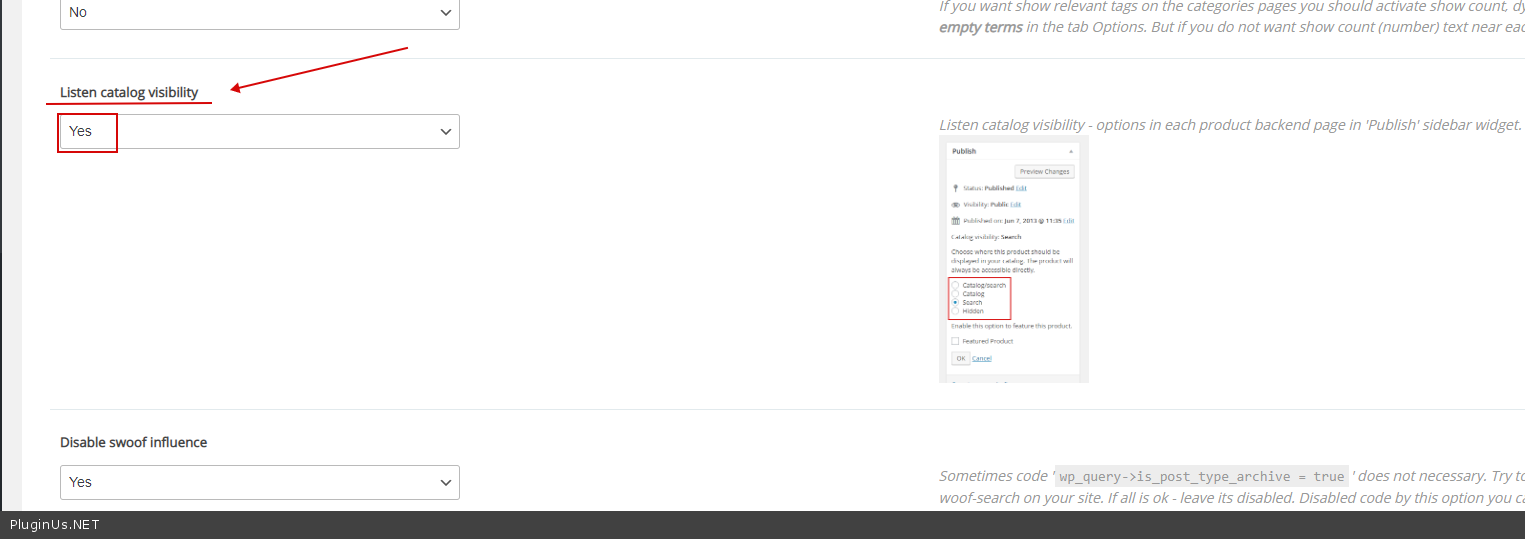
Try this option please ->Advanced-> https://c2n.me/48l4LjV.png
Hello Sam
Try this option please ->Advanced-> https://c2n.me/48l4LjV.png
krackers2020(@krackers2020)
5 PostsTopic Author
Customers
Quote from krackers2020 on July 10, 2020, 11:54
Hi Pablo,
Unfortunately the terms are still visible in the shop filter for products that are set to 'Catalog visibility: Search Results only'
Any other ideas?
Thanks,
Sam
Hi Pablo,
Unfortunately the terms are still visible in the shop filter for products that are set to 'Catalog visibility: Search Results only'
Any other ideas?
Thanks,
Sam
Pablo Borysenco(@pavlo_borysenco)
34,196 Posts
Quote from Pablo Borysenco on July 10, 2020, 12:38
Clear all cache if no luck please drop me exact link to the issue
Clear all cache if no luck please drop me exact link to the issue
krackers2020(@krackers2020)
5 PostsTopic Author
Customers
Quote from krackers2020 on July 13, 2020, 18:58
Hi Pablo
I have shared an exact link in the 'private data for this topic' tab. Can you see this information?
Thanks
Sam
Hi Pablo
I have shared an exact link in the 'private data for this topic' tab. Can you see this information?
Thanks
Sam
Pablo Borysenco(@pavlo_borysenco)
34,196 Posts
Quote from Pablo Borysenco on July 14, 2020, 12:09
Hello Sam
Paste your license key here - https://c2n.me/43SC6rb.png -> https://c2n.me/42HBIt7.png and wp-admin access - https://c2n.me/42BAoj4.png
Hello Sam
Paste your license key here - https://c2n.me/43SC6rb.png -> https://c2n.me/42HBIt7.png and wp-admin access - https://c2n.me/42BAoj4.png
krackers2020(@krackers2020)
5 PostsTopic Author
Customers
Quote from krackers2020 on July 17, 2020, 14:20
Hi Pablo
I have inserted that information into the places you have said. Please let me know if you need anything else.
Thank you!
Sam
Hi Pablo
I have inserted that information into the places you have said. Please let me know if you need anything else.
Thank you!
Sam
Pablo Borysenco(@pavlo_borysenco)
34,196 Posts
Quote from Pablo Borysenco on July 20, 2020, 10:51
Hello Sam
'Catalog visibility: Search results only' - The plugin is working correctly. In fact, the filter should show the amount of product after filtration(search result)
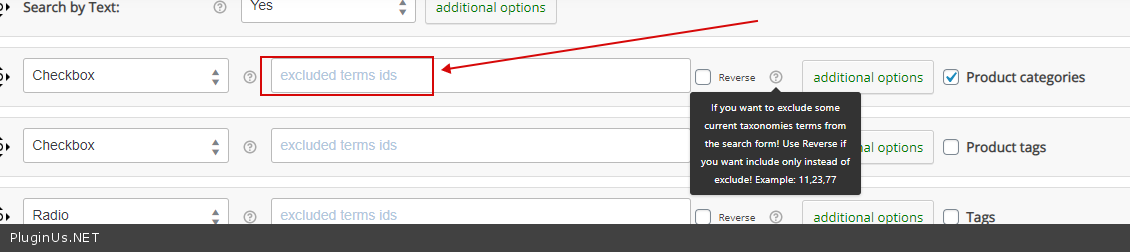
If you want to hide these terms - https://c2n.me/48sdCs5.png
Hello Sam
'Catalog visibility: Search results only' - The plugin is working correctly. In fact, the filter should show the amount of product after filtration(search result)
If you want to hide these terms - https://c2n.me/48sdCs5.png