Pablo Borysenco(@pavlo_borysenco)
34,196 Posts
Quote from Pablo Borysenco on July 29, 2020, 12:36
Hello
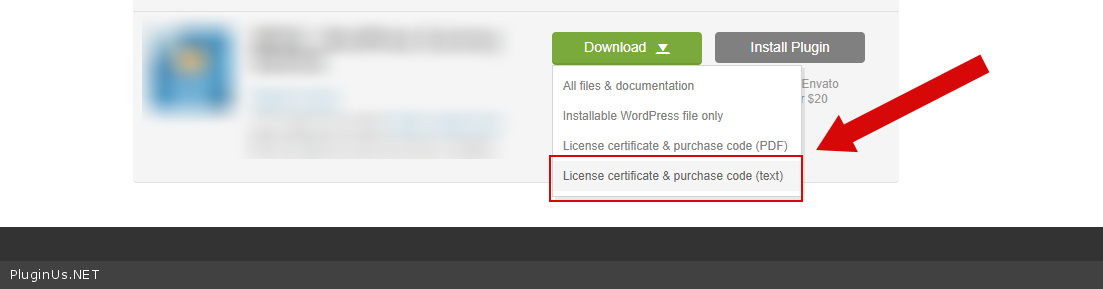
To get license key - https://codecanyon.net/downloads - https://c2n.me/46i7Aam.png
Paste your license key here - https://c2n.me/43SC6rb.png -> https://c2n.me/42HBIt7.png
Is there anything I need to do, after I change woocommerce data using API calls please? - Not! It doesn't matter for the filter how you updated the product data, the filter makes standard queries to the database. The main thing is that in the database this information is updated correctly.
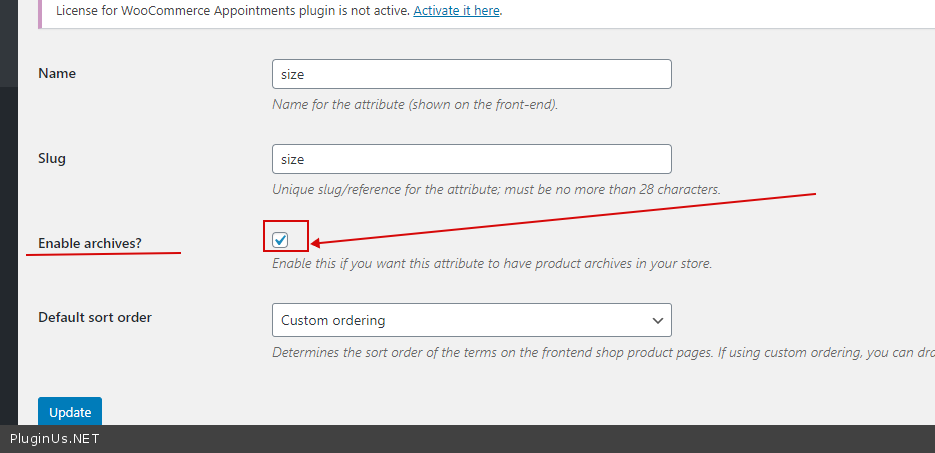
Check this option after updating data - https://c2n.me/48zMSH4.png - It should be checked
Hello
To get license key - https://codecanyon.net/downloads - https://c2n.me/46i7Aam.png
Paste your license key here - https://c2n.me/43SC6rb.png -> https://c2n.me/42HBIt7.png
Is there anything I need to do, after I change woocommerce data using API calls please? - Not! It doesn't matter for the filter how you updated the product data, the filter makes standard queries to the database. The main thing is that in the database this information is updated correctly.
Check this option after updating data - https://c2n.me/48zMSH4.png - It should be checked
Pablo Borysenco(@pavlo_borysenco)
34,196 Posts
Quote from Pablo Borysenco on August 10, 2020, 12:03
Hello
To get license key - https://codecanyon.net/downloads AND https://prnt.sc/tx23li
in file - wp-content\plugins\woocommerce-products-filter\index.php - delete this code - https://prnt.sc/tx27dx
Hello
To get license key - https://codecanyon.net/downloads AND https://prnt.sc/tx23li
in file - wp-content\plugins\woocommerce-products-filter\index.php - delete this code - https://prnt.sc/tx27dx