

Adding custom button to [woot_upsells] table column?
The support doesn work on Saturdays and Sundays, so some Friday requests can be answered on Monday. If you have problems with registration ask help on contact us page pleaseIf you not got email within 24~36 business hours, firstly check your spam box, and if no any email from the support there - back to the forum and read answer here. DO NOT ANSWER ON EMAILS [noreply@pluginus.net] FROM THE FORUM!! Emails are just for your info, all answers should be published only here.
The support doesn work on Saturdays and Sundays, so some Friday requests can be answered on Monday.

Quote from johnmazza on January 28, 2021, 16:06Hi there! Thank you so much for this plugin, it's been a huge help in getting our site functionality working as desired.
One thing I was curious about is if there is a way to create a column with a custom button? Specifically this is for [woot_upsells]. I'm using the pods framework and created a field to extend the functionality of the Product post type, where we could add such a button to the product listing. However this field doesn't show up in the main settings page where you can add columns to [woot_upsells].
I know there is [woot_button], but this isn't exactly what I'm looking for as I need the button to appear next to every product in the table row. And from what I see, [woot_button] can't be used to extend other shortcodes, correct?
I feel like there's an easy answer I'm missing here! Thanks for any help. - john
Hi there! Thank you so much for this plugin, it's been a huge help in getting our site functionality working as desired.
One thing I was curious about is if there is a way to create a column with a custom button? Specifically this is for [woot_upsells]. I'm using the pods framework and created a field to extend the functionality of the Product post type, where we could add such a button to the product listing. However this field doesn't show up in the main settings page where you can add columns to [woot_upsells].
I know there is [woot_button], but this isn't exactly what I'm looking for as I need the button to appear next to every product in the table row. And from what I see, [woot_button] can't be used to extend other shortcodes, correct?
I feel like there's an easy answer I'm missing here! Thanks for any help. - john

Quote from Pablo Borysenco on January 29, 2021, 11:52Hello John
I'm not sure if I understood you correctly
To add upsells - https://c2n.me/4aK8yZS.png - result - https://c2n.me/4aK8BT0.png
Read this please - https://products-tables.com/how-to-add-custom-column-to-the-tables/ - you can add any content to the column even [woot_button]
Hello John
I'm not sure if I understood you correctly
To add upsells - https://c2n.me/4aK8yZS.png - result - https://c2n.me/4aK8BT0.png
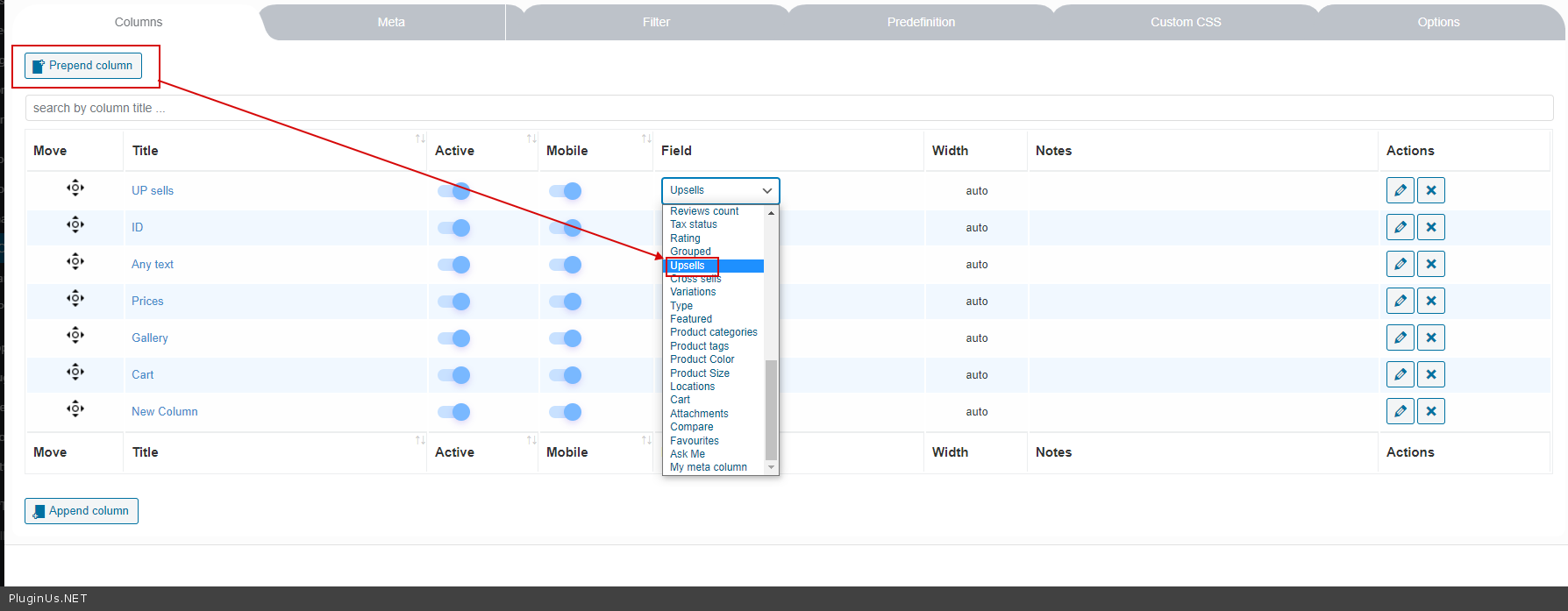
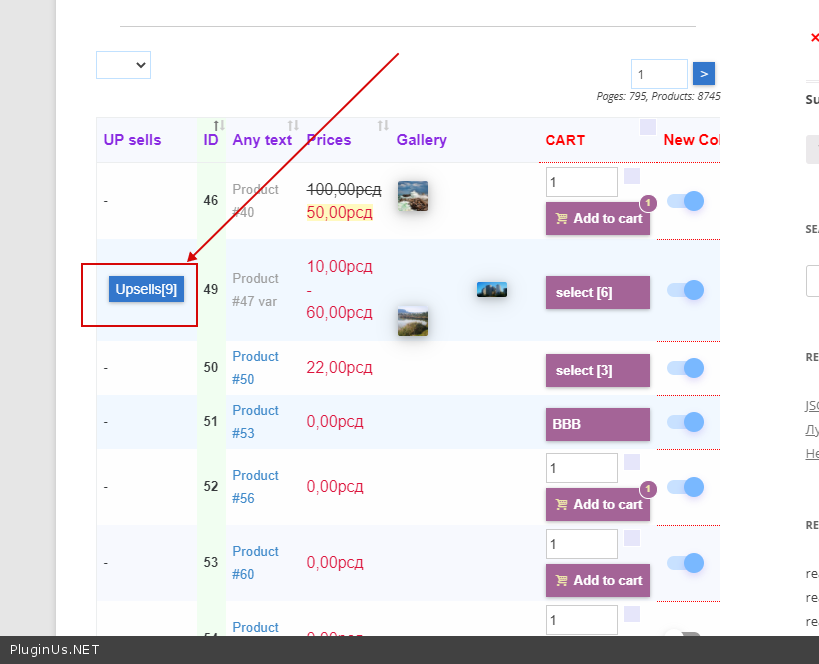
Read this please - https://products-tables.com/how-to-add-custom-column-to-the-tables/ - you can add any content to the column even [woot_button]
Quote from johnmazza on January 29, 2021, 21:01Ah thank you Pablo! This should fix my issue. I'll give that a try and let you know how it goes
Ah thank you Pablo! This should fix my issue. I'll give that a try and let you know how it goes
Quote from Pablo Borysenco on February 1, 2021, 10:12Hello
Ok! Great
Welcome;)
Hello
Ok! Great
Welcome;)
Quote from johnmazza on February 2, 2021, 22:15Hi Pablo! So I've installed the code in your example as follows, and I have the "Ask me" button now showing up! My question is, how could I change this to open the link of whatever product it is associated with? (it's going to be a "View Product" button. Thanks so much :) - john
add_action('woot_profile_extend', function($profile, $action_name) {if ($action_name === 'woot_woocommerce_tables') {$profile['ask_me'] = ['title' => 'Ask Me','order' => FALSE,'action' => function($post_id) {return WOOT_HELPER::draw_html_item('a', ['href' => 'javascript: new Popup23({iframe:"https://demo.products-tables.com/wpform-contact-ask-me/?product_id=' . $post_id . '", '. 'allow:"accelerometer; autoplay; encrypted-media; gyroscope; picture-in-picture", '. 'title:"Ask manager about the product"});void(0);','class' => 'woot-btn'], 'Ask Me');}];}return $profile;}, 10, 2);
Hi Pablo! So I've installed the code in your example as follows, and I have the"Ask me" button now showing up! My question is, how could I change this to open the link of whatever product it is associated with? (it's going to be a"View Product" button. Thanks so much :) - john
add_action('woot_profile_extend', function($profile, $action_name) {if ($action_name === 'woot_woocommerce_tables') {$profile['ask_me'] = ['title' => 'Ask Me','order' => FALSE,'action' => function($post_id) {return WOOT_HELPER::draw_html_item('a', ['href' => 'javascript: new Popup23({iframe:"https://demo.products-tables.com/wpform-contact-ask-me/?product_id=' . $post_id . '", '. 'allow:"accelerometer; autoplay; encrypted-media; gyroscope; picture-in-picture", '. 'title:"Ask manager about the product"});void(0);','class' => 'woot-btn'], 'Ask Me');}];}return $profile;}, 10, 2);
Quote from Pablo Borysenco on February 3, 2021, 10:28Hello
To get the link to the product -
$url = get_permalink( $post_id );
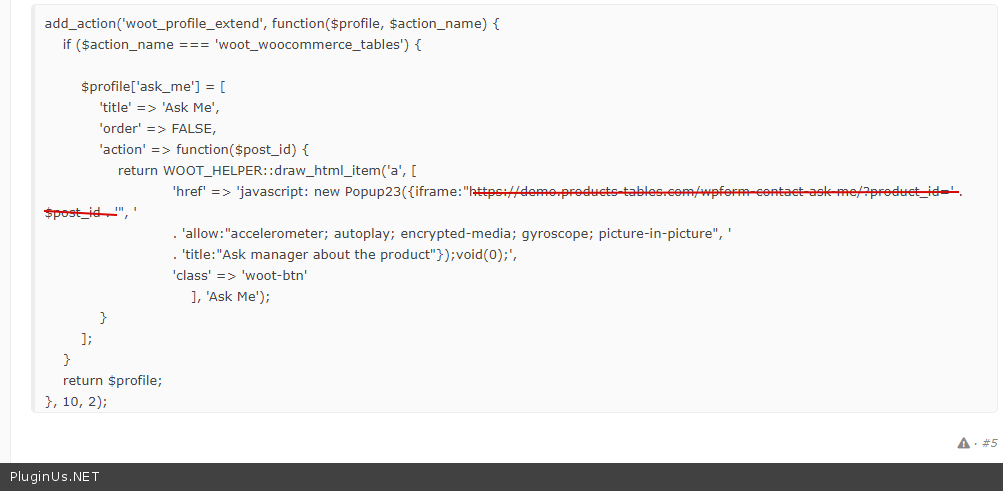
and paste $url - https://c2n.me/4aNIIYE.png
Hello
To get the link to the product -
$url = get_permalink( $post_id );
and paste $url - https://c2n.me/4aNIIYE.png
Quote from johnmazza on February 9, 2021, 21:12Perfecto! Thank again. You rock! - john
Perfecto! Thank again. You rock! - john
Quote from Pablo Borysenco on February 10, 2021, 10:19Hello John
Welcome;)
Hello John
Welcome;)