PluginUs.Net - Business Tools for WooCommerce and WordPress

[realize your idea - make your dreams come true]

Support Forum

You need to log-in to create request (topic) to the support

Add To Cart Option Missing For 0 Quantity Products

The support doesn work on Saturdays and Sundays, so some Friday requests can be answered on Monday. If you have problems with registration ask help on contact us page please
If you not got email within 24~36 business hours, firstly check your spam box, and if no any email from the support there - back to the forum and read answer here. DO NOT ANSWER ON EMAILS [noreply@pluginus.net] FROM THE FORUM!! Emails are just for your info, all answers should be published only here.
The support doesn work on Saturdays and Sundays, so some Friday requests can be answered on Monday.

All of our products are set up to allow backorders. However if the current stock quantity of a product = 0, then the add to cart option is missing. However, the option is available for any product <> 0. Is there a setting to have the add to cart option appear for all products?

Add To Cart


Further to this issue. I discovered that if I try to add a product with a negative stock value I get the following err:

Cart Error

Hello

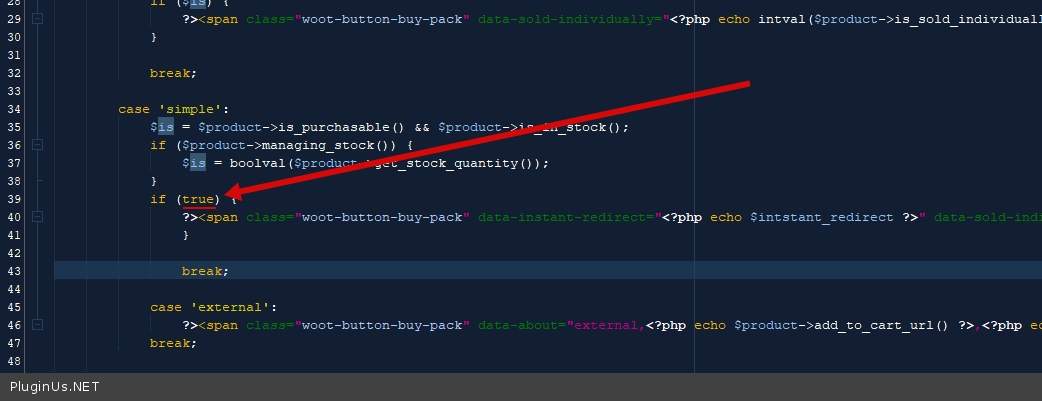
In this case, you need customization of the code.

in file -"\wp-content\plugins\woot-products-tables\profiles\woocommerce\views\add_to_cart.php" - change code - https://c2n.me/4dZGKjI.png

and  in file -"wp-content\plugins\woot-products-tables\profiles\woocommerce\js\woocommerce-cart.js" - delete  thids code - https://share.pluginus.net/image/i20211115121047.png

Thank you. This has fixed the problem.

Is this a change you will be adding to a future release? Or do I need to ensure this modification is made with each update?

Hello

we will not include this in a future update. Because this is misbehavior.

We will fix: if the number of products is negative, the button will be hidden

You are right. The current behavior is not correct. The Add To Cart button should only appear if:

  1. The current stock quantity > 0
  2. The WooCommerce Allow backorders option for the product is set to Allow.

Also, a negative stock value should never be displayed in the table. If the stock is < 0, then the displayed stock value should be 0.


Hello

Yes. You are  right