PluginUs.Net - Business Tools for WooCommerce and WordPress

[realize your idea - make your dreams come true]

Support Forum

You need to log-in to create request (topic) to the support

503 Server Error

The support doesn work on Saturdays and Sundays, so some Friday requests can be answered on Monday. If you have problems with registration ask help on contact us page please
If you not got email within 24~36 business hours, firstly check your spam box, and if no any email from the support there - back to the forum and read answer here. DO NOT ANSWER ON EMAILS [noreply@pluginus.net] FROM THE FORUM!! Emails are just for your info, all answers should be published only here.
The support doesn work on Saturdays and Sundays, so some Friday requests can be answered on Monday.

Hello,

we have installed the latest version of your plugin here: [removed]

When we try to filter some products, there is 503 error here. Please check.

After selecting a specific configuration of product filters in the store
WooCommerce, the server stops responding with the following error:
https://prnt.sc/10t8vtv


Hello

Please  drop me  wp-admin+FTP access (https://c2n.me/43SC6rb.png ->https://c2n.me/42BAoj4.png) I will  check(fix)  it

Added as private :)

Hello

Please  update  the  plugin  to  latest  version - https://products-filter.com/how-to-make-auto-update-for-wordpress-plugins-and-themes-bought-on-envato/

The error occurs only when the message that there are no products should be displayed. Have you customized the template?


OK I found the problem. There is custom code in child theme and when is disabled, everything is fine:


add_action( 'woocommerce_no_products_found', 'show_products_on_no_products_found', 20 );

function show_products_on_no_products_found() {
echo '<h2>' . __( '...ale może spodoba Ci się to', 'domain' ) . '</h2>';
echo do_shortcode( '[recent_products per_page="8"]' );
}


Do you have any ideas how to implement this code without conflict with your plugin?

Hello

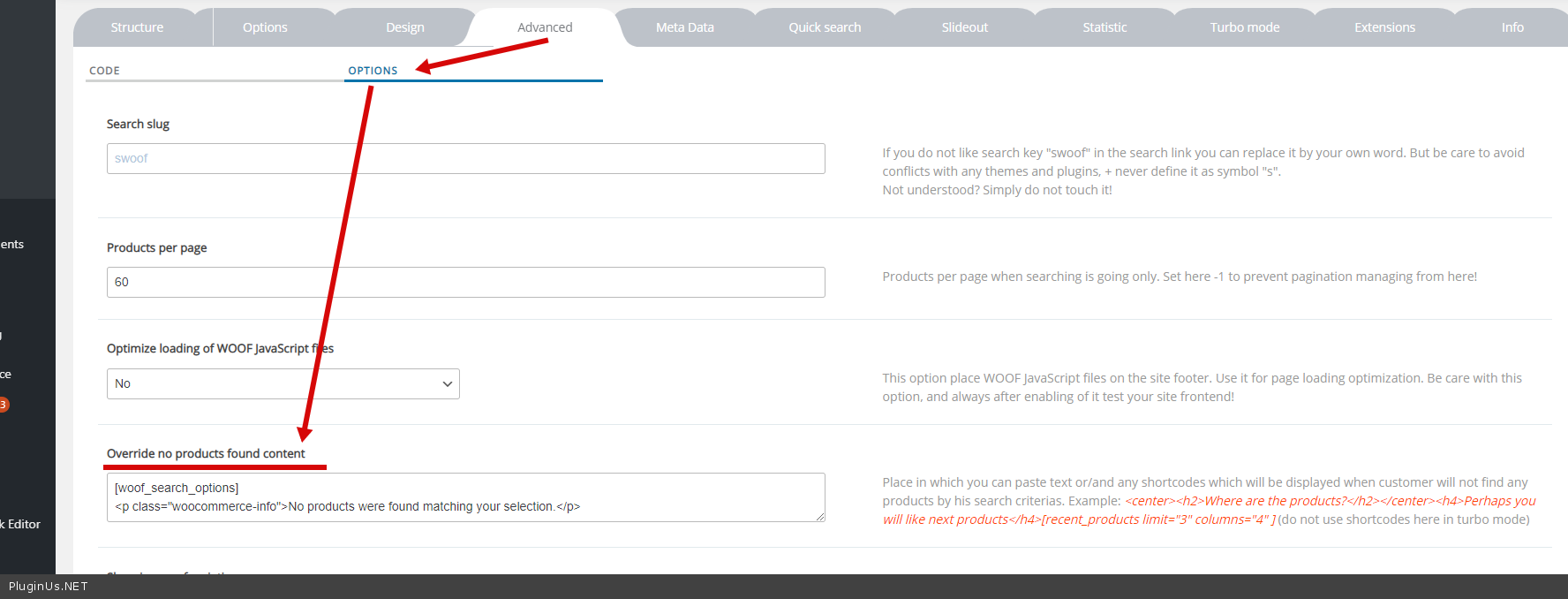
Please  update  the  plugin  to  latest  version  and  set  you custom  HTML here - https://c2n.me/4bqE4S6.png

Thanks, it's fixed!

Hello

Welcome;)